
Track numbers over time
A number is a measure your team follows week after week: video views per channel, sign-ups per product, how many clients reached each step of their journey, how long support takes to answer. Each number has a home, an owner and a history.
A number keeps:
- an id (a short name such as
video-views) and a name in plain words; - an owner: the agent that looks after it;
- a unit, such as
views,clientsor%; - an optional target, with a direction:
upwhen higher is better (the target is the least you want),downwhen lower is better (the target is the most you accept); - a rhythm:
daily,weekly(the default) ormonthly. It says how often the number gets a new value; - tags, such as
channel:videoorproduct:shop, so you can pick out the numbers of one channel or one product; - a source: where its values come from.
Each value is a reading. A reading covers a window: the days it counts. "Views from 2 to 8 November" is one reading. Days are counted in UTC, and weeks start on Monday.
Numbers are not goals. A goal ends once, and keeps no history. A goal can still close itself on a number: see Close a goal on a number.
Nothing changes on a machine with no numbers set up.
Where the values come from
| Source | What it reads | Who can set it up |
|---|---|---|
manual (the default) | Nothing: you or an agent record each reading. | You, any agent |
count | How many issues or pull requests a GitHub or GitLab project has, with filters. | You, any agent |
http-json | A web address that answers with JSON (structured data), and where the value sits in it. | You, any agent. Request headers (for a key): only in agentx.json |
command | A command run on this machine that prints the value. | Only you, in agentx.json |
AgentX reads a number with a source once per period of its rhythm, for the last whole period. A weekly number read on Tuesday gets the reading for Monday to Sunday of the week before.
When a read fails, AgentX keeps it as no reading, never as 0, and tries again an hour later.
Status
| Status | Meaning |
|---|---|
| on target | The newest reading meets the target. |
| missed | The newest reading misses the target. |
| missed twice | The newest reading and the one before it both miss. |
| no reading | No reading yet, the newest read failed, or the last whole period has none. |
| no target | It has a reading but no target to compare with. |
Add a number
Terminal: go to the folder that holds
agentx.json.Terminal: run:
bashagentx numbers add video-views --name "Video views" --unit views --target 1000 --rhythm weekly --tags channel:video,product:shop --owner marketerTerminal: run
agentx numbers. The number is listed with the status no reading.
To change it later, run agentx numbers add again with the same id and only the options you want to change.
Record a reading by hand
Terminal: run:
bashagentx numbers record video-views 1240 --from 2026-11-02 --to 2026-11-08 --note "from the channel's stats page"Without
--from, the reading is for the last whole period of the number's rhythm. Without--to, the window is the one day given in--from. Recording the same window again replaces its value.Terminal: run
agentx numbers show video-views. You see the number, its status and each reading, newest first.
Let AgentX read it
Give the number a source with --source and a JSON object. Two examples:
Open bugs with the label
bugin a GitHub project, counted as they are now:bashagentx numbers add open-bugs --name "Open bugs" --target 5 --direction down --source '{"kind":"count","provider":"github","project":"example-org/shop","labels":["bug"]}'Issues closed during each week:
bashagentx numbers add bugs-closed --name "Bugs closed" --source '{"kind":"count","provider":"github","project":"example-org/shop","state":"closed","window":"closed"}'
The count source takes:
| Field | Values | Default |
|---|---|---|
provider | github or gitlab | required |
project | owner/repo on GitHub, group/project on GitLab | required |
what | issues, prs (pull or merge requests) or all | issues |
state | open, closed or all | open |
labels | label names; every one must be on the item | none |
window | none (the count now), created (made within the reading's window), closed (closed within it; GitHub only) | none |
It reads through the GitHub or GitLab connection already set up for open requests (channels.github, channels.gitlab or requests.checkers).
The http-json source takes url and path. In url, {start} and {end} become the first and last day of the window, such as 2026-11-02. path names where the value is in the answer: data.views, or rows[0].total. For example:
agentx numbers add signups --name "Sign-ups" --source '{"kind":"http-json","url":"https://stats.example.com/signups?from={start}&to={end}","path":"total"}'Set numbers up in agentx.json
Numbers you set up in agentx.json are yours: agents cannot change or archive them. Only here can a number run a command, or send request headers.
Agents never see the secret parts of a source. In the Hub, the CLI, the agent tool and read errors, header values, values after ? in an address, a name and password written in an address (https://name:password@host) and command text all show as ***.
Editor: open
agentx.jsonand add anumberssection:json"numbers": { "items": { "newsletter-readers": { "name": "Newsletter readers", "owner": "marketer", "unit": "readers", "target": 500, "rhythm": "weekly", "tags": ["channel:newsletter"], "source": { "kind": "command", "command": "./scripts/newsletter-readers.sh", "timeoutSeconds": 30 } } } }Terminal: run
agentx daemon restart, or wait: the daemon picks the change up at its next check, within a minute.Terminal: run
agentx numbers. The number is listed.
A command runs from the folder that holds agentx.json. It gets the window in two variables, AGENTX_PERIOD_START and AGENTX_PERIOD_END (first and last day). It prints the value as its last line, or prints JSON and the source names the value with path. Taking a number out of agentx.json archives it: it is no longer read, and its readings stay.
See the numbers that need a look
- Terminal: run
agentx numbers review. - Read the list. It holds only the numbers that are missed twice, missed or have no reading, worst first. Numbers on target, and numbers without a target, are left out. Add
--tag channel:videoto see one channel only. - Under a number that missed twice, a line says which card it raised and for which agent, or why no card was raised.
When nothing needs a look, the command says so.
When a number misses twice
When the two newest readings of a number both miss its target, AgentX raises one decision card (see Approvals). It is raised for the number's owner agent:
- The card shows on the Approvals page, like any other card. Its title is
<name> missed its target twice. It says both values, their dates and the target, and asks whether the owner agent should find out why and change the plan. - You answer Yes or No.
- The owner agent is told your answer. On Yes, it reads the readings, looks for the cause and says what it changes. On No, or when nobody answers before the card expires, nothing changes.
One run of misses raises one card. A third or fourth miss in a row raises no new card. A new card comes only after a reading meets the target and the number then misses twice again. A failed read in between does not count as meeting the target.
Add a reviewer
A reviewer is a second agent that checks the owner's follow-up, for example an agent that runs your operations.
Editor: open
agentx.jsonand addreviewerto thenumberssection, with the reviewer agent's id:json"numbers": { "reviewer": "operations" }Terminal: run
agentx daemon restart.
From then on, each missed-twice card names the reviewer. When you say Yes, the reviewer is told too, and checks that the owner says what it changed. A number with no owner agent on this computer sends its card to the reviewer.
Turn the card off
Set "missedTwiceCard": false in the numbers section of agentx.json. No card is raised; agentx numbers review still lists the number.
Start from a template
A template is a sample set of numbers you can add in one step. Each number is recorded by hand: record readings, or give it a source afterwards.
| Template | What it follows |
|---|---|
client-journey | Each step a client takes: new enquiries, first calls, proposals sent, clients signed, and the hours to answer an enquiry. Every step has the tag journey:client. |
content-distribution | How far what you publish travels: posts published, video views, social reach, newsletter opens, visits from content. Each has a channel: tag. |
- Terminal: run
agentx numbers templateto see the templates and the numbers in each. - Terminal: run
agentx numbers template client-journey --owner marketer. Use your own agent's id after--owner. - Terminal: run
agentx numbers --tag journey:client. The new numbers are listed with the status no reading.
A number whose id is already taken is left as it is, so running the template again changes nothing. Change each number with agentx numbers add <id> …, or archive the ones you do not need.
Let agents keep numbers
Agents use the agentx_numbers tool:
{"action": "list", "tags": ["channel:video"]}lists numbers with every tag given.{"action": "review"}lists the numbers that are missed, missed twice or have no reading, worst first, with their missed-twice card.{"action": "show", "id": "video-views"}shows one number and its readings.{"action": "create", "id": "video-views", "name": "Video views", "unit": "views", "target": 1000, "tags": ["channel:video"]}makes a number. The agent becomes its owner unless it names another withowner.{"action": "record", "id": "video-views", "value": 1240, "from": "2026-11-02", "to": "2026-11-08"}keeps a reading.{"action": "archive", "id": "video-views"}stops tracking a number. Its readings stay.
Only a number's owner records readings for it, changes it or archives it.
Close a goal on a number
A goal (see A goal's own record) can close by itself when a number crosses a threshold. Give the goal the check {"kind": "number", "number": "video-views", "atLeast": 1000}, or atMost for a number that should come down. The goal closes as done once the newest reading crosses it. While the number has no reading, the goal stays open.
Link a job's value line to a number
A scheduled job's value line (crons.<id>.value) says why the job runs and the number that proves it. Add number with the number's id to say which tracked number measures it:
"value": { "why": "Grows the video audience", "metric": "Weekly views at least 1000", "number": "video-views" }See numbers in the Hub
The Hub has a Numbers page. It lists every number on every machine the Hub reads. The page shows up in the Hub's menu once one machine has a number. Before that, the Hub looks as it always did.
- Browser: open the Hub.
- Browser: in the menu on the left, under Work, select Numbers. On a phone, tap More at the bottom, then Numbers.
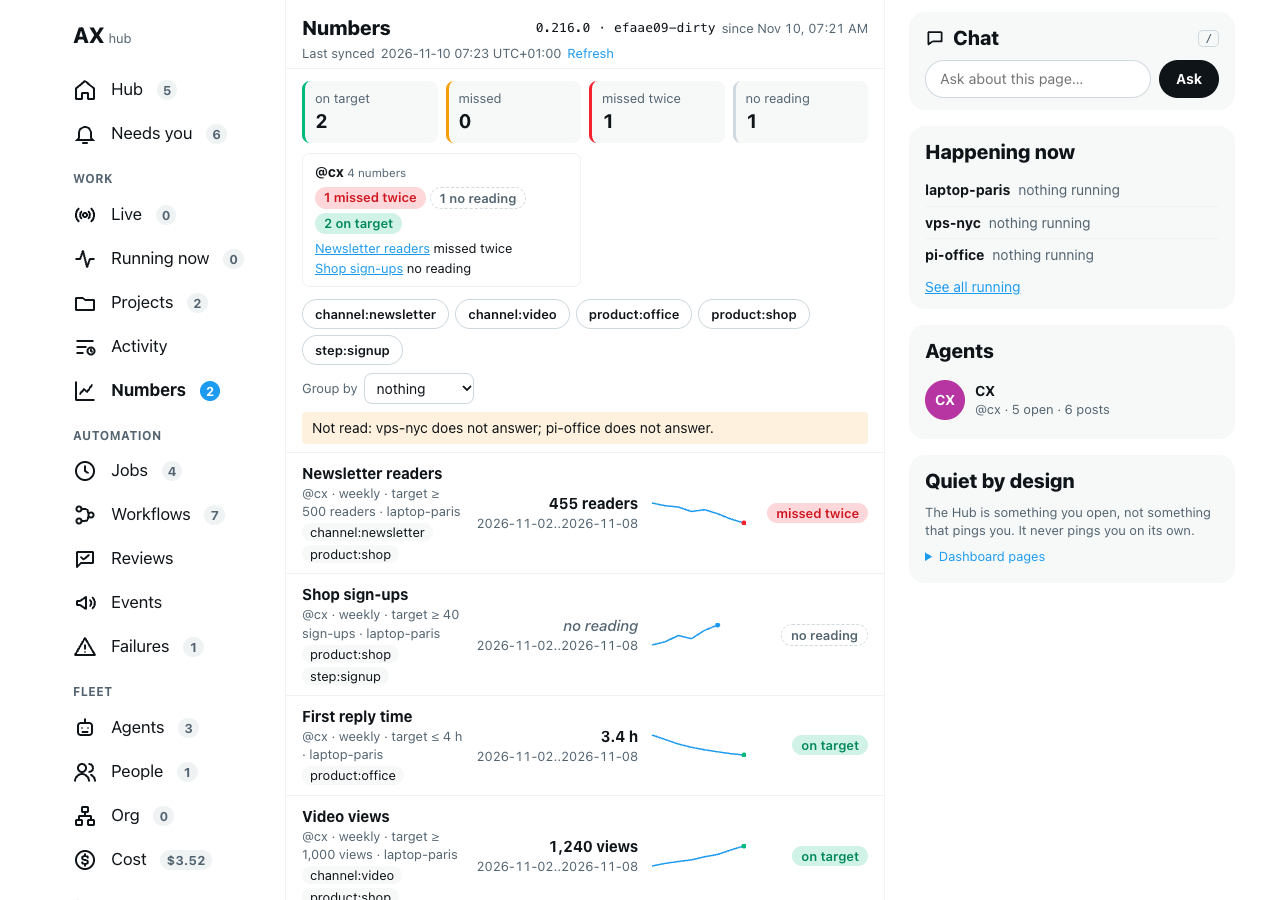
At the top, four boxes count the numbers that are on target, missed, missed twice and with no reading. The count next to Numbers in the menu is how many are missed, missed twice or have no reading.
Under them, one card per department says how its numbers stand and names the ones that need a look. A number belongs to the department of its owner agent, as set on the Org page. When no owner is in a department, there is one card per owner instead.
Each row is one number:
- its name, its owner, its rhythm, its target and the machine that keeps it;
- its tags;
- its newest reading and the window that reading covers;
- a small line, the trend, of its last twelve readings, oldest on the left. A failed read leaves a gap in the line. It never drops to 0;
- its status in words.
A failed read shows no reading, never 0.
Look at one number's readings
- Browser: select the number's row. It opens.
- Browser: read the table: each reading's window, its value, who gave it and its note. A failed read shows no reading and, in red, why it failed.
- Browser: copy the page's address to share it: the link opens with that number open.
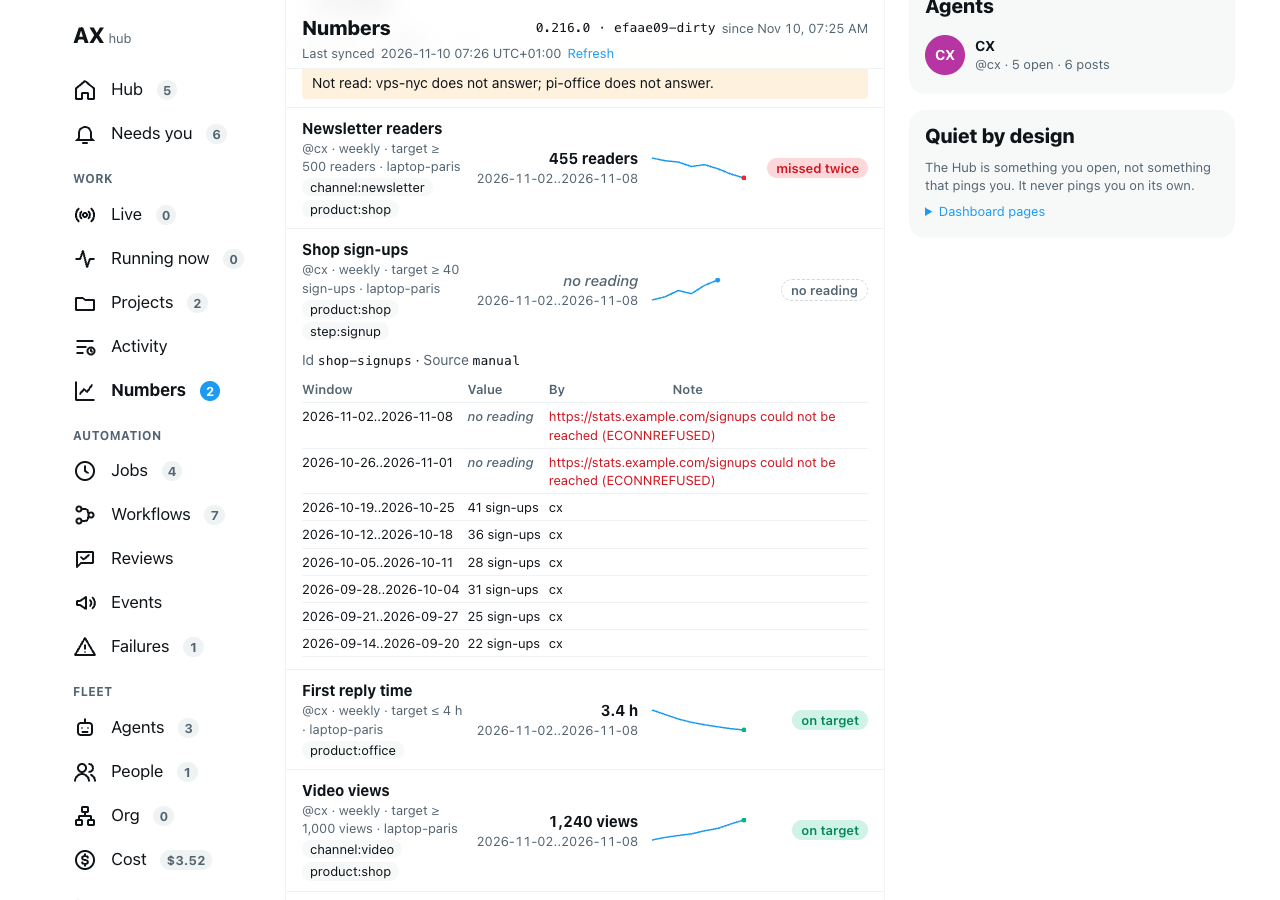
The row also shows the number's id and its source. Keys and passwords in a source are hidden as ***, as they are for agents.
Pick numbers by tag, or group them
- Browser: select a tag, such as
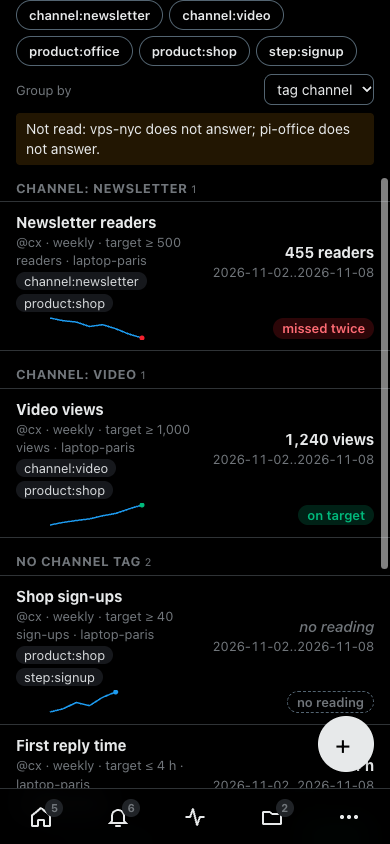
product:shop. Only numbers with that tag stay. Select more tags to keep only numbers with all of them. Select All tags to see every number again. - Browser: in Group by, choose department, owner, or a kind of tag, such as tag channel. Numbers are listed under one heading per department, owner or channel. A number with two channel tags shows under both.
The address keeps what you picked, so you can share the view.
On a phone, each row stacks: the name and the reading first, then the trend and the status.
See a job's number on the Jobs page
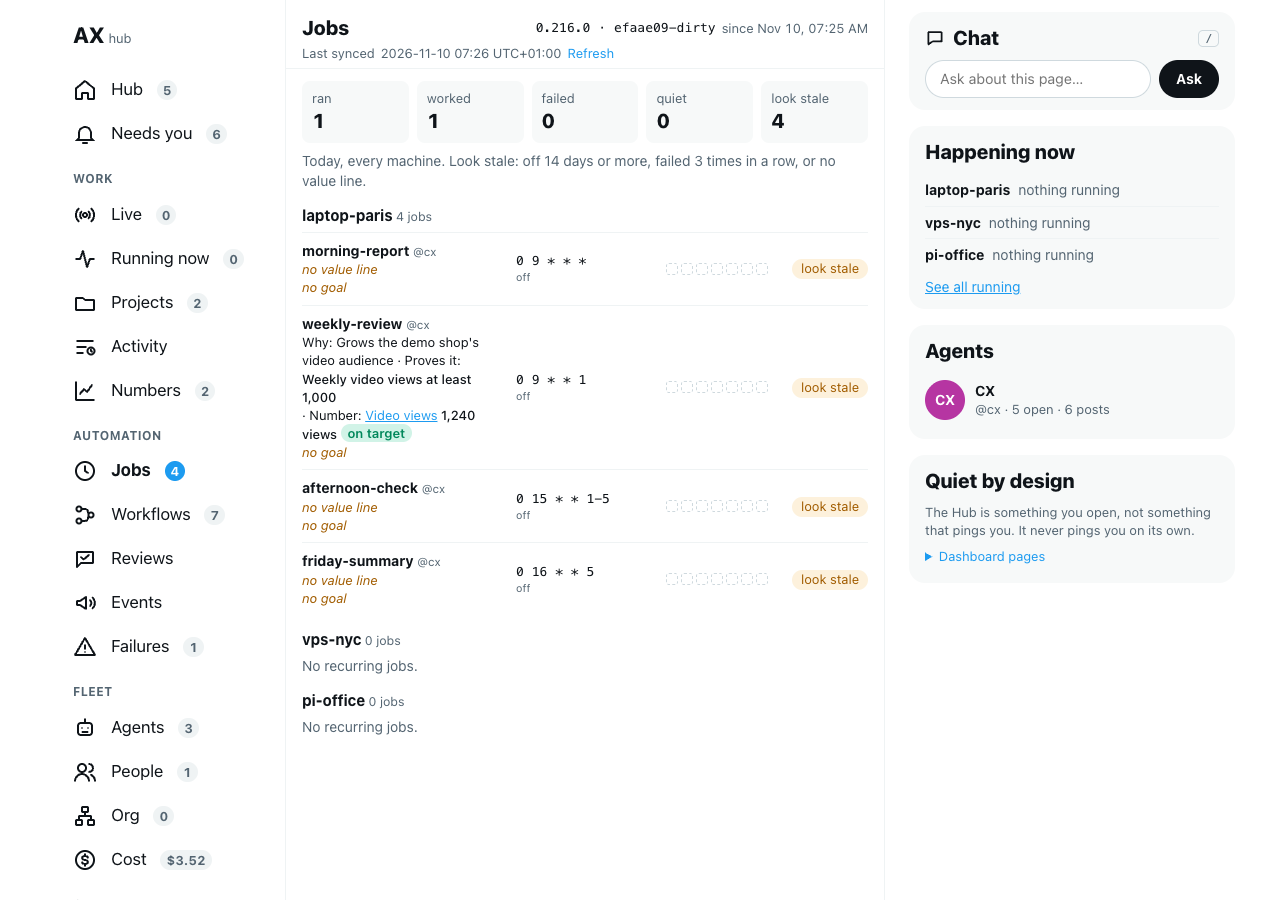
When a job's value line names a number (see Link a job's value line to a number), the Hub's Schedules page shows that number's newest reading and status under the value line. Select the number's name to open it on the Numbers page.
Follow a funnel
A funnel lists numbers in order, such as visits, then sign-ups, then orders. For each step it shows the conversion: the step's value as a share of the step before. The step with the lowest conversion is the biggest drop: that is where most people stop.
You set funnels up in agentx.json, next to your numbers.
Editor: open
agentx.json. In thenumberssection, addfunnels:json"numbers": { "funnels": { "shop-journey": { "name": "Shop journey", "steps": [ { "name": "Visits", "tag": "step:visit" }, { "name": "Sign-ups", "tag": "step:signup" }, { "name": "Orders", "tag": "step:order" } ] } } }Each step, first to last, is one of:
- a number's id, such as
"video-views"; { "name": "Views", "number": "video-views" }, the same with a name of its own;{ "name": "Visits", "tag": "step:visit" }: every number with that tag, added up. Give each channel or product its own number with the step tag, such asvisits-videowith the tagsstep:visitandchannel:video. The funnel can then be cut by channel.
A funnel has 2 to 12 steps.
- a number's id, such as
Terminal: run
agentx daemon restartto check the file. A funnel that is not valid stops the start with a message that names it.Browser: open the Hub, select Numbers, then the Funnels tab. The tab shows once a funnel is set up. You do not need to restart anything for the Hub to see a change to a funnel: select Refresh.
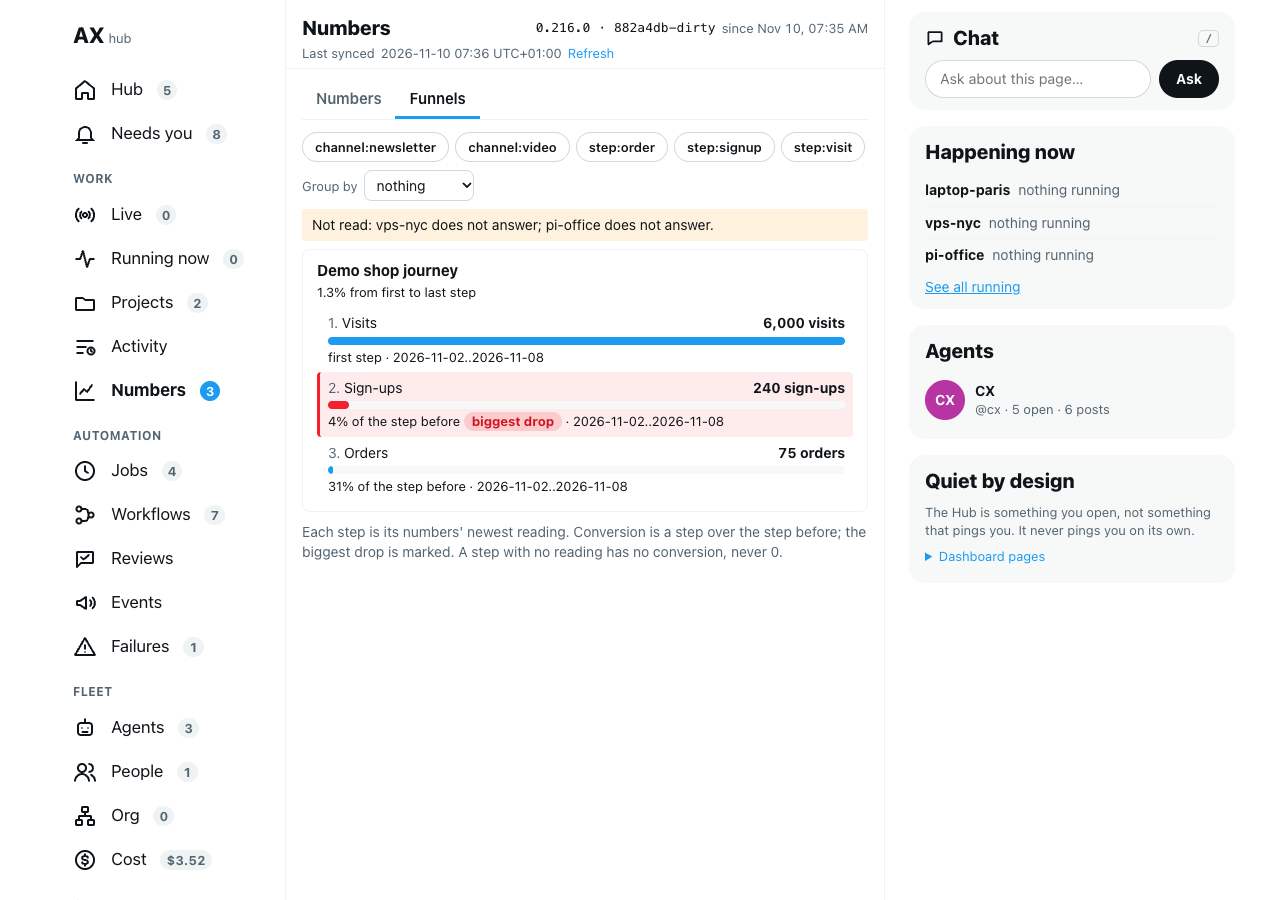
Each step shows its value (its numbers' newest readings), a bar, and its conversion from the step before. The biggest drop is marked biggest drop. Under the funnel's name, a line gives the share that went from the first step to the last.
To cut a funnel:
- Browser: select a tag, such as
channel:video. Each step only counts its numbers with that tag. - Browser: in Group by, choose a kind of tag, such as tag channel. The funnel is drawn once per channel, so you can see which channel loses most people, and where.
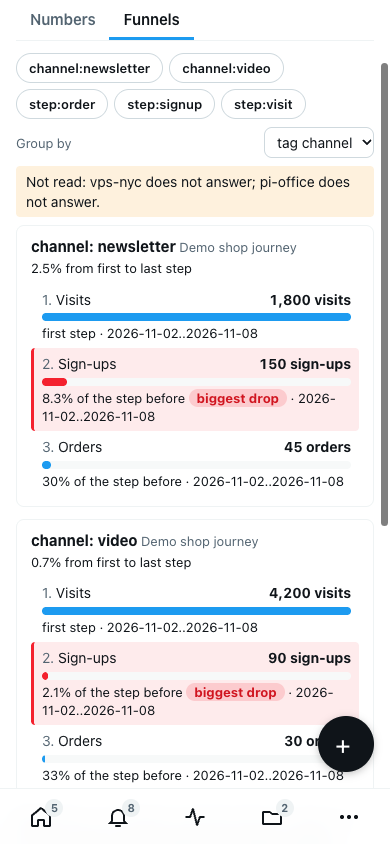
A step with no reading (its read failed, or no number is left after the tags you picked) shows no reading. It gets no conversion, and neither does the step after it: a missing value is never counted as 0. When the steps' newest readings cover different weeks, the funnel says so.
A funnel uses the numbers of the machine whose agentx.json sets it up.
Check it worked
- Terminal: run
agentx numbers add test-number --name "Test number" --target 10. - Terminal: run
agentx numbers record test-number 12. - Terminal: run
agentx numbers. Test number shows on target and12with last week's dates. - Terminal: record two misses for the two last whole weeks (Monday to Sunday) before today. For example, on 10 November 2026, run
agentx numbers record test-number 3 --from 2026-10-26 --to 2026-11-01, thenagentx numbers record test-number 4 --from 2026-11-02 --to 2026-11-08. - Terminal: run
agentx numbers review. Test number shows missed twice. - Browser: within a few minutes, open the Approvals page on the Hub. A card Test number missed its target twice waits there, when the number has an owner agent (
--owner) ornumbers.revieweris set. Answer No. - Browser: open the Hub and select Numbers. Test number is listed with
4, missed twice, and its trend shows the three readings. - Editor: in
agentx.json, add a funnel with two steps undernumbers.funnels:"test-funnel": { "name": "Test funnel", "steps": ["test-number", "test-number"] }. - Browser: in the Hub, on Numbers, select Refresh, then the Funnels tab. Test funnel shows two steps of
4, the second at 100% of the step before. - Terminal: run
agentx numbers archive test-numberto remove it from the list, and taketest-funnelout ofagentx.json.
If something is wrong
no agentx.json here: run the command from the folder that holdsagentx.json.- A number stays at no reading: run
agentx numbers show <id>. The newest reading shows why the read failed, in red. For acountsource, check the GitHub or GitLab connection; forhttp-json, open the address in a browser. is set up in agentx.json: that number is changed inagentx.json, not with the command or by an agent.a command source can only be set in agentx.json: put the number undernumbers.itemsinagentx.json.- An agent's record is refused with
belongs to: only the number's owner records readings. Ask the owner agent, or change the owner withagentx numbers add <id> --owner <agent>. - The Hub has no Numbers entry: no machine the Hub reads has a number yet. Add one, then select Refresh in the Hub.
- The Numbers page says
Not read:and a machine: that machine did not answer. Its numbers are missing from the page until it answers again; the others still show. - A job shows
Number: <id> not found: no machine the Hub reads has a number with that id. Check the id in the job's value line withagentx numbers. - The Funnels tab is missing: no machine the Hub reads has a funnel in
numbers.funnels, or its funnel is not valid. Runagentx daemon restart: a bad funnel is named. - A funnel step shows no reading: none of its numbers has a reading, or none has every tag picked. Open the Numbers tab to see each number's readings.
- The daemon log says
numbers.items.<id>: …: that number inagentx.jsonis not valid; the message says which field to fix. - A number missed twice and no card came: run
agentx numbers review. The line under the number says why: it has no owner agent on this computer andnumbers.revieweris not set, or the card was refused (an agent can have at most 25 cards waiting). Check also thatnumbers.missedTwiceCardis notfalse. The same run of misses is not tried again: the next card comes after the number meets its target and misses twice again. - A number missed three times and only one card came: that is on purpose. One run of misses raises one card.
no template "…": runagentx numbers templateto see the names.