
Run a health check
agentx doctor checks the most common reasons AgentX doesn't work, before you hit them: the wrong Node.js version, a broken agentx.json, a missing AI tool, keys that aren't set, agent folders that don't exist, and a daemon (the AgentX background service) that doesn't answer.
Doctor only checks. It doesn't install or repair anything; each problem it finds comes with a suggested fix.
Run it from the terminal
- Terminal: go to the folder that holds your
agentx.json. - Terminal: run:shIn a source checkout, run
agentx doctornode dist/cli.js doctorinstead. - Read the report. Checks are grouped (Environment, Config, Secrets, Workspaces, Runtime and others). On a Mac with banners turned on, Notifications checks whether AgentX Helper is installed and allowed to show banners (Get notified). Each line starts with a mark:
✓the check passed.!a warning. Worth reading, but it doesn't stop AgentX.✗an error. AgentX won't work properly until it's fixed.
- Under a failed line, the line starting with
→is the suggested fix. Apply it. - Terminal: run
agentx doctoragain until the last line saysAll checks passed, or only lists warnings.
A shortened example of the report:
  agentx doctor

  Environment
    ✓ Node.js 22.x.x
    ✓ npm on PATH

  Config
    ✓ agentx.json valid (1 agents, 0 schedules)

  Runtime
    ✓ Daemon healthy — 1 agents live, uptime 5m

  All checks passed (5).
Options
agentx doctor --no-runningskips the check that the daemon answers. Use it when you stopped the daemon on purpose.agentx doctor --jsonprints the same checks in a format other programs can read, for example in an automated test.
Doctor exits with code 1 when there is at least one error, and 0 otherwise.
Run it from the browser
The same checks are on the dashboard.
- Browser: open
/admin/healthon your dashboard (for examplehttp://127.0.0.1:4202/admin/health). - Select the Doctor tab.
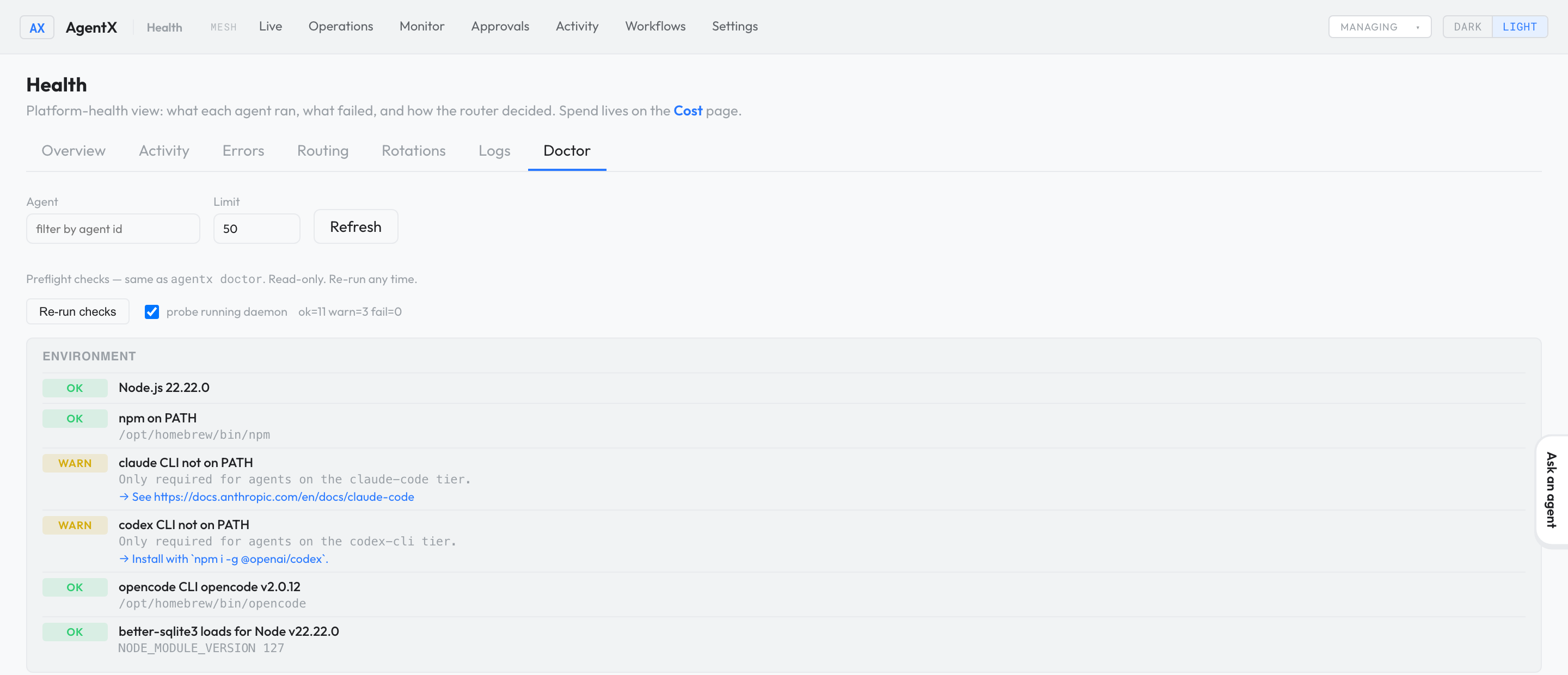
Check it worked
- Terminal: run
agentx doctor. - The last line reads
All checks passed (…), or… warning(s). Review but not blocking.
If something is wrong
command not found: agentx: AgentX isn't installed on this machine's path. In a source checkout, usenode dist/cli.js doctor. Otherwise see Install.Node.js … AgentX requires Node 22.19 or newer, up to Node 26: install Node.js 22, then run doctor again.agentx.json is not valid JSON: the detail line names the position of the mistake. Fix it, or restore the latest backup: each save from the dashboard leaves a copy namedagentx.json.bak.<number>in the same folder.Daemon not reachable (not running?): the daemon isn't running or can't be reached. Start it withagentx daemon start --detach, or add--no-runningif it's stopped on purpose.- Everything passes but messages still get no reply: follow It's not answering.