
Pause a task and resume it later
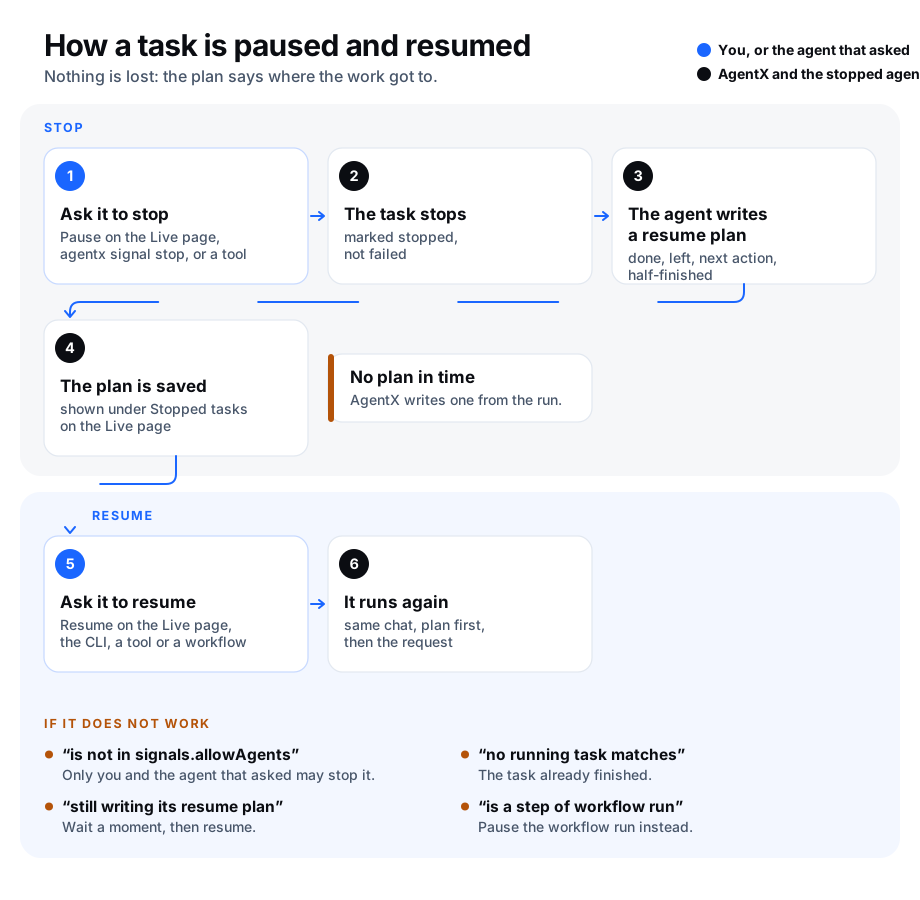
Sometimes an agent is busy with something that has to wait: a more urgent job came in, a rule changed, or you are about to deploy. Pausing the task stops the agent cleanly and keeps a note of where it got to, so you can pick the work up later without explaining it again.
That note is the resume plan. Right after the stop, the agent gets one short turn to write it, under four headings:
| Heading | What it holds |
|---|---|
| Done | What is finished. |
| Left | What is still to do. |
| Next action | The first thing to do when the task is resumed. |
| Half-applied | Anything started but not finished, such as a partial edit, an open branch or an unsent message. |
The plan is written in a separate chat with the agent's usual tools, so nothing is posted in the chat the task came from. In it, the agent sees the original request and the list of tools it used, not the conversation that was stopped.
The agent is asked to do nothing else in that turn. Its tools are not taken away: it is only told, in words, not to change anything. If it doesn't answer within the time limit (two minutes unless you change it), AgentX stops that turn too and writes the plan itself from the run's trace (the record of every tool the agent used). Such a plan says it was written by AgentX.
A paused task is marked stopped, not failed. It waits until someone resumes it. Resuming runs it again in the same chat, with the plan placed before the original request, so the agent continues instead of starting over.
In AgentX, a stop or resume request is called a signal. These are not the workflow signals that one workflow step sends another (signal.emit and signal.wait in a workflow).
Where the answer goes after a resume
| The task came from | The resumed answer goes to |
|---|---|
| A chat (Telegram, WhatsApp, GitLab, GitHub…) | That chat, as a normal reply. |
| A chat another machine of your mesh received | That chat, through the machine that received it. |
| Another agent that asked for it | That agent, as a new message. |
| A step of a workflow run | The workflow run. The step runs again and the run goes on to its next steps. |
| Anything else (the API, a schedule, voice) | Nobody is waiting for it. The task runs, and its answer is kept on its task page and in its trace only. |
agentx signal resume and the agentx_signal tool say which of these applies.
If AgentX restarts
- A paused task stays paused. A restart never picks it up on its own; only a resume does. The one exception is a task paused by a stop-all order: see Stop everything before a restart.
- If the restart happens while the agent is still writing its plan, AgentX writes the plan from the run's trace when it starts again, and the task can be resumed as usual.
- A resumed task that a restart cuts off is picked up again like any other cut-off work. See restart without losing work.
Pause a task from the dashboard
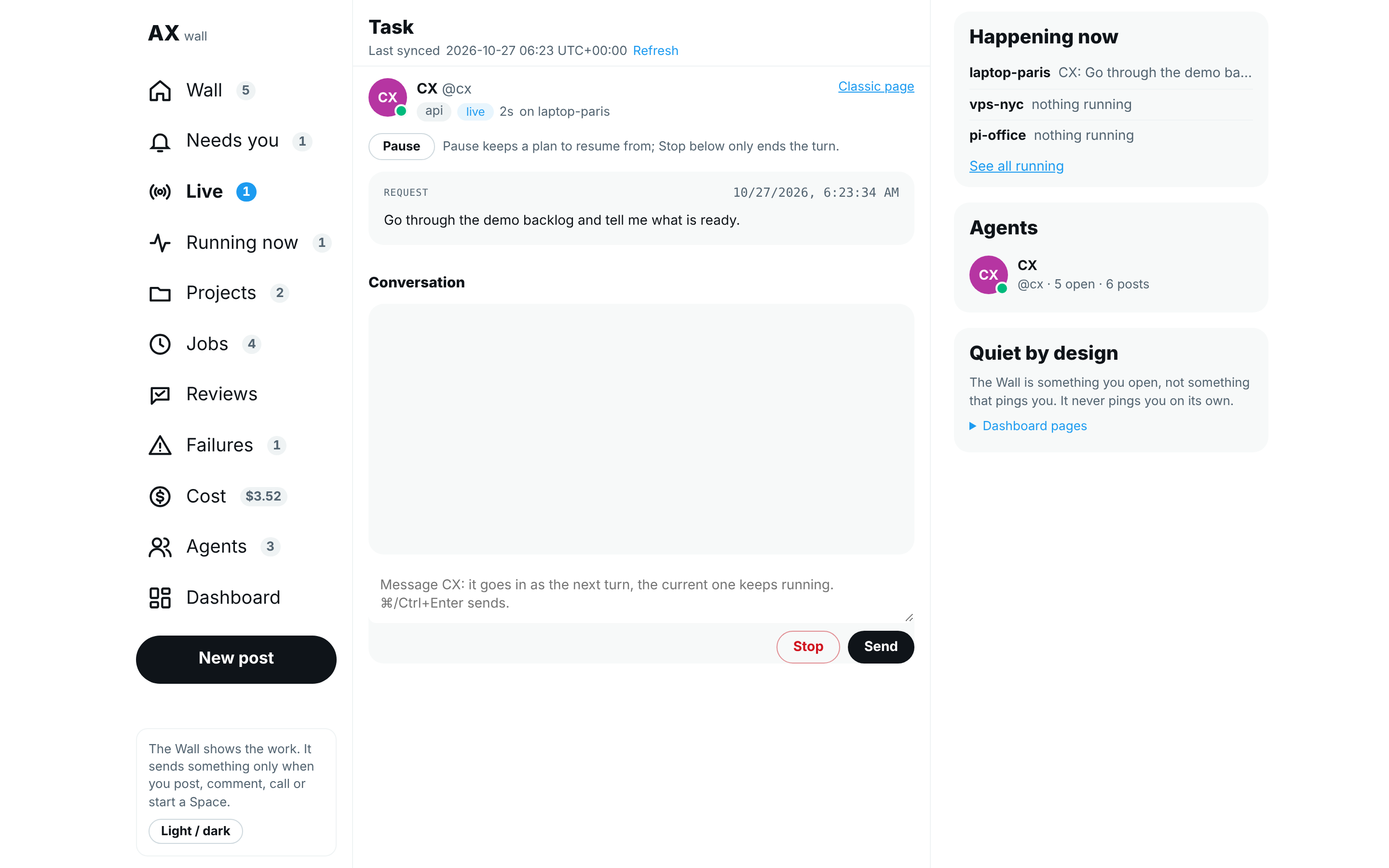
- Browser: open the dashboard and select Live in the Hub's nav (under More on a phone).
- Under Running now, select the agent's card. The run's Task page opens.
- Select Pause at the top, then Pause it? to confirm.
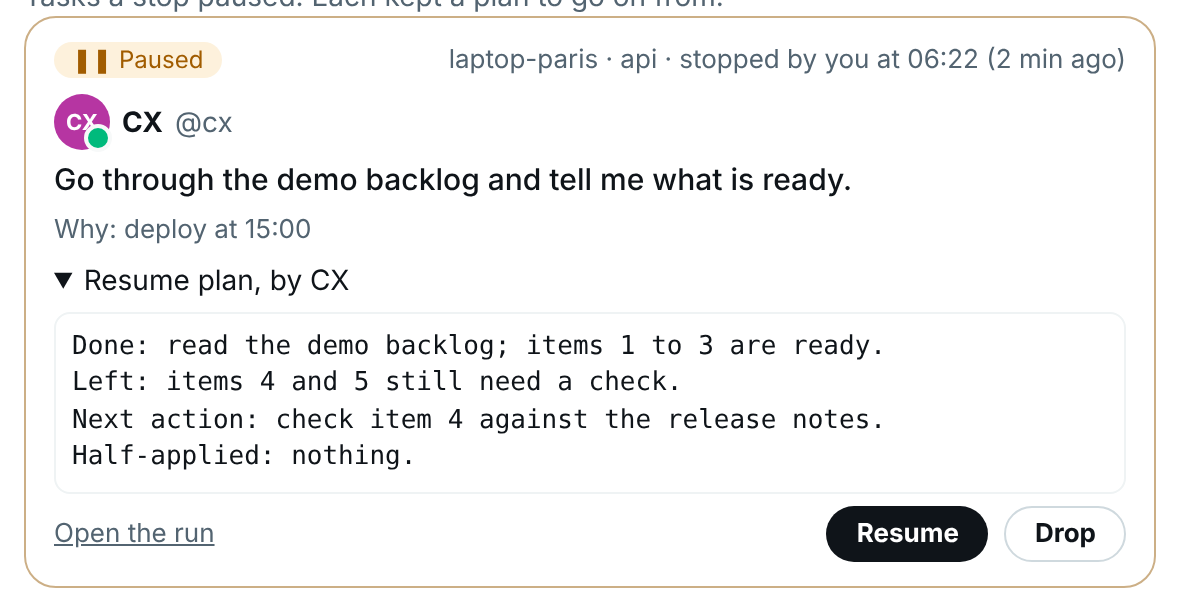
- Wait a few seconds. Back on Live, the task is under Paused, with who stopped it and when.
- Select Resume plan, by … on the card to read the resume plan.
Resume a task from the dashboard
- Browser: open Live on the Hub.
- Find the task under Paused.
- Select Resume. The note at the top says Resumed: it goes on from its plan.
- The task shows under Running now again. Its answer goes to the chat the task came from, as it would have the first time.
The task's own page has the same Resume: select Open the run on its card.
Drop a task you won't resume
A paused task stays under Paused until it is resumed. A resumed task is removed by itself after 7 days. To remove one you will never resume:
- Browser: open Live on the Hub.
- Find the task under Paused.
- Select Drop, then select Drop it for good? within a few seconds to confirm. The task and its plan are deleted, and it can no longer be resumed.
From the terminal, agentx signal drop <taskId> does the same.
Pause and resume from the terminal
- Terminal: run
curl -s http://127.0.0.1:18800/agentsand copy theidlisted under the agent'srunningTasks. On the dashboard, the same id is in the address bar of a running task's page. - Terminal: run
agentx signal stop <taskId> --reason "deploy at 15:00". - Terminal: run
agentx signal listto see stopped tasks. The plan's first line is shown under each one. - Terminal: run
agentx signal show <taskId>to read the whole plan. - Terminal: when you're ready, run
agentx signal resume <taskId>. - Terminal: if the task will never be resumed, run
agentx signal drop <taskId>instead. This deletes the task's record and plan.
Without a task id, name the agent and its chat instead: agentx signal stop --agent coder --channel telegram --chat 12345. This works when that agent has exactly one task running on that chat.
For a task on another machine of your mesh (your connected AgentX machines), add --peer <machine name> to any of these commands.
Stop everything before a restart
Before you restart AgentX, for example to install an update, you can pause every task at once. Each agent writes its resume plan, and when AgentX starts again every one of those tasks resumes from its plan by itself. This is a stop-all order. Only you (or another machine that signals.allowPeers names) can give it; agents cannot.
- Terminal: run
agentx signal stop --all --reason "update". Add--meshto stop every task on all your connected machines too. - Wait. The command lists each task, grouped by machine, and says plan by the agent or plan by AgentX once its plan is saved. It waits at most
signals.windDownSecondsplus about a minute. - Read the last line. safe to restart means every plan is saved. not safe to restart means a task could not be stopped and is still running: wait for it to finish, or accept that the restart cuts it off. not every plan is confirmed saved means a task or machine needs a look first: its line says why.
- Terminal: restart AgentX on each machine, for example with
agentx daemon restart. - Wait a few seconds after AgentX starts. Each stopped task resumes from its plan, in the chat it came from.
- Read the report AgentX sends to your notification chat (
notifications.destination): how many tasks resumed, failed or were skipped, with one line per task, grouped by machine and agent. Without a notification chat, the report is in the AgentX log.
One report for all your machines. With --mesh, you get one report, sent by the machine you gave the order on. Each other machine sends it what happened to its tasks after its own restart. The report waits up to 10 minutes for every machine:
- A machine that took the order but did not answer in time (no answer in time) still reports to the same machine after its restart, like the others.
- A machine that sent nothing in that time is listed as no report. If it restarts later, its part comes as a second, short message: Late part of the stop-all ….
- A machine that had nothing running is listed as nothing was running.
- A machine that cannot reach the one you gave the order on (for about 10 minutes) sends its own report instead, and says so on its last line.
Without --mesh, the machine sends its own report, as before.
Each task gets one try after the restart, however long the restart took. A task that fails to resume is listed in one report and is not tried again, or listed again, by later restarts. Resume it yourself with agentx signal resume <taskId> once the cause is fixed. A task that was still running when AgentX stopped (for example after --no-wait and a quick restart) is resumed once, from its plan, not twice.
Background builders
A background builder is a helper an agent starts to work on its own while the agent goes on (in Claude Code, an Agent call with run_in_background). A builder runs inside its agent's task, so stopping the task stops the builder too. AgentX finds a task's builders, and the folders they worked in, in the task's trace.
When a stop or a stop-all stops a task that had started builders, AgentX does this before the agent writes its plan:
- For each folder the builders worked in that holds changes not yet committed, it saves every change (new files included, ignored files not) as one commit on a new branch,
agentx/wip/<taskId>. If that branch exists already, it adds-2,-3and so on. It never overwrites a branch. It spends at most 60 seconds on this; a folder it did not get to is listed as not saved. - It leaves the folder exactly as it was: same branch, same files, nothing staged or unstaged. The WIP branch is only an extra branch next to it.
- It lists commits that were made but not pushed as they are: they are in the folder already.
- It tells the agent which builders were stopped and where their work is saved, so the plan says from which branch to start each one again.
When the task resumes, it is told the same, and starts its builders again from their WIP branches. The stop-all line of the task says, for example, 1 builder(s) stopped, 1 folder(s) saved on a WIP branch, and the report after the restart names the branch. agentx signal show <taskId> lists each builder and each folder.
AgentX gives this saving up to 60 seconds for all the folders together, on top of signals.windDownSeconds. A folder it had no time left for is listed as NOT saved, with its changes still in the folder.
What this writes in your folders. This happens on every stop of a task with builders, not only on stop-all. In each folder named in the task's tool calls (a shared checkout too) that holds changes not yet committed, AgentX adds:
- one commit, made by AgentX, holding those changes;
- one local branch pointing at it,
agentx/wip/<taskId>(or with-2,-3…).
Nothing else changes: not the checkout, its branch, its staged changes or its files. Nothing is pushed. Delete a WIP branch you no longer need with git branch -D agentx/wip/<taskId>.
To turn this off, run agentx config set signals.saveBuilderWork false. A stop then writes nothing in those folders: each folder with changes is listed as not saved, with its changes still in the folder, and the stop does not wait the 60 seconds for the saving. What AgentX writes in your folders lists every write of this kind.
The WIP branch stays in the folder; AgentX does not push it. If the folder is in a place the computer empties when it starts (such as /tmp on some systems), restart AgentX, not the whole computer, or push the branch first.
Some tasks are not stopped:
- A step of a workflow run that cannot pause where it is. Its line says not stopped and why. A restart cuts it off and AgentX picks it up like any other cut-off work.
- Tasks that start after the order, before you restart. They are cut off by the restart and picked up the same way.
--no-wait answers at once without waiting for the plans. Check them with agentx signal list.
Who counts as "you". AgentX treats any request that reaches it from the same machine (127.0.0.1), or that carries the shared mesh token without naming a machine it was sent on from, as coming from you. So a shell command an agent runs on the same machine, or a machine that holds the shared mesh token, can give a stop-all order too, and with --mesh it reaches every connected machine. The same is true today for stopping one task. Keep the shared mesh token private, and give each machine its own peer token where you can.
From another program, send POST /api/signals/stop-all with { "reason": "…", "mesh": true, "wait": true }. The answer lists each task, each machine under peers, and safeToRestart. A task line holds builders (how many builders were stopped, and how many folders were saved) when it had any. After the restart, each other machine sends its part to POST /api/signals/stop-all/report on the machine you gave the order on; only a machine that took the order can.
Run a stop-all drill
A drill checks, at a quiet time, that a stop-all and a restart lose nothing. Use a test pair of machines first, never your live fleet.
- Terminal (machine A): on each of the two machines, run
agentx config set signals.allowPeers <other machine's name>. - Browser: give the agents three tasks that each take a few minutes, across both machines. Ask one agent to start a background builder that edits files in a test clone.
- Terminal (machine A): while they run, run
agentx signal stop --all --mesh --reason "drill". - Check that every task line says plan by the agent or plan by AgentX, the builder's task says saved on a WIP branch, and the last line says safe to restart.
- Terminal (machine with the builder): in the test clone, run
git branch --list 'agentx/wip/*'. The WIP branch is listed, andgit statusshows the same changes as before. - Terminal: run
agentx daemon restarton both machines. - Browser: within a few minutes, your notification chat gets one message, After the stop-all … on 2 machine(s), listing all three tasks as resumed, with the builder's branch.
- Browser: check that each task carries on in its chat, and that the builder's task starts its builder again from the WIP branch.
The code's own drill runs the same steps on two simulated machines: pnpm vitest run test/stop-all-drill.test.ts.
Let agents pause and resume
Agents use the agentx_signal tool with action set to stop, resume or list. A coordinating agent can, for example, pause the task it handed to another agent when something more urgent arrives, then resume it later.
A workflow can resume a task with the built-in action signal.resume. Give it the stopped task's id.
Pause a step of a workflow
A workflow is a saved series of steps; each run of it is a workflow run. When the task you pause is an agent's step in a workflow run, the whole run pauses at that step. It is not marked failed.
- Browser: on the Hub's Live page, open the agent's running card and select Pause, as for any task.
- Wait a few seconds. Under Paused, the task says A workflow step: its run waits here until this resumes.
- Terminal (optional): run
agentx workflow runs <workflow>. The run showspaused, and itslastline names the step with(paused). - Terminal (optional): run
agentx signal show <taskId>. It names the step and the workflow run, and shows the resume plan. - Browser: when you're ready, select Resume on the task. In a terminal,
agentx signal resume <taskId>does the same.
agentx workflow resume <run id> does not work on such a run: it says to use agentx signal resume instead, which brings back the plan.
The step runs again with its resume plan placed before the step's prompt, so the agent continues where it stopped. When the step is done, the run goes on to its next steps as usual. Only that step gets the plan.
If you cancel the workflow run while it is paused, the stopped task can no longer be resumed. The resume is refused and says the run was canceled.
Tasks every agent runs inside a workflow
With every task in a workflow switched on, each task runs inside a run of its own. Pausing such a task closes its run as canceled. Resuming it starts a new run, and that run names the one it continues:
- Terminal: run
agentx workflow records. - Find the line of the resumed task. Its
continuesfield holds the id of the run the pause closed.
Who may pause or resume a task
| Who | May signal |
|---|---|
| You (dashboard, terminal) | Any task, always. |
| The agent that handed out the task | That task. |
An agent listed in signals.allowAgents | Any task on this machine. |
| Another machine of your mesh | Only when signals.allowPeers names it. An agent on that machine still needs one of the rows above. |
An agent can never pause its own task, and the plan-writing turn cannot send signals.
A machine is recognised by its own token in mesh.peers: a request with that token counts as that machine, so signals.allowPeers applies to it. signals.allowPeers does not protect you from a machine that uses the token every machine shares (MESH_TOKEN). Such a request is believed about which machine it comes from, and when it names none it counts as you, the owner. The same token already lets a machine cancel tasks and reload this one. If your machines are not all equally trusted, give each one its own token in mesh.peers.
To let a coordinating agent pause any task on this machine:
- Terminal: run
agentx config set signals.allowAgents lead(use your agent's id). - Terminal: run
agentx config get signalsand check thatallowAgentslists it.
The settings
The settings live under signals in agentx.json. Change them with agentx config set signals.<key> <value>, or in the dashboard under Settings › Advanced. The configuration reference lists them all.
| Setting | Default | What it does |
|---|---|---|
signals.enabled | true | Turns pausing and resuming on. |
signals.windDownSeconds | 120 | How long the agent gets to write its plan. |
signals.allowAgents | [] | Agents that may pause or resume any task. "*" allows every agent. |
signals.allowPeers | [] | Mesh machines whose signals are accepted. |
signals.maxPerRoot | 6 | Most signals one request may carry in a day. |
signals.saveBuilderWork | true | Saves the work a stopped task's background builders left on a local agentx/wip/<taskId> branch. false: nothing is written, the folders are listed as not saved. |
The last setting is a brake against loops between agents. Everything that comes from one request (a chat message, a schedule, a webhook) shares one id, its root. A paused and resumed task keeps its root. When signals keep bouncing, for example one agent resumes what another keeps pausing, the seventh signal from agents or other machines in a day is refused. Your own pauses and resumes are never counted or refused.
Each pause and resume is also published as an event of kind signal (signal:stop, signal:stopped, signal:resume, signal:resume-failed, signal:dropped, and signal:stop-all for a stop-all order), so an agent can follow events about it.
Check it worked
- Browser: send an agent a task that takes a while, open its card on the Hub's Live page and select Pause, then Pause it?.
- Within the time limit, Paused on Live shows the task with Resume plan, by agent.
- Terminal: run
agentx trace list --agent <agent>. The task's status isstopped, noterror. - Browser: select Resume. The task shows under Running now again, and the answer reaches the original chat.
- Terminal: run
curl 'http://127.0.0.1:18800/events/recent?kind=signal'. You seesignal:stop,signal:stoppedandsignal:resumewith the samerootId. - For a stop-all: Terminal: run
agentx signal stop --all, restart AgentX, then runagentx signal list --all. Every task of the order showsresumed, and your notification chat got one report. With--mesh, that one report covers every machine. - For background builders: Terminal: run
agentx signal show <taskId>for a task that had one. Each folder says saved on agentx/wip/…, andgit branch --list 'agentx/wip/*'in that folder lists the branch. - For a workflow step: after Resume, Terminal: run
agentx workflow runs <workflow>. The run isrunningagain, thencompletedonce its last step is done.
If something is wrong
- "is not in signals.allowAgents": an agent tried to signal a task it didn't hand out. Add it to
signals.allowAgents, or pause the task yourself. - "mesh peer … is not in signals.allowPeers": on the machine that runs the task, add the other machine's name to
signals.allowPeers. - "no running task matches": the task finished before the signal arrived, or several tasks run on that chat. Use the task id.
- "still writing its resume plan": wait for the plan (at most
signals.windDownSeconds), then resume or drop the task. - "is a step of workflow run …, which cannot pause here": the workflow engine is off on this machine, or the run is not on that agent's step any more. Cancel the workflow run instead.
- "resume failed: workflow run … is not paused by a stop": the workflow run was canceled, or went on, after the pause. Start the workflow again.
- "carried 6 signals today": the loop brake stopped an agent's signal. Check which agents keep pausing and resuming this task before you raise
signals.maxPerRoot. - The plan says "written by AgentX": the agent didn't answer in time. Raise
signals.windDownSecondsif your agents need longer. - Resume says "already resumed" but the task shows stopped: AgentX stopped in the middle of a resume. Restart AgentX; on start it clears the leftover mark, and you can resume again.
- "mesh peer … is not in signals.allowPeers" from your own dashboard: the dashboard reaches that machine with a token from
mesh.peers, so it counts as that machine. Add the machine tosignals.allowPeers, or give the dashboard the sharedMESH_TOKENfor it. - Stop-all says a machine is "not in signals.allowPeers": on that machine, add the name of the machine you gave the order from to
signals.allowPeers, then give the order again. - Stop-all says "no answer in time; its plans may still be saving": that machine's agents need longer. Run
agentx signal list --peer <machine>until every task there shows stopped, then restart. The machine still took the order: its part comes in the one report. - A machine's own report says "… refused its part": the machine you gave the order on no longer knows the order, for example because its
.agentx/signals/orders/folder was removed. The report that came is complete for that machine; nothing else is needed. - The report says a machine sent "no report": that machine had not restarted, or could not reach this one, within 10 minutes. Run
agentx signal list --peer <machine>. Once it restarts, its part arrives as a late message. - You got a report from each machine after
--mesh: a machine could not reach the one you gave the order on. Its report says so on the last line. On that machine, runagentx mesh listand check the other machine shows as healthy. - A builder's folder says "NOT saved": AgentX could not commit its changes (the reason follows). Nothing was lost: the changes are still in the folder. Commit them yourself, or let the resumed task do it.
- "NOT saved (a branch named agentx/wip is in the way …)": the folder has a branch called exactly
agentx/wip(oragentx), and git cannot keep that andagentx/wip/<taskId>side by side. Terminal: in that folder, rename it, for examplegit branch -m agentx/wip agentx-wip-old. - "NOT saved (the stop's time to save builder work ran out)": the task's builders worked in many folders, or git was slow. Commit the changes in that folder yourself.
- A stop-all task is "skipped (already tried …)" in the report: an earlier restart tried it once. Run
agentx signal resume <taskId>when you're ready. - Resume does nothing in a chat: the chat's channel isn't running on this machine any more. Check it in Settings.