
Run a sprint in lanes
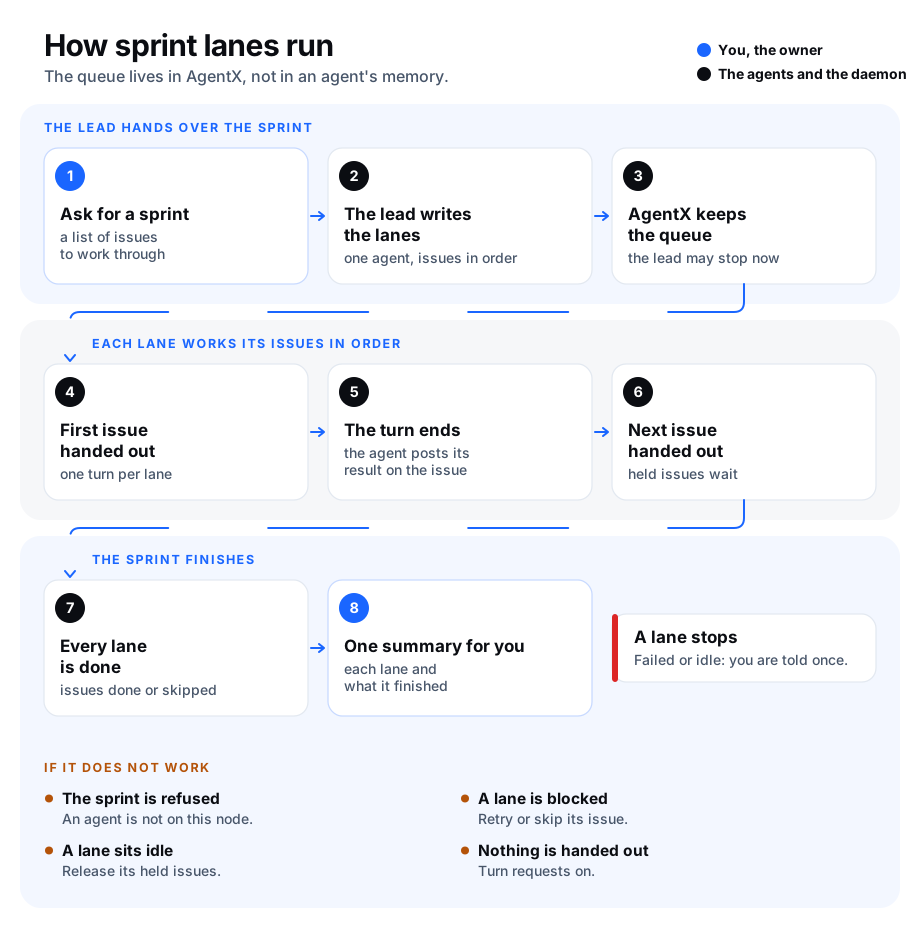
A sprint is a batch of issues worked through by several agents at once. It is split into lanes: each lane has one agent and its own list of issues, in order. Lanes run side by side.
Without sprint lanes, the list of what comes next lives only in a plan comment and in the lead agent's memory. When a lane's task ends, or the lead's session ends, nothing starts the next issue, and nobody is told. With sprint lanes, AgentX keeps the list. It hands each lane its next issue as soon as the lane's last one ends, whether or not the lead is still running.
Sprint lanes are part of open requests, so open requests must be on.
How a sprint works
- You ask an agent (the lead) to run a list of issues as a sprint.
- The lead splits the issues into lanes and hands them to AgentX with its
agentx_sprinttool. Each lane names one agent on this machine and its issues, in order. - AgentX gives each lane its first issue: it starts a turn (one run of the agent) in the lane's own chat. The agent posts its result on the issue or the pull request.
- When that turn ends, the issue counts as done and AgentX gives the lane its next issue, within seconds.
- An issue can be held, for example while it waits on a decision. AgentX passes over a held issue, writes a note in the sprint's log, and comes back to it once it is released.
- When a lane's turn fails, or the turn is stopped, the lane is blocked: AgentX hands out nothing more on it and tells you once, with the reason. You, or the lead, retry or skip the issue.
- When a lane sits idle with issues left for longer than 30 minutes (a turn whose end was never recorded, or only held issues left), AgentX tells you once.
- When every lane is done, the sprint is done and you get one summary: each lane and what it finished.
The lead does not need to stay in its session for any of this.
See a sprint
- Terminal: go to the folder that holds
agentx.json. - Terminal: run
agentx requests sprints. You see each active sprint: its id (it starts withspr-), its title, its lead, and each lane with its agent, its state and how many issues are done. - Terminal: run
agentx requests sprints <id>. You see every issue of every lane, with its state:pending(waiting its turn),running,done,failed,heldorskipped. - Terminal: add
--allto the list to see finished and cancelled sprints too.
Move a lane on
When a lane is blocked or idle you get one notice that names the sprint and the lane. In the commands below, a lane is named by its name (A), and one issue by its lane and its number in the lane (A:3; 1 is the first).
- Terminal: go to the folder that holds
agentx.json. - Terminal: run one of these:
| Command | What it does |
|---|---|
agentx requests sprints <id> --retry A | Hands the lane's failed (or stuck) issue to its agent again. |
agentx requests sprints <id> --skip A | Skips the lane's current issue. The lane goes on with the next one. |
agentx requests sprints <id> --hold A:3 | Holds a waiting issue. The lane passes over it. |
agentx requests sprints <id> --release A | Puts the lane's first held issue back in its place in the queue. A:3 releases that one. |
agentx requests sprints <id> --block A --note "…" | Stops a lane, with the reason. --retry or --skip starts it again. |
agentx requests sprints <id> --cancel | Stops the whole sprint. A turn already running goes on; nothing more is handed out. |
Add --note "…" to any of them to give the reason. It is written in the sprint's log. AgentX picks the change up within a minute.
Change the settings
The settings are the requests.sprints block in agentx.json: see Configuration: automation.
| Setting | Default | What it does |
|---|---|---|
requests.sprints.enabled | true | Agents may start sprints, and AgentX follows them. false stops handing out issues; sprints already made wait. |
requests.sprints.idleMinutes | 30 | Minutes a lane may sit idle with issues left before you are told. A sprint can set its own. |
- Terminal: open
agentx.jsonin a text editor. - Terminal: under
"requests", add or change"sprints": { "idleMinutes": 60 }. - Terminal: save the file. The daemon reads it again on its own.
What an agent sends
The lead starts a sprint with its agentx_sprint tool. For example:
{
  "action": "start",
  "title": "Checkout fixes",
  "ref": "https://example.com/acme/shop/issues/10",
  "lanes": [
    { "name": "A", "agent": "coder", "items": ["#11", "#12"] },
    { "name": "B", "agent": "reviewer", "items": [
      { "ref": "#21", "title": "Review the cart change", "brief": "Review only; do not merge." },
      { "ref": "#22", "held": "waits on the design call" }
    ] }
  ]
}titleis the sprint in a few words. It is needed.refis optional: where the plan lives, for example the issue or comment that lists the lanes. Every turn names it.idleMinutesis optional: this sprint's own idle time.- Each lane needs
agent, an agent on this machine, anditems, in order.namedefaults toA,B,C… A sprint has up to 10 lanes of up to 50 items. - An item is an issue number or a link, or an object with
refand, optionally,title,brief(what to do with it, beyond working on it) andheld(the reason it waits).
Other actions:
{"action": "list"}and{"action": "show", "id": "spr-…"}show sprints.{"action": "block", "id": "spr-…", "lane": "A", "note": "…"}stops a lane. The lane's own agent or the lead may send it, for example when the issue cannot be done.retry,skip,holdandreleasetakeid,laneand, optionally,item(its number in the lane). Only the lead sends them.{"action": "cancel", "id": "spr-…"}stops the sprint. Only the lead sends it.
Only an agent in a running turn can send these. You do the same from the terminal, on any sprint.
Check it worked
- Ask an agent to run two small issues as a sprint with one lane, for example: "Run #11 and #12 as a sprint for coder."
- Terminal: run
agentx requests sprints. The sprint is listed, and laneAshows0/2 done. - Terminal: run
agentx requests sprints <id>. Issue 1 isrunningand issue 2 ispending. - When the agent's turn on issue 1 ends, run
agentx requests sprints <id>again. Issue 1 isdoneand issue 2 isrunning, with no one asking for it. - When issue 2 ends, you get one notice, Sprint finished, and the sprint is no longer in the list.
If something is wrong
- The agent says sprints are off: set
requests.sprints.enabledtotrue, and check open requests are on (agentx requests settings). agent "…" is not on this node: each lane's agent must run on this machine. Start the sprint on the machine that runs the agent, or pick another agent.- A lane is blocked: read the notice, or
agentx requests sprints <id>, for the reason. Fix the cause, then run--retry A. To go on without that issue, run--skip A. - A lane is idle and one issue stays
running: the agent's turn ended without AgentX hearing of it, often after a restart. Check the agent's last run on the issue, then run--retry Aor--skip A. - A lane is idle with only held issues: release them with
--release A, or skip them. - You are told too soon about idle lanes: raise
requests.sprints.idleMinutes, or have the lead setidleMinuteson the sprint. - You retried an issue that was still running: AgentX hands it out again, and from then on only the new turn's end counts: the old turn ending does not mark the issue done or move the lane on. The old turn may still be working, so stop it first if two turns on one issue would get in each other's way.