
Install the AgentX plugin in Claude Code
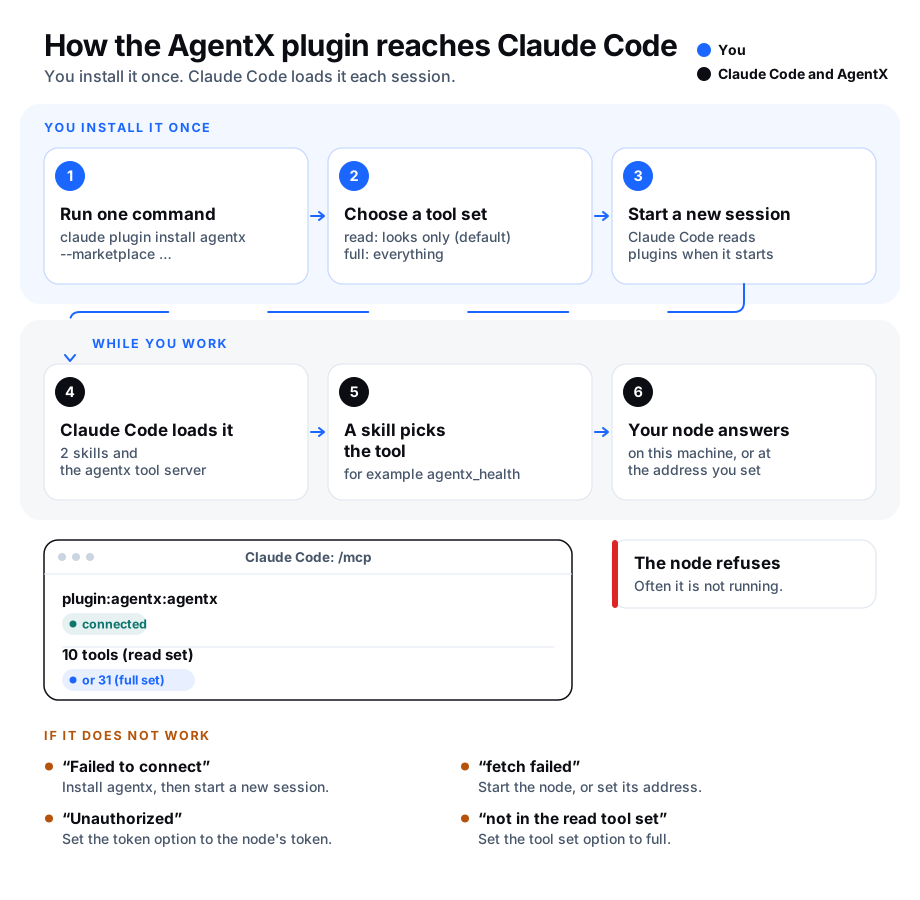
The AgentX plugin is a pack you add to Claude Code with one command. It gives Claude Code:
- The AgentX tool server. Claude Code can check your AgentX node (the background program that runs your agents), list your agents, and read recent chats, events, schedules and the wiki. If you allow it, it can also hand tasks to your agents.
- Two skills. A skill is a short instruction file that Claude Code reads when a request matches it.
agentxteaches Claude Code to use the tools safely: it checks the node first and asks you before it sends anything.agentx-contributehelps you file a clear AgentX issue.
The plugin adds about 220 tokens (the units a model reads text in) to each session, for the two skill descriptions. A skill's full text loads only when it is used.
For Cursor, VS Code or Windsurf, follow Use AgentX from your code editor instead. Those editors take the same tool server but no plugin.
Before you start
- Terminal: run
agentx --versionto check that AgentX is installed. The plugin starts theagentxcommand, so it must be on yourPATH. - Terminal: run
agentx daemon statusto check that your AgentX node is up. - Terminal: run
claude --version. The one-command install needs Claude Code 2.1.275 or later. An older version works with the two commands under Older Claude Code.
Install it
Terminal: run:
bashclaude plugin install agentx --marketplace anis-marrouchi/agentxThis adds the AgentX marketplace (the list of plugins this repository offers) and installs the
agentxplugin from it, for your user.Terminal: start a new Claude Code session, or type
/reload-pluginsin an open one.
You can also install from inside Claude Code: type /plugin install agentx --marketplace anis-marrouchi/agentx.
Older Claude Code
- Terminal: run
claude plugin marketplace add anis-marrouchi/agentx. - Terminal: run
claude plugin install agentx@agentx. - Terminal: start a new Claude Code session.
Choose its settings
The plugin works without settings for a node on the same machine. It starts in the read tool set: it looks, and sends, starts and changes nothing.
| Setting | Key | Default | What it does |
|---|---|---|---|
| Tool set | tools | read | read only looks. full also sends messages, starts tasks, changes schedules and answers approvals. |
| Node address | daemon_url | empty | Your node's address, for example http://node.example.com:18800. Empty uses node.bind from agentx.json in the AgentX folder, else http://localhost:18800. |
| Node token | token | empty | The node's MESH_TOKEN, needed only for a node on another machine. Claude Code keeps it in your system's secure store. |
| AgentX folder | install_dir | . | The folder that holds agentx.json, as a full path. . is the folder Claude Code was started in. |
To change them:
- Claude Code: type
/plugin configure agentx@agentx. - Fill in the settings you need and save.
- Start a new Claude Code session.
To set them while installing, add one --config per setting, for example:
claude plugin install agentx --marketplace anis-marrouchi/agentx --config tools=full --config install_dir=/home/you/agentxCheck it worked
- Terminal: run
claude plugin list.agentx@agentxshows as enabled. - Terminal: run
claude mcp list. The lineplugin:agentx:agentxends inConnected. - Claude Code: ask "Check my AgentX node." Claude Code calls
agentx_healthand shows your node's health report. - Claude Code: with the default
readtool set, ask it to send a task to an agent. It explains that the tool set isreadand sends nothing.
Update or remove it
- Update. Terminal: run
claude plugin marketplace update agentx, thenclaude plugin update agentx@agentx. - Remove. Terminal: run
claude plugin uninstall agentx@agentx. To remove the marketplace too, runclaude plugin marketplace remove agentx.
If something is wrong
plugin:agentx:agentxshows "Failed to connect". Claude Code cannot startagentx. Runagentx --versionin the same terminal. If it is not found, install AgentX (Install) or add its folder to yourPATH, then start a new session.- "fetch failed". The node is not running, or it listens somewhere else. Run
agentx daemon status, or set Node address. - "Unauthorized". The node wants a token. Set Node token to the node's
MESH_TOKEN. - "… is not in the "read" tool set". That tool acts on your agents. Set Tool set to
fullif you want to allow it, then start a new session. - "unknown option '--marketplace'". Your Claude Code is older than 2.1.275. Use the two commands under Older Claude Code, or update Claude Code.