
Have a second agent write tests from the issue
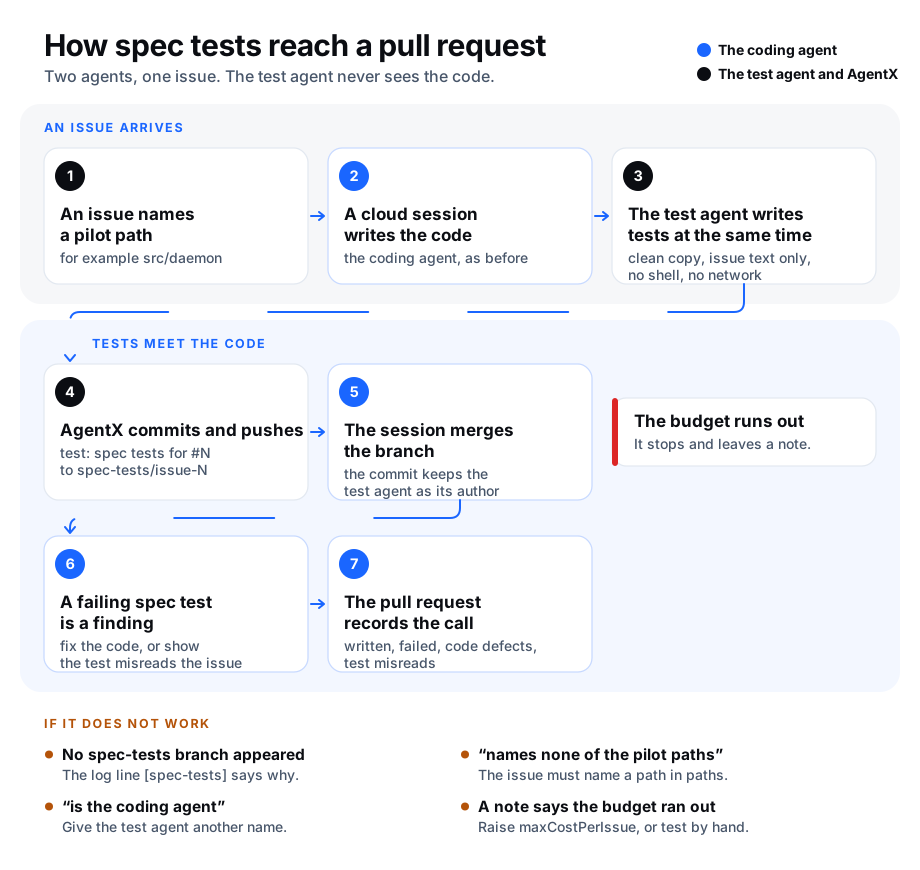
When one agent writes both the code and its tests, the tests tend to miss what the code misses. With spec tests ("spec" is short for specification: what the issue asks for), a second agent, the test agent, writes tests from the issue alone, while the coding agent writes the code. The test agent never sees the code.
This works together with Claude cloud sessions: the coding agent works in a cloud session, and the test agent runs on your computer beside it. The setting is off until you turn it on.
What happens
An issue arrives that names one of the pilot paths, for example
src/daemon. A pilot path is a folder you choose to try spec tests on first.The coding agent starts a cloud session for the issue, as before. Its task also says that spec tests are coming and how to handle them.
At the same time, AgentX starts the test agent on a clean copy of the repository's main branch. Its input is the issue's title and text, the acceptance criteria (the checklist under an "Acceptance criteria" heading) and the names in backticks the issue mentions. It gets no code from the coding agent, no shell and no network. It can read and write files only inside its clean copy: it is blocked from your clone, the folder you run
agentxfrom, and private files in your home folder (such as SSH keys and sign-in files).The test agent writes one test file. Only new test files are kept. Any other change it makes is thrown away, including a change to a test that already exists, so it cannot weaken or delete your current tests. The log lists what was thrown away.
AgentX checks the new files for anything that looks like a password, key or token. If it finds one, it pushes nothing and leaves a note on the issue that names the kind of secret and the file, never the secret itself.
AgentX commits the file as
test: spec tests for #N, with the test agent as the author, and pushes it to the branchspec-tests/issue-N. It then tells the cloud session the tests are there.The cloud session merges that branch into its own (so the commit keeps its author) and runs the tests. A failing spec test is a finding: the session fixes the code, or shows that the test misreads the issue and changes it in a separate
test: spec misreadcommit.The pull request description gets a "Spec tests" section with the outcome, ending in a line like this one, which the weekly quality report reads:
<!-- agentx:spec-tests written=6 failed-first-run=2 code-defects=1 test-misreads=1 -->
The test agent runs once per issue. AgentX marks the issue as running as soon as the test agent starts, so a second message about the same issue does not start a second test agent. Its cost and minutes are kept in .agentx/spec-tests.json in the folder you run agentx from.
Before you start
- Claude cloud sessions already work for the repository: an issue gets a "Started a Claude cloud session" comment.
- Terminal, on the computer that runs the agent: run
gh auth status. AgentX uses the GitHub command-line toolghto read the whole issue and to leave notes on it. If it says you are not signed in, rungh auth login. - Terminal: in the clone, run
git push --dry-run origin HEAD:refs/heads/spec-tests/check. It must not say "permission denied": AgentX pushes the tests from this clone.
Turn it on
Terminal: open
agentx.jsonand add aqualitysection at the top level:json"quality": { "specTests": { "enabled": true, "paths": ["src/daemon"], "agent": "spec-tests", "maxCostPerIssue": 2 } }Terminal: run
agentx config check. It prints✓ Config valid.Terminal: restart the daemon with
agentx daemon restart --when-idle.
Settings
Under quality.specTests:
| Key | Type | Default | What it does |
|---|---|---|---|
enabled | boolean | false | Turns spec tests on. Off, nothing changes. |
paths | list of strings | ["src/daemon"] | Folders in the pilot. An issue that names one of them, or a file under it, gets spec tests. |
agent | string | "spec-tests" | The test agent's name. It is the author of the spec-test commit. It must not be the coding agent's id. |
model | string | unset | Model the test agent uses, for example "sonnet". Unset: the claude command's default. |
maxCostPerIssue | number (up to 100) | 2 | Most the test agent may spend on one issue, in US dollars. When it is spent, the test agent stops, pushes nothing and leaves a note on the issue. |
maxMinutes | number (1–120) | 20 | Most minutes the test agent may run for one issue. Past it, the same: it stops and leaves a note. |
Check it worked
- Browser: open an issue in the repository that names
src/daemonand has an "Acceptance criteria" checklist. - Browser: the issue gets the "Started a Claude cloud session" comment, as before.
- Terminal: run
agentx daemon logs -n 2000 | grep spec-tests. Within the test agent's time limit, a line sayspushed, with the minutes and the cost. - Browser: on GitHub, open the branch
spec-tests/issue-N. Its last commit istest: spec tests for #N, and its author is the test agent's name. - Browser: when the pull request appears, it contains that commit and a "Spec tests" section.
If something is wrong
- No
spec-testsline in the log. The setting is off, or the issue did not go to a cloud session. Spec tests only run beside a new cloud session for an issue, not for a pull request or a local run. - The log says "names none of the pilot paths". The issue's title or text must name a folder from
paths, such assrc/daemonorsrc/daemon/index.ts. - The log says "the issue text could not be read". Terminal: run
gh issue view <number> --repo <owner>/<repo>in the clone. Sign in toghif it asks. - The log says "is the coding agent". Set
agentto a name other than the coding agent's id. - The log says "already running for this issue". A test agent is still working on it. If the daemon stopped in the middle of a run, the mark expires on its own after
maxMinutesplus 10 minutes. - The log says "already ran for this issue". The test agent runs once per issue. To run it again, stop the daemon, remove the issue's entry from
.agentx/spec-tests.json, and start the daemon. - The issue has a note that the budget or time ran out. Nothing was pushed. Raise
maxCostPerIssueormaxMinutes, or write the tests by hand. - The issue has a note that a file looks like it holds a secret. Nothing was pushed. Check which file the note names and how the test agent could have seen that value; make sure no real secret is in the repository's tracked files.
- The log says "discarded (only new test files are committed)". The test agent also changed files that already existed. Those changes were thrown away on purpose; only its new test file was pushed.
- The issue has a note that the push failed. The clone cannot push to GitHub. Run the
git push --dry-runcheck from Before you start. - The pull request has no "Spec tests" section. The cloud session did not follow its task. Comment on the issue to ask for it while the session is open.