
People: who is connected and what they asked for
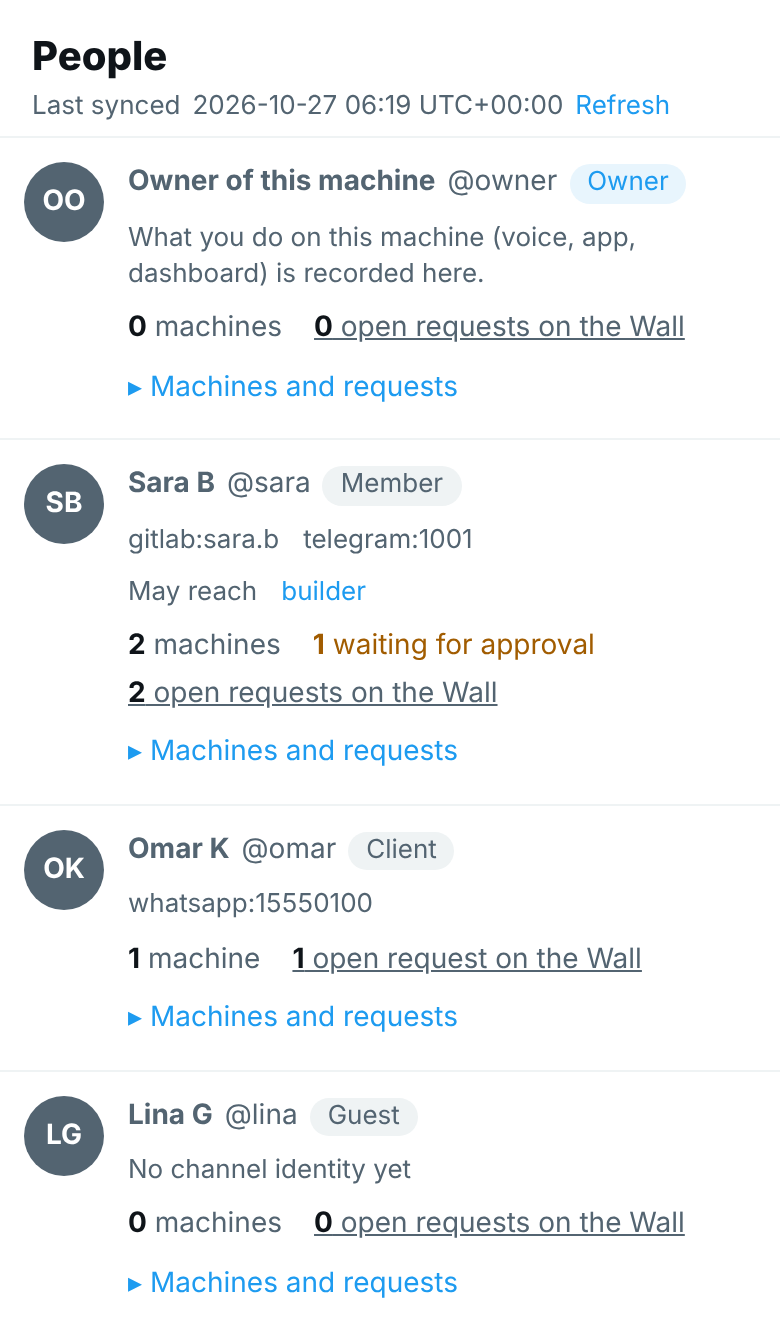
Your teammates, clients and guests reach your agents from their own channels and their own machines. People is a page of the Hub that lists every person, the machines each has paired, and what each asked the agents for. You can end one machine's access from it.
It shows what agentx people already records. There is nothing to set up: with nobody listed, the page shows you, the owner of this machine.
Open it
- Browser: open the dashboard. The Hub is the first page you see.
- Select People in the nav on the left. The number next to it is how many people are listed. On a phone, select More in the bottom bar, then People. The page's address is
/hub#page=people. The old address,/people, opens this page too. - Every person is one row: a round picture with their initials, their name, their handle (such as
@sara), and their role (Owner, Member, Client or Guest). Under it, the channel identities you gave them, such asgitlab:sara.b, and the agents they may reach, when you limited them. - The last line counts their machines, how many of those wait for your approval, and their open requests on the Hub.
- Under it, Upload picture gives them a picture in place of the initials; see Give agents and people a picture.
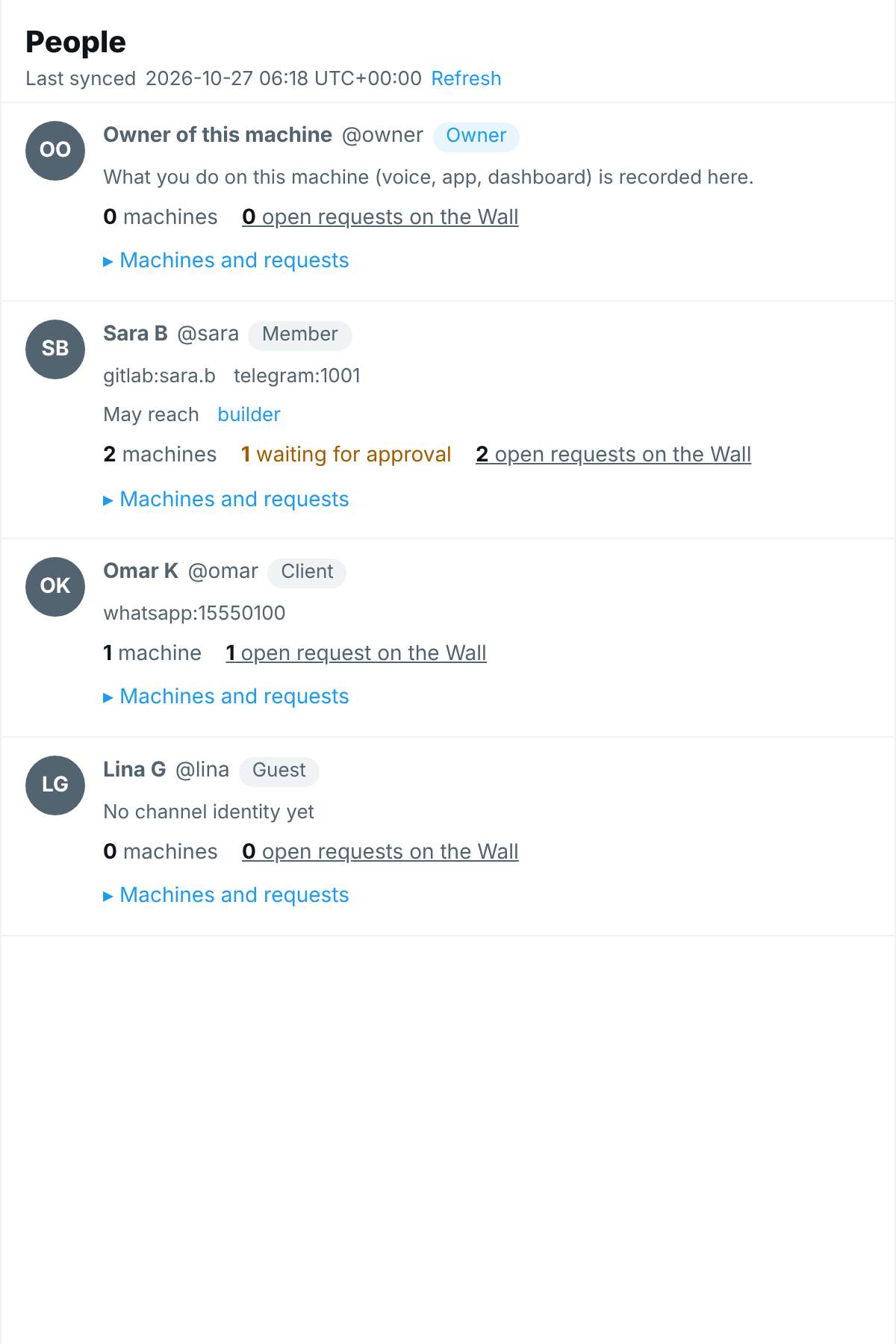
Fictional data; your people will differ.
The page refreshes with the rest of the Hub, every minute, and when you select Refresh.
What you see for one person
- Select a person's name, or Machines and requests under it. Their details open under the row.
- Select it again (Hide machines and requests) to close them.
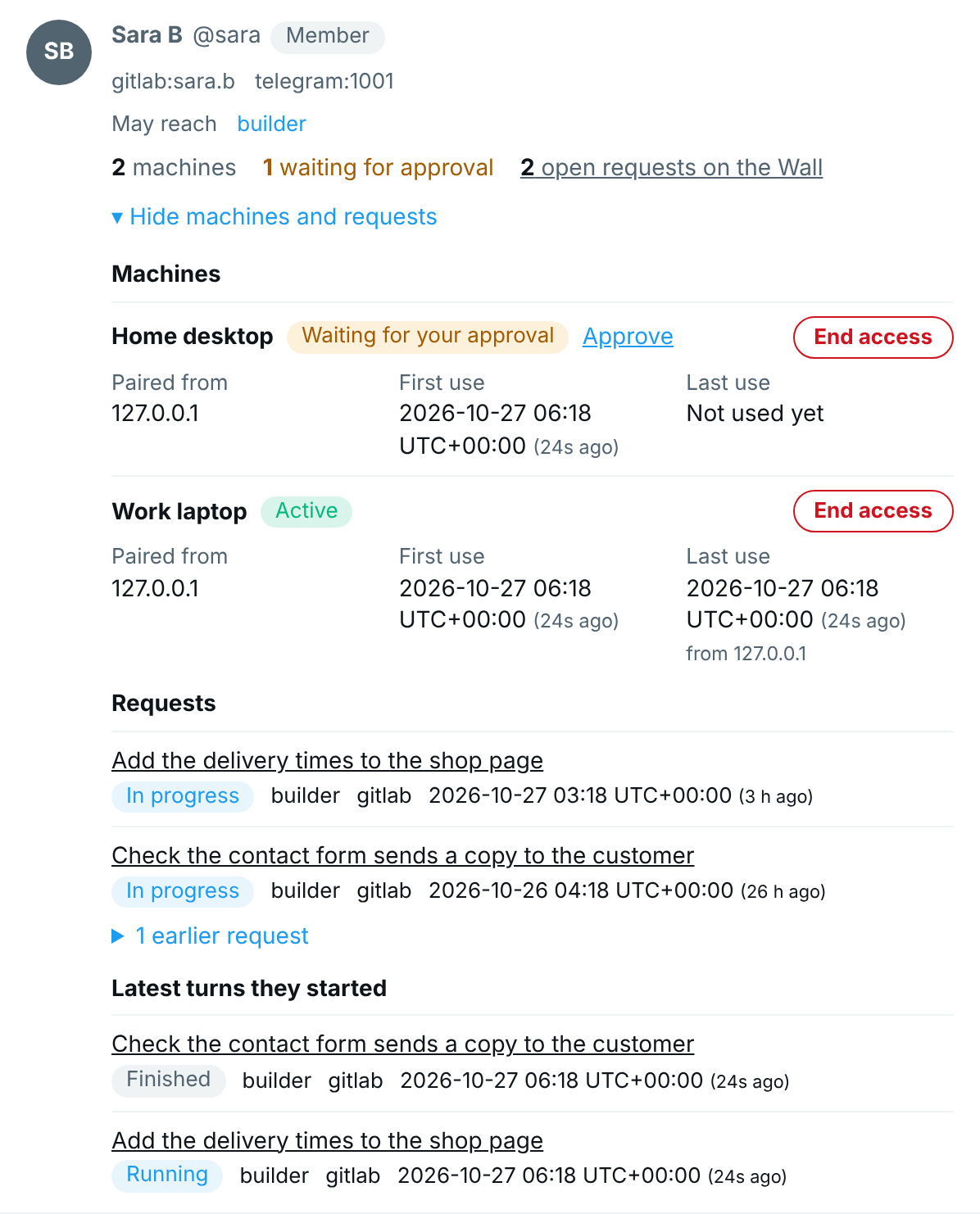
Machines. A machine is a computer the person paired with their own page: My work for a teammate (see Invite a teammate to their work page), Your project for a client (see Give a client a page of their own). Each machine shows:
| What | What it means |
|---|---|
| Name | The name the person typed when pairing. |
| State | Active: it works. Waiting for your approval: its card is in Approvals; select Approve to go there. Approved: you said yes and the machine has not opened the page since. Refused: you said no, or the card ran out. Ended: its access was removed, with the reason. |
| Paired from | The address the pairing came from, and the login your private network reported for it. |
| First use | When the machine was paired. |
| Last use | The last time it opened the page, and from which address. |
Requests. What the person asked for that is still open, newest first, each with its state (in progress, waiting on you, waiting on another agent, needs attention), the agent, the channel and the time. Select a request to open its post on the Hub. Closed requests (done, declined, dropped) are folded under earlier requests: select that line to show them. This list needs request tracking turned on.
Latest turns they started. The last 20 messages they sent to an agent, on every channel, with the agent, the channel, the time, and whether the agent is still running. Select one to open that run on the Hub's Task page. This list fills without request tracking.
A person's work is found by the identities on their entry. A message from a login or number you did not list is not shown under anyone: see Tell agents who is who.
See everything one person asked for
- On the People page, select open requests on the Hub on the person's row.
- The Hub's feed opens with only that person's open posts. The line under the title says asked by and their name.
- Select everyone on that line to see every post again.
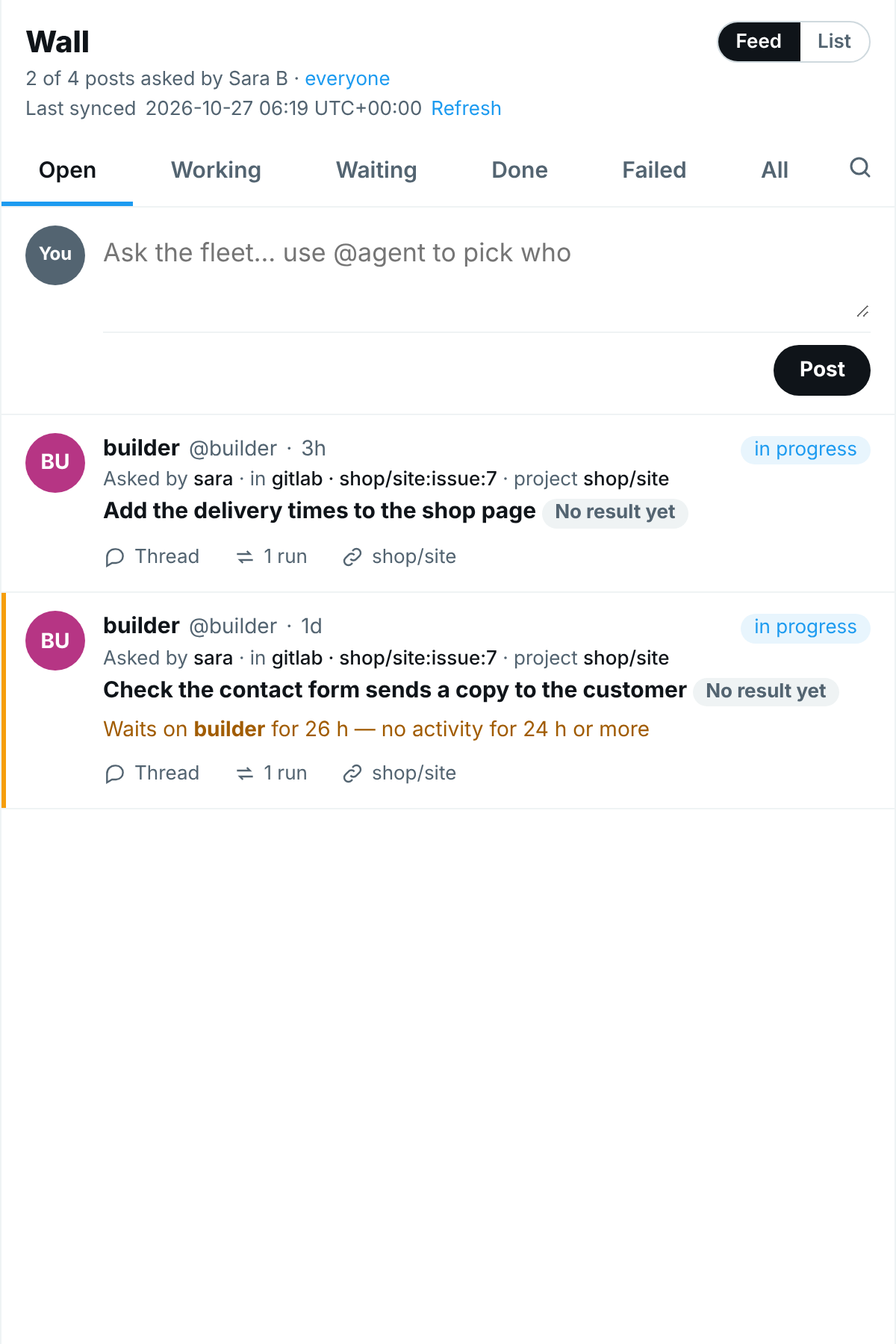
The same filter is Asked by in the Hub's search and filters, so you can also pick a person there and save it as your view.
End one machine's access
- Browser: open the person and find the machine.
- Select End access, then confirm.
- The machine stops at once: its next request is refused, and its line turns to Ended. The line at the top of the page says Access ended. The person's other machines keep working.
This does the same as agentx people revoke-device <id>. To let that machine in again, invite the person again with agentx people invite <id>.
Ending a machine does not remove the share in Tailscale. If the person should no longer reach this computer at all, remove the share there too.
Adding people, changing their role or identities, and inviting them stay with the agentx people commands in the terminal: the People page only reads, apart from End access.
When nobody is paired
The page says Nobody has paired a machine yet and shows the three steps to invite someone: list them (with --role client for a client), make their one-time code, and say yes to their machine in Approvals.
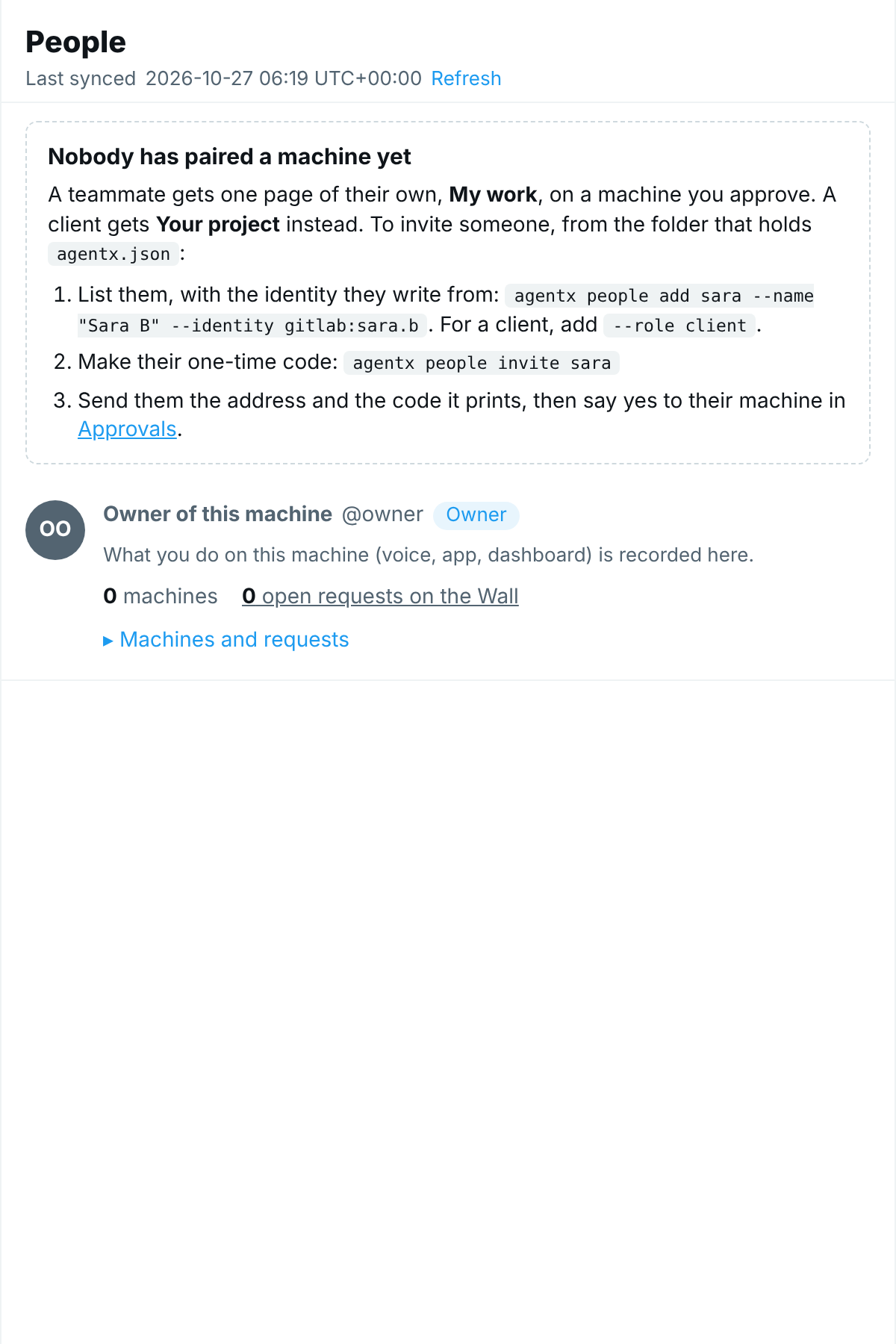
The full path, with the network setup, is in Invite a teammate to their work page.
On a phone
The page is the same, one column wide. Each machine's facts stack under its name, and End access sits under the machine's state.
Who can open this page
Only you. The page is part of the dashboard, which listens on your own computer. A teammate's machine reaches two paths and nothing else, /member and /api/member, and this page is under neither. If you set a dashboard token (dashboard.token), the page's data and End access need it, like the rest of the dashboard: anyone else is refused.
Never publish /hub, /people or the whole dashboard with tailscale serve. agentx people invite refuses to make a code while a path other than the member page's and the phone app's (including the Android app's /.well-known/assetlinks.json) is published.
Check it worked
- Browser: open
http://127.0.0.1:4202/people. The Hub opens on People, and you see at least one row: yourself. - Terminal: run
agentx people listandagentx people devicesfrom the folder that holdsagentx.json. The page shows the same people and the same machines. - Browser: select open requests on the Hub on a person who asked for something. The feed shows only their posts.
- Teammate's browser: opening
https://<your computer>/peopleshows nothing of yours.
If something is wrong
- The page lists only "Owner of this machine": nobody is in your people list yet. Add someone with
agentx people add. - A person has no requests and no turns: the identity they write from is not on their entry, so their messages were not recorded under them. Add it with
agentx people link <id> <channel:id>. Work from before that stays unlisted. - Requests are empty but turns are listed: request tracking is off. Turn it on with
agentx requests settings. - "open requests on the Hub" says 0 but the person has open requests: the Hub shows this node's requests and those of the nodes it reaches. Select Refresh; a node that does not answer is named under Happening now.
- The page shows other people or machines than the terminal: the dashboard reads the folder it was started in. Start
agentx board servefrom the folder that holdsagentx.json. - A machine stays on "Approved" or "Refused": its state is written the next time that machine opens the page. Nothing is wrong: an approved machine works when it comes back, a refused one is turned away.
- "Could not read the people list": the dashboard has a token and this browser tab was opened before it was set. Reload the page. The rest of the Hub keeps working meanwhile.