
Send coding tasks to Claude cloud sessions
Every agent run on your computer counts against your Claude plan. A Claude account can also hold a separate credit for cloud sessions: Claude Code working on a copy of your repository on a computer that Anthropic runs, started with claude --cloud, which you follow in a browser at claude.ai/code. Only cloud sessions draw on that credit.
With the setting on this page, an agent sends a coding task that arrives from GitHub to a cloud session instead of running it on your computer. The session does the work and opens a pull request. Your computer stays free, and the plan's weekly limit is not touched.
The setting is off until you turn it on, for one agent and for the GitHub channel. Here is the whole path:
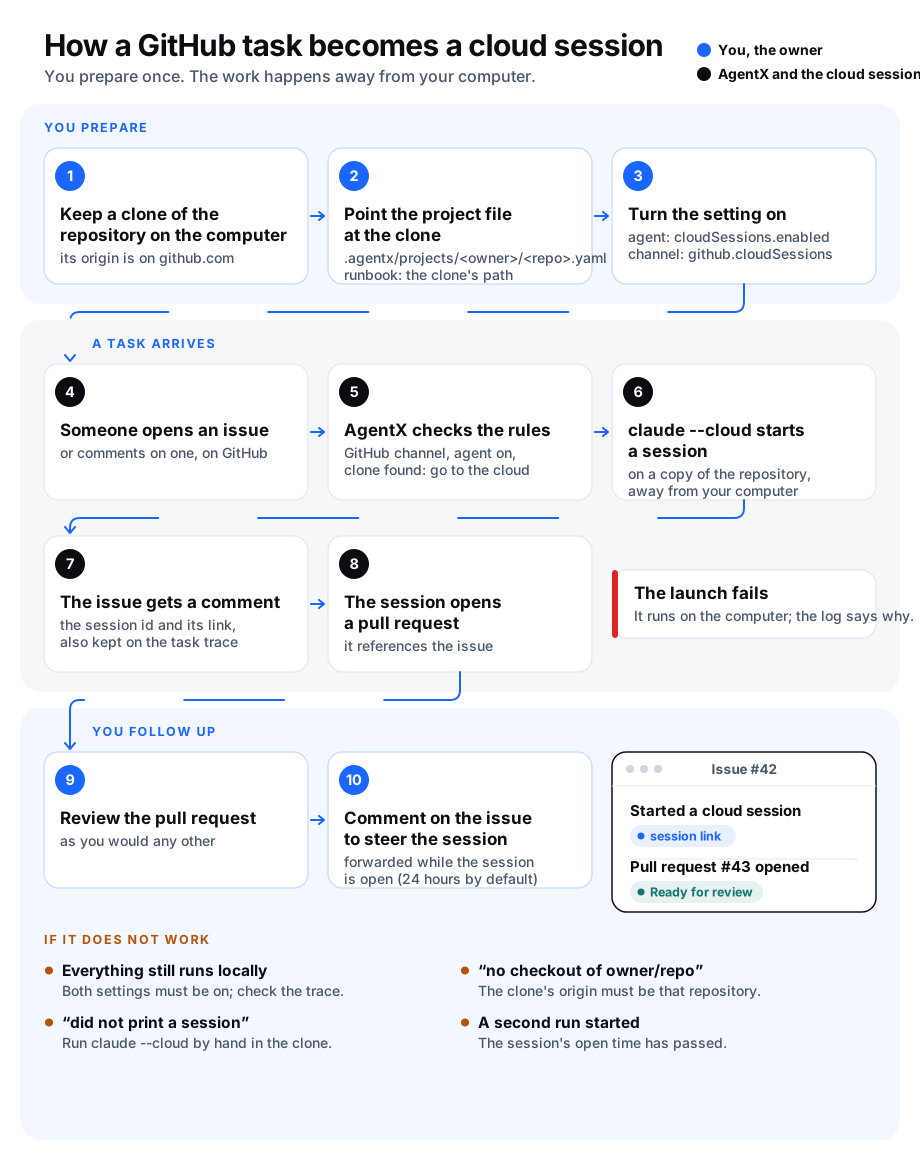
What goes to the cloud, and what does not
- Only a task from the GitHub channel about an issue or pull request. A comment on an issue is one. A push, a Telegram message or a schedule is not: those run on your computer as before.
- Only when the agent's engine is
claude-code, and when this computer holds a clone of that repository whoseoriginpoints atgithub.com. A repository that lives elsewhere, or that this computer has no clone of, runs locally. - The result is a pull request, not a reply. AgentX posts one comment on the issue with the session's id and its link, and keeps both on the task's trace.
- While a session is open for an issue (24 hours by default), no second run starts for that issue. A new comment on the issue is forwarded to the session instead.
- When a forward fails because the session no longer exists ("Session not found"), AgentX forgets the session and runs the comment on your computer. This happens, for example, after you sign
claudein with another account: sessions started by the old account can no longer be reached. - When the launch fails, the task runs on your computer as before, and the reason is in the daemon log and on the trace.
- The cloud session reads the repository's own
CLAUDE.md. It does not get the agent's system prompt, tool servers or local files.
Before you start
- Terminal, on the computer that runs the agent: run
claude --version. You need a version that has the--cloudoption; runclaude --helpand look for it. - Terminal: run
python3 --version. AgentX uses Python'sptymodule to giveclaude --cloudthe terminal it needs. It is on every Mac and on nearly every Linux system. - Terminal: run
claudeonce and sign in with the account that holds the cloud credit, then leave with/exit. - Browser: make sure the GitHub channel already works: an issue in the repository reaches the agent and gets a comment.
Turn it on
Terminal: clone the repository on the computer that runs the agent, for example into
/home/you/repos/example-repo:shgit clone git@github.com:example-org/example-repo.git /home/you/repos/example-repoTerminal: create the project file for that repository,
.agentx/projects/example-org/example-repo.yamlin the folder you runagentxfrom, and pointrunbookat the clone. Write the full path, not~:yamlproject: example-org/example-repo channel: github runbook: /home/you/repos/example-repoThe daemon reads project files on the fly: save, and the next event uses it. If the agent's own
workspaceis already that clone, you can skip this step.Terminal: open
agentx.jsonand turn the setting on for the agent and for the channel:json"agents": { "coder": { "name": "Coder", "workspace": "/path/to/coder-workspace", "tier": "claude-code", "cloudSessions": { "enabled": true } } }, "channels": { "github": { "enabled": true, "cloudSessions": true, "routes": [{ "repo": "example-org/example-repo", "agent": "coder" }] } }Terminal: restart the daemon with
agentx daemon restart --when-idle.
Settings
Under agents.<id>.cloudSessions:
| Key | Type | Default | What it does |
|---|---|---|---|
enabled | boolean | false | Sends this agent's GitHub issue and pull request tasks to cloud sessions. Needs channels.github.cloudSessions too. |
maxPerDay | number | 0 | Most sessions this agent may start per day. 0 means no limit. Past the limit, tasks run on your computer. |
openHours | number (1–168) | 24 | How long a started session counts as open: no local run starts for its issue, and comments are forwarded to it. |
launchTimeoutSeconds | number (10–600) | 120 | How long claude --cloud may take to print the session before AgentX gives up and runs the task locally. |
Under channels.github:
| Key | Type | Default | What it does |
|---|---|---|---|
cloudSessions | boolean | false | Lets agents with cloudSessions.enabled send this channel's tasks to the cloud. Both must be on. |
While a session is open
- Browser: open the link in the comment on the issue to watch the session work.
- Browser: to steer it, comment on the issue. AgentX forwards the comment to the session with
claude -p "<comment>" --cloud <session-id>and answers with a short note. - When the session is done, review its pull request as you would any other.
- After
openHourshave passed, the next comment on the issue starts a new task as usual.
To forget an open session before its time is up:
- Terminal: go to the folder you run
agentxfrom. - Terminal: run
agentx cloud-sessions listto see the open sessions, one line per issue, writtenowner/repo#number. - Terminal: run
agentx cloud-sessions close example-org/example-repo#42with the issue from that list. You can name several issues in one command.
The daemon picks up the change at once; no restart is needed. The next comment on that issue starts a new task as usual.
Spec tests from a second agent
For issues in folders you pick, a second agent can write tests from the issue text while the cloud session writes the code. See Have a second agent write tests from the issue.
Check it worked
- Browser: open a new issue in the repository, with a small, clear task.
- Browser: within a minute or two the issue gets a comment from the agent that starts with "Started a Claude cloud session" and shows a session id and a claude.ai/code link.
- Terminal: run
agentx trace list --agent coder --limit 1, thenagentx trace show <taskId>with the id it printed. The trace has acloud_sessionstep with the actionlaunchedand the same id and link. - Browser: open the link. The session is working on a copy of the repository, and later a pull request appears that references the issue.
If something is wrong
- The agent answered the issue itself, as before. Both settings must be on:
cloudSessions.enabledon the agent andcloudSessionson the GitHub channel. The agent'stiermust beclaude-code. Runagentx trace show <taskId>: thecloud_sessionstep says why the task stayed local. - The trace says "no checkout of owner/repo on this node". The project file's
runbookpath (or the agent'sworkspace) must be a clone whoseoriginis that repository on github.com. Terminal: rungit -C /home/you/repos/example-repo remote get-url originand compare. - The trace says "did not print a session within 120s" or "exited with code 1". Terminal: go to the clone and run
claude --cloud "Say hello"by hand. Sign in if it asks, and answer any question it asks once; AgentX cannot answer for you. A slow network needs a higherlaunchTimeoutSeconds. - The trace says "python3 is not installed". That computer needs Python 3; AgentX uses it to give
claude --clouda terminal. - Every comment on an issue fails with "Claude cloud session … is still open for this issue". Forwarding to the session failed for a reason other than the session being gone, for example a network error or a sign-in problem; the error says which. Terminal: run
claude -p "hello" --cloud <session-id>by hand from the clone to see the full message. To give up on the session, runagentx cloud-sessions close owner/repo#number. - A second run started for the same issue. The first session's
openHourshad passed, or.agentx/cloud-sessions.jsonwas removed. RaiseopenHoursif sessions take longer. - Too many sessions started.
maxPerDaycaps them. Tasks past the limit run on your computer and the trace says "daily cap reached".