
Let another organisation into part of your mesh
This page is for two organisations that both run AgentX. The guest's operator joins from their own machine, with a terminal. The work runs the other way round from a client's project: the guest asks, and your agent works on your machine and your files, never on the guest's. For a person who only asks your agents for things on a chat channel, give them their own work page instead, or a client a project page of their own; for a machine of your own, add a second machine; for your own phone, the phone app. Never pair a guest with a mesh invite or the phone app: both open everything of yours. The five ways side by side: Who gets which way in.
Two companies with some common ground: one is willing to give the other access to one of its machines, for a service, for assistance, for a project. This page shows how a host opens part of its mesh to a guest mesh, keeps control of it while it is in use, and how the guest uses it.
The rule that keeps it safe: the guest asks, the host's own agent acts. The guest never gets a shell, a session or an agent of its own on your machine. Its messages run as turns of one agent of yours, inside what you opened, under your rules and in your log. The guest sees only the answers to its own requests.
What a grant is
A grant is one named opening, for example Support session for Company X. It holds:
| Part | What it means |
|---|---|
| guest | The other organisation's name. |
| agent | The agent of yours that works for them. |
| folders, skills, commands | What that agent may touch for them. Empty means none named: the agent is told to stay away unless your own instructions already allow it. |
| level | How much freedom the agent has on the guest's turns: report reads and answers only; propose may prepare changes and open a merge request but never merge, deploy or delete; act works freely inside the grant. report and propose are enforced on the run, the same way as for schedules and workflows. |
| until | The grant ends on its date and does not renew by itself. Default 7 days. |
Nothing is shared until you open a grant, and a grant opens nothing until the guest has joined and you have said yes.
Host: open a grant
Terminal: from the folder that holds
agentx.json:shagentx mesh guests invite --name "Support session for Company X" --guest "Company X" \ --agent support-agent --folders /srv/app --skills deploy-notes --level propose --days 7It prints the address of your node and a code such as
7KQ4-M2XH. The code works once, for 10 minutes.Send both to the guest's operator on a channel you trust.
The address is the one other machines reach your daemon on, over your private network or a reverse proxy. Pass --url if it differs from dashboard.daemonUrl.
Host: bill the guest's turns to your API key
The guest's turns run on your engine. A personal plan, the sign-in claude uses by default, is for you alone under the provider's terms; an API key billed to you is made for use by others on your behalf. So the agent a grant names should bill your API key, not your sign-in. Do this before you send the code.
Terminal: from the folder that holds
agentx.json, check that.envnext to it has a lineANTHROPIC_API_KEY=…. Add it if not. The daemon reads this file when it starts.Terminal: set the grant's agent to bill that key:
shagentx config set agents.support-agent.billing apiTerminal: run
agentx daemon restart --when-idleso the agent's next run uses the key.
This setting is for agents on the claude-code tier (see billing). An agent on another tier uses that engine's own credentials: give it an API key of yours there too, never a personal plan.
Guest: join
Terminal (guest's machine): from the folder that holds its
agentx.json:shagentx mesh join https://host.example.com --code 7KQ4-M2XH --name company-xIt says Joined … The host's owner has to approve the join once. The key the host gave is kept in
.agentx/guest-hosts.json, readable by that user only.
Host: approve the join
- A card Guest mesh: Company X wants to join arrives in your Approvals inbox, naming the guest's node, where it came from, the agent, the level and the end date.
- Answer Yes if the guest's operator told you they are joining now. No ends the grant at once; a card nobody answers is treated as no after three days.
Guest: ask
- Terminal:
agentx mesh ask company-x "Why is the checkout failing on your side?". The answer prints when the host's agent is done. - From an agent:
POST /mesh/taskon the guest's own daemon with{ "peer": "company-x", "message": "…" }. The host's name works like a peer's; only the answer comes back. agentx mesh hostsshows each host joined and where the grant stands: waiting, active, paused or ended.
Host: keep it in hand
In the dashboard, open Guest meshes (/guests): every grant with its state, what it opens, how many turns the guest took, and the trail of what happened. Pause stops the guest at once and cancels its running turns; Resume lets it work again; End ends the grant for good.
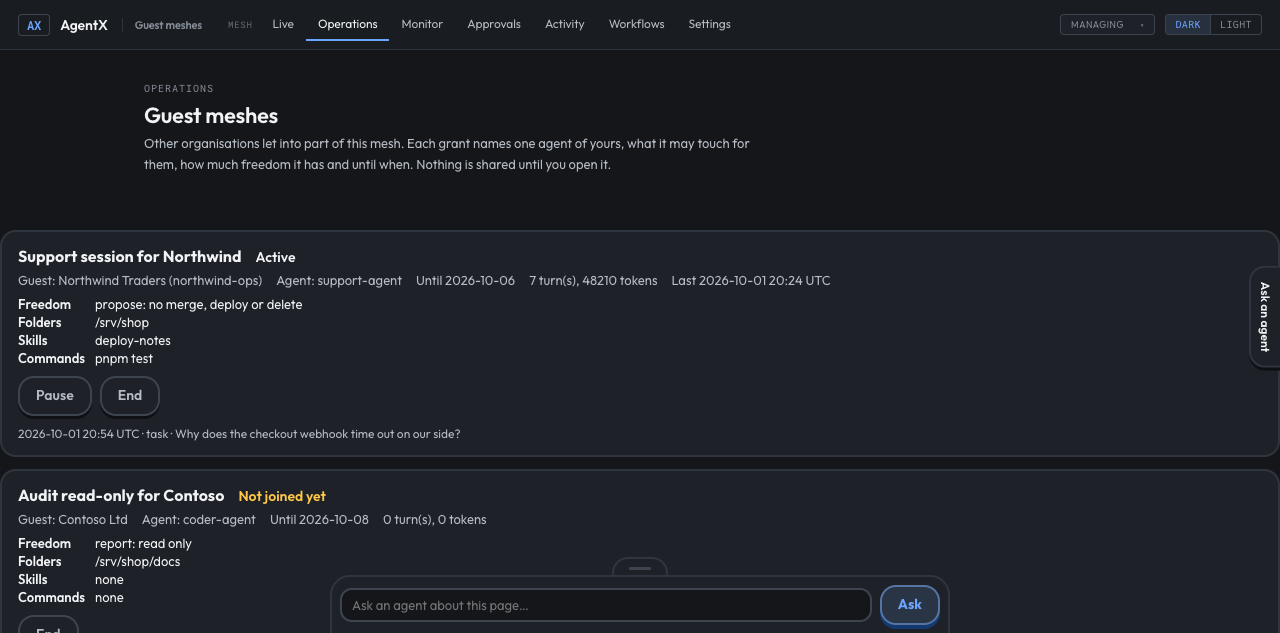
From the terminal:
| Command | What it does |
|---|---|
agentx mesh guests | Every grant: state, guest, agent, level, end date, usage. |
agentx mesh guests show <id> | One grant and its trail. |
agentx mesh guests pause <id> | Stops the guest at once; running turns are cancelled. |
agentx mesh guests resume <id> | Lets a paused guest work again. |
agentx mesh guests set <id> --level act --folders /srv/app,/srv/docs --days 14 | Widens or narrows the grant while it is in use. none clears a list. |
agentx mesh guests end <id> | Ends the grant; its key stops at once. |
Every turn the guest takes shows in your normal activity as channel guest, and in agentx mesh guests show with the first words of the message. Usage is counted per grant (turns and tokens) and shown to you; nothing is billed between the two organisations.
What each side sees
- You see everything the guest asks and everything your agent does for it.
- The guest sees the answers to its own requests and the state of its grant, never your other agents, chats, people or files. Your agent is told so on every guest turn.
Check it worked
- Host, terminal:
agentx config get agents.support-agent.billingprintsapi. - Host, terminal:
agentx mesh guestslists the grant asactiveafter you said yes. - Guest, terminal:
agentx mesh ask company-x "Say hello"prints an answer from the host's agent. - Host, dashboard: the grant shows 1 turn, and the trail has a
taskline. - Host, terminal:
agentx mesh guests pause <id>; guest:agentx mesh hostsnow says the host paused this grant.
If something is wrong
Join refused (401): That code didn't work. Ask the host for a new one.: the code was mistyped, is older than 10 minutes, or was already used. The host runsagentx mesh guests inviteagain and sends you the new code. The message never names a command, because the command is the host's, not yours.Join refused (429): too many wrong codes from that address. Wait the minutes shown.waiting for the host to approve the join: the card is still in the host's Approvals inbox.no grant opens this: the host said no, ended the grant, or it reached its end date. Ask the host.agent must be an agent on this node: the--agentid is not in youragentx.json. Runagentx agents.Could not reach the daemon:pause,resume,setandendgo through the running daemon, which also stops the guest's running turns. Start it.- The guest's turn fails with
billing "api" needs ANTHROPIC_API_KEY in the agent's environment: the agent is set to bill your API key, but the daemon has none. AddANTHROPIC_API_KEY=…to.envnext toagentx.jsonand restart the daemon (agentx daemon restart). The run does not fall back to your sign-in. - The guest's turns are refused with
autonomy "report" is only enforceable on the claude-code tier:reportandproposeneed the agent on theclaude-codetier. Use such an agent, oractwith a narrow grant.