
Run every task through a workflow
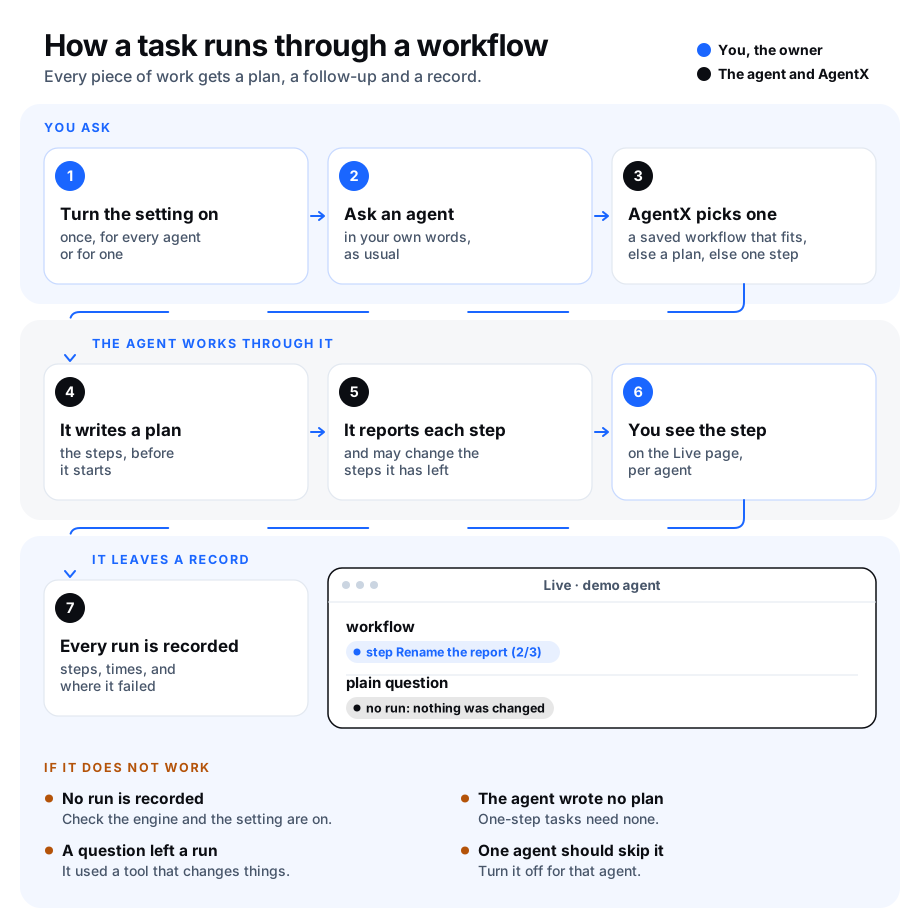
Normally an agent just does what you ask. With this setting on, every task an agent gets runs inside a workflow run: a record of the steps the work went through, kept by AgentX. You see the plan before the work is done, the step each agent is on while it works, and afterwards how long each step took and where it failed. Those records are what you study later to find the shortest way to a goal.
A workflow is a list of steps AgentX runs in order. One pass through it is a run.
What it does
When a task reaches an agent, AgentX picks the workflow in this order:
- A saved workflow that fits. If you or an agent saved a workflow that matches the request closely, AgentX starts it and follows it to the end, as described in Let a workflow follow a request. The person who asked gets one line saying which workflow took the request. This applies to requests from people (chat, dashboard, issues), not to schedules or messages between agents.
- A plan the agent writes. Otherwise the agent is told, in one line, that its task runs inside a run. For a task of several steps it writes its plan first, then reports each step as it starts it and when it is done or failed. If the plan changes halfway, it writes the steps it has left again, with a reason. Steps already done keep their place, and the change is kept on the run.
- One step. A task the agent does in one go needs no plan. The run then has the shape of the
lineartemplate: start, the agent's reply, done.
What does not change: the agent answers in the same chat, with the same tools, in the same session, and a task cut off by a restart is picked up again as before. A step of a workflow that is already running is never wrapped in a second run.
Two limits on the first choice:
- Matching reads words in plain Latin letters. It uses the same matcher and the same threshold as workflow matching (
workflows.matching.autoRunThreshold, default0.85), and it compares words of four letters or more written in a to z. A request in Arabic, or with many accented words, rarely matches a saved workflow, so it gets a plan or one step instead. - A routine with limited permissions never starts a saved workflow. A schedule or routine that may only report or propose (its autonomy is
reportorpropose) cannot set a whole workflow going. It still runs inside a run of its own, on a plan or one step.
Plain questions
A plain question is a task the agent answers without writing a plan and without using any tool that changes something (it only read files, searched or looked things up). By default a plain question leaves no run, because there is nothing to follow up. You can turn this off so that every question leaves a run too.
A tool AgentX does not recognise as read-only counts as one that changes something, so a question that used it leaves a run.
What it costs
For a task of one step, the wrap adds about 1 millisecond of disk writes before and after the agent's turn, about 200 tokens of instructions the agent reads, and no extra call to the AI model. Run pnpm bench:required in a copy of the AgentX source to measure the disk and token side on your own computer.
A task where the agent writes a plan costs more: writing the plan and reporting each step are tool calls, so a plan of three steps adds four short trips to the AI model inside the same turn. Measure that on your own agents before you turn the setting on for all of them: run the same tasks with the setting off and on, and compare their time and tokens in agentx workflow records and the dashboard's costs page.
Turn it on
The setting is off by default.
From the terminal
- Terminal: go to the folder that holds
agentx.json. - Terminal: run
agentx workflow required --enabled on. This also turns the workflow engine on (workflows.enabled) if it was off. - Terminal: run
agentx daemon restart. The restart starts the workflow engine if it was off, and gives every agent theagentx_workflowtool it uses to write its plan. - Terminal: run
agentx workflow required. The first line saysEvery task in a workflow on.
If the engine was already on, step 3 is not needed: the daemon picks the change up on its own.
From the dashboard
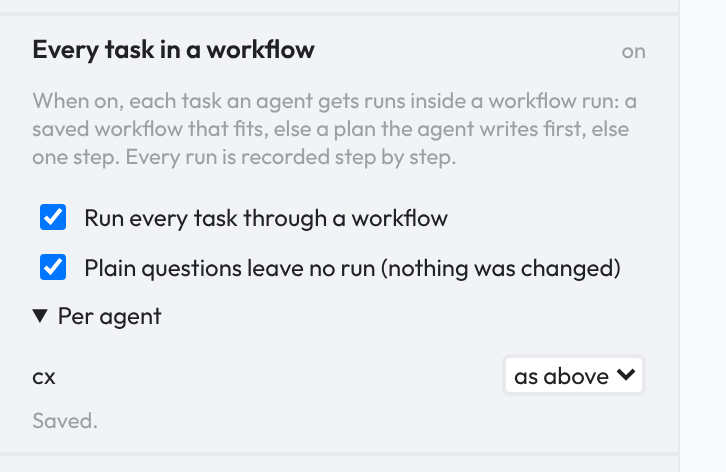
- Browser: open the dashboard and click the Workflows tab.
- Browser: in the left column, click Every task in a workflow to open the card.
- Browser: tick Run every task through a workflow. The card says
Saved. - If the card says the workflow engine was off, Terminal: run
agentx daemon restart.
The card changes the setting of the computer chosen in the top bar's machine menu.
Change the settings
The settings are the workflows.required block in agentx.json.
| Command | What it does |
|---|---|
agentx workflow required | Shows the settings. |
agentx workflow required --enabled on | Every task of every agent runs inside a workflow run. off turns it off. |
agentx workflow required --exempt-questions off | A plain question leaves a run too. on (the default) leaves none. |
agentx workflow required --retention-days 7 | Task runs are removed 7 days after they end. The default is 30; 0 keeps them all. |
agentx workflow required --agent <agent-id> --agent-required off | Turns it off for one agent while it is on for the others. on turns it on for that agent only, even when it is off for the others. default makes the agent follow the setting for all again. |
In the dashboard, the same card has a tick box for plain questions and, under Per agent, a menu next to each agent: as above, on or off.
In agentx.json:
{
  "workflows": {
    "enabled": true,
    "required": {
      "enabled": true,
      "exemptQuestions": true,
      "retentionDays": 30,
      "agents": { "<agent-id>": false }
    }
  }
}
See the step each agent is on
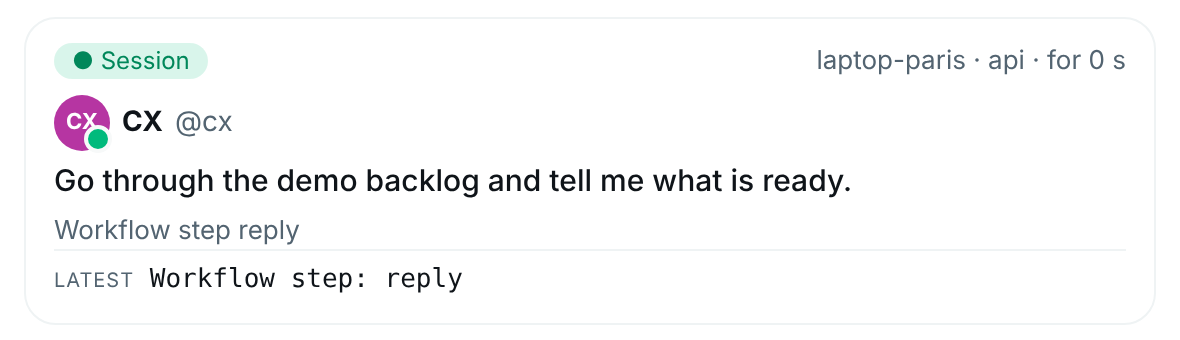
- Browser: open the dashboard and select Live in the Hub's nav (under More on a phone).
- Browser: look at a card under Running now. A line starting with Workflow names the step it is on. For a task that wrote a plan it shows the step's title and its place, for example
step Rename the report (2/3). A task of one step showsstep reply. A step of a saved workflow also shows the workflow's name first.
Live shows every computer of your mesh. A computer that cannot be reached says unreachable on its card under Machines, and the others still show.
Read the records
Every run keeps, for each step: whether it was done, failed or skipped, when it started and how long it took. A run that wrapped an agent's turn also keeps the tokens the turn used.
A task you stop, cancel or that a restart cuts off is not a failure: its run ends as canceled, the step it was on is marked skipped with the reason, and failedAt stays empty. Only a turn that went wrong ends as failed.
- Terminal: go to the folder that holds
agentx.json. - Terminal: run
agentx workflow records. Each line is one run, newest first, written as JSON (a text format programs read). - To narrow it down, add
--agent <agent-id>,--workflow <workflow-id>or--days 7. Runs that wrapped a task have the workflow idtask. - Terminal: to keep the records for analysis, run
agentx workflow records --days 30 > runs.jsonl.
Each line has the run's title, mode (workflow for a saved workflow, plan or linear for a wrapped task), status, durationMs, its steps (each with id, title, status, startedAt, durationMs and a short note), failedAt (the first step that failed, or null), revisions (how many times the plan changed), tokens and, for a paused task that was resumed, continues (the id of the run the pause closed; see pause a task and resume it later). It never holds the full request or what a step produced.
To see one run step by step, run agentx workflow trace <runId>.
Where task runs are kept
A run that wrapped a task is kept apart from the runs of saved workflows, in the _tasks folder next to the workflow runs. So many tasks never hide a saved workflow that is waiting for a signal or a reply: it is still found and picked up. The Workflows tab lists the runs of saved workflows only.
Task runs do not pile up forever. A task run that ended is removed 30 days after its last change, checked when the daemon starts and every 6 hours. A run still going is never removed. To keep them longer or shorter:
- Terminal: run
agentx workflow required --retention-days 90. Use0to keep them all. - Terminal: run
agentx workflow required. The lineTask runs keptshows the new value.
Copy the records out with agentx workflow records before they are removed if you want to keep them longer than that.
Check it worked
- Terminal: run
agentx workflow required. It saysEvery task in a workflow on, and no line says the engine is off. - Ask an agent for something that changes a file, for example: "Rename the March report to Q1."
- Browser: while it works, open the Live tab. Under its running task you see
workflow · step …. - Terminal: when it is done, run
agentx workflow records --agent <agent-id> --days 1. The first line is that task, with"status":"completed"and its steps. - Ask the same agent a plain question, for example "What day is it?". With plain questions exempt, no new line appears in
agentx workflow records. - Terminal: run
agentx workflow required. The lineTask runs keptsays how many days ended task runs are kept.
If something is wrong
The workflow engine is off: runagentx config set workflows.enabled true, thenagentx daemon restart.- No run is recorded for a task: check the agent is not set to
offinagentx workflow required(it lists the agents it is off for). A plain question leaves no run while plain questions are exempt. A step of a workflow that is already running is recorded in that workflow's run, not in a run of its own. - The agent never writes a plan: a task of one step needs none, and is recorded as the step
reply. If a longer task gets no plan, check the agent has theagentx_workflowtool: runagentx daemon restartso the daemon adds AgentX's tool server to the agent's workspace. If its workspace has a.mcp.jsonyou wrote by hand, add the server there:agentx serve --stdio --cwd <install folder>. run … is not the run of your current task: the agent named a run from an earlier task. It can only write the plan of the task it is working on.- A question left a run: the agent used a tool that may change something (a command, an edit, a message), or one AgentX does not know. That is expected.
- A saved workflow took a request it should not have: the match was close enough to start it. Make the saved workflow's title and description more specific, or raise
workflows.matching.autoRunThreshold(default0.85) withagentx config set workflows.matching.autoRunThreshold 0.95. - A task run is not on the Workflows tab: task runs are kept apart from the runs of saved workflows. Use
agentx workflow records --workflow taskoragentx workflow trace <runId>. - Old task runs are gone: they were removed after
workflows.required.retentionDays(30 by default). Raise it withagentx workflow required --retention-days <n>, or set0to keep them all. - The dashboard card says
Not saved: the workflow editor is read-only on that computer (workflows.editor). Use the terminal command on that computer instead.