
Let agents leave notes for the wiki run
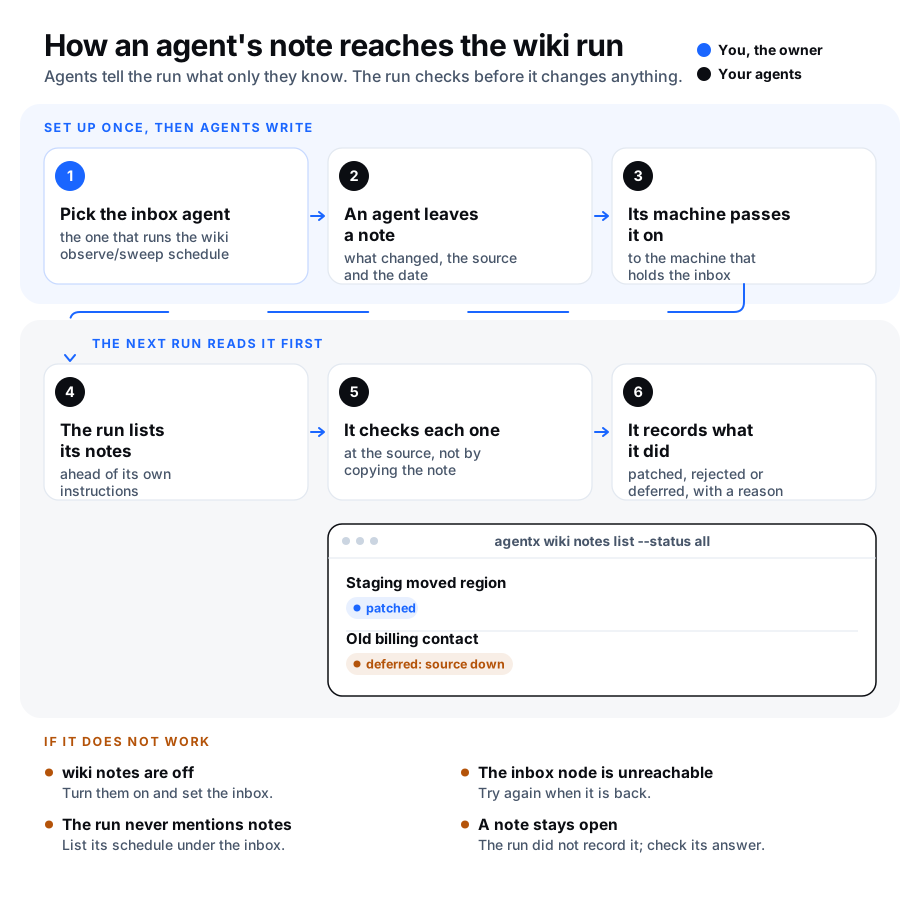
Many fleets have one agent that keeps the wiki honest on a timer: it looks over recent work and sweeps out facts that went stale. We call that the observe/sweep run. On its own it only sees logs and saved conversations, so it has to guess at things another agent saw first-hand: a deploy that moved, a name a person corrected, a price that changed.
With wiki notes, any agent can leave that run a short note: what changed, where it saw it (the source) and the date. The notes wait in the inbox of the agent that runs the schedule. When the schedule starts, the run reads its notes first. The step that writes wiki articles from saved conversations (wiki absorb) can read them too.
- A note is a claim to check, not a fact to copy. The run is told to confirm each note at its source, or against the wiki, before it changes anything.
- Every note gets an answer. The run records each note as patched (the wiki was updated), rejected (the note was wrong), or deferred (not now), always with a reason. A deferred note comes back on the next run. A note the run was given but did not record counts as deferred too. A note deferred three times (you can change this) expires: it stays on file with its last reason, but is no longer offered, so notes nobody can check never crowd out new ones.
- Notes stay inside your fleet. They travel only between your own machines, over the same protected link your machines already use to talk to each other (the mesh). Nothing is posted anywhere public.
Wiki notes are off until you turn them on.
Before you start
- You have a schedule that runs your wiki observe/sweep work. See Send a daily report to create a schedule.
- You know which agent runs it. That agent is the inbox agent.
- Decide which step should answer the notes:
- A schedule whose agent checks and edits the wiki. The notes go into that agent's own instructions, so the agent must be able to change the wiki and run
agentx wiki notes handle. - Wiki absorb. If your wiki is written by a schedule that runs the command
agentx wiki absorb, that command passes nothing on from the schedule's instructions. Name an agent under Absorb that reads the inbox instead (see Let wiki absorb answer the notes).
- A schedule whose agent checks and edits the wiki. The notes go into that agent's own instructions, so the agent must be able to change the wiki and run
Turn it on from the dashboard
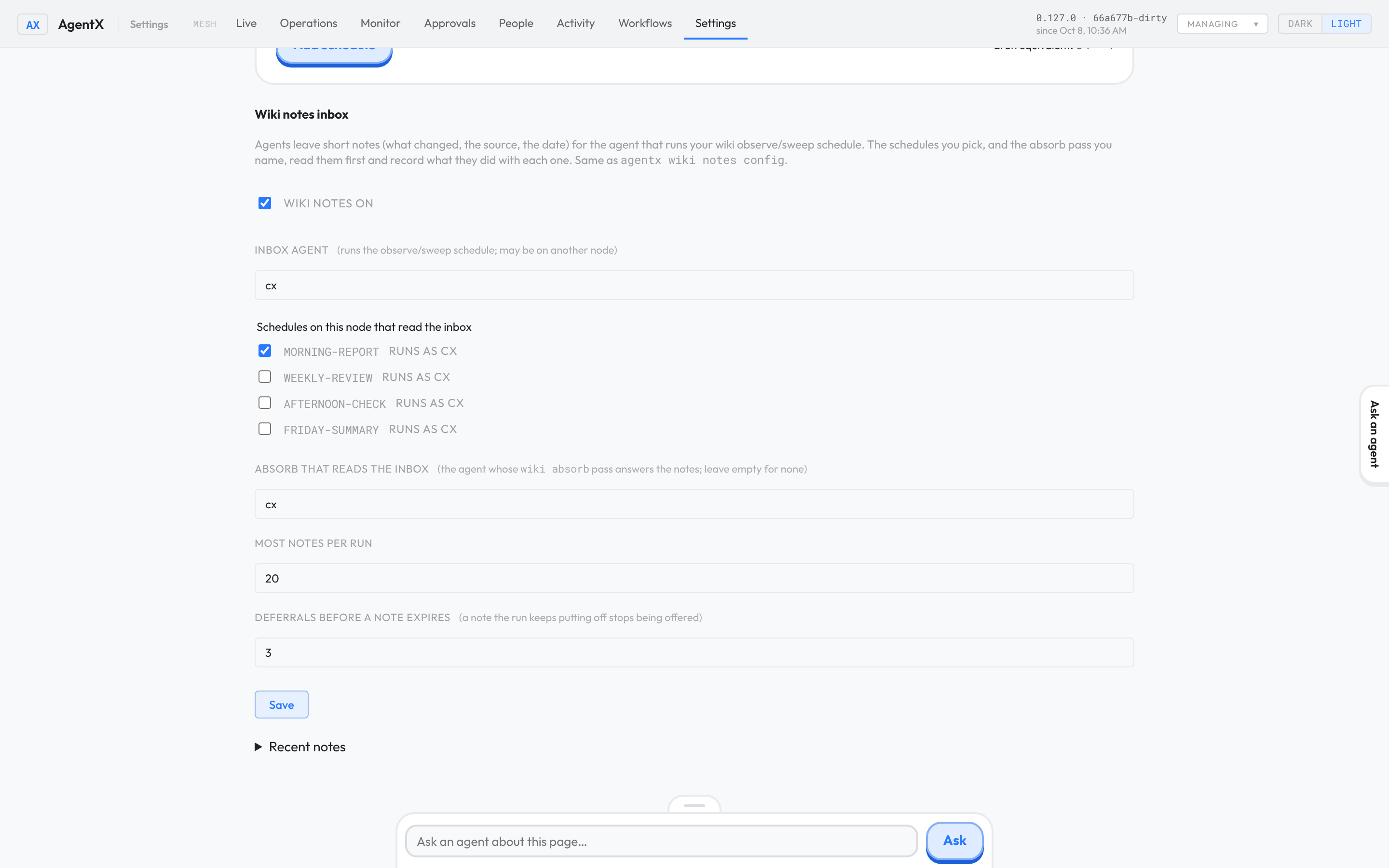
- Browser: open the dashboard and go to Settings.
- Click the Schedules tab.
- Scroll to Wiki notes inbox.
- Type the inbox agent's id in Inbox agent.
- Tick each schedule that should read the inbox. Only schedules that run as the inbox agent are accepted.
- Tick Wiki notes on.
- Click Save.
Turn it on from the terminal
- Terminal: go to the folder that holds
agentx.jsonon the machine where the inbox agent runs. - Terminal: run
agentx wiki notes config --inbox wiki-agent --cron wiki-sweep --enable, with your own agent id and schedule id. The command prints the new settings.
Let wiki absorb answer the notes
Wiki absorb is the step that turns saved conversations into wiki articles, for one agent's part of the wiki at a time. You can name one agent whose absorb step also reads the notes. Absorb then lists the waiting notes for the model, which checks each one against the conversations and the articles it is shown, and answers it:
- patched, with small corrections to articles absorb showed it in full. Absorb makes the corrections itself and refuses any that would rewrite most of a page, remove a contact detail (a phone, an email, a handle, an address) or a role or organisation, or delete a number or link. A refused correction leaves the page as it was, and the note is deferred with the reason.
- rejected, when the wiki or the conversations show the note is wrong.
- deferred, when nothing it has can settle the note.
A note alone never creates or rewrites an article: while notes are being answered, absorb only saves a new or rewritten article that cites at least one of the saved conversations in the same run.
Absorb reads the notes and those conversations together, so an article written from the conversations can still reflect what a note said. That article is checked like any other absorb save: it is refused if a rewrite would delete a number or a link the page had. The stricter note check (no removed contact detail, role or organisation) does not apply to it.
If a schedule answers a note while absorb is still working, the schedule's answer stays, and absorb leaves that note and its pages alone. Every outcome is stored on the note with a reason and the run's id, which starts with absorb/. If the run fails, its notes stay waiting for the next one.
Browser:
- Open the dashboard on the inbox agent's machine and go to Settings.
- Click the Schedules tab and scroll to Wiki notes inbox.
- Type the agent's id in Absorb that reads the inbox. It must be an agent on this machine.
- Click Save.
Terminal:
- Go to the folder that holds
agentx.jsonon the inbox agent's machine. - Run
agentx wiki notes config --absorb wiki-agent, with your own agent id.
To see it work without waiting for the schedule:
- Terminal: run
agentx wiki absorb --agent wiki-agent --dry-run. It printsWiki notes: <n> from the <inbox> inboxwhen notes are waiting. - Terminal: run
agentx wiki absorb --agent wiki-agent. Each note is printed with its outcome and reason.
To run absorb once without the notes, add --no-notes.
Let agents on your other machines post
Each machine keeps its own settings. A machine whose agents should be able to post needs only the inbox agent's id. Its notes are passed to the machine that holds the inbox.
- Terminal: on each other machine, go to the folder that holds
agentx.json. - Terminal: run
agentx wiki notes config --inbox wiki-agent --enable.
You can also do this on that machine's dashboard: fill in Inbox agent, tick Wiki notes on, leave the schedules unticked, and click Save.
How agents leave a note
Once wiki notes are on, each agent is told how to leave a note when it starts a new session. An agent leaves one like this:
agentx wiki notes add --from agent-a \
  --change "The staging site moved to a new server." \
  --source "deploy log, release 2.4" \
  --date 2026-10-07
You can leave a note yourself the same way. Keep notes short (up to 1,000 characters), and never put passwords or keys in one.
The same note posted twice is kept once. Re-posting a note the run already rejected does not reopen it.
What the run sees
At the start of each listed schedule, the run gets up to Most notes per run waiting notes, ahead of its own instructions: new (open) notes first, then deferred ones. Within each group, notes take turns: a note no run has seen yet comes first, then the one a run saw longest ago, then the oldest. A note a run keeps skipping does not hold its place ahead of newer ones. When a run gets more than one note and some are deferred, one place is kept for a deferred note, so a steady stream of new notes cannot hide the older ones. Each note shows who left it, its date, the change and the source, and the command to record what the run did:
agentx wiki notes handle 3f2a91c04b7e --outcome patched \
  --reason "Updated the Staging article with the new server" \
  --run wiki-sweep/2026-10-08T06-00-00-000Z
The run's record also lists the notes it was given, under wikiNotes.
See the notes
- Terminal: on the inbox agent's machine, run
agentx wiki notes list. It shows the notes still waiting. - Terminal: run
agentx wiki notes list --status allto see every note and how it was handled.
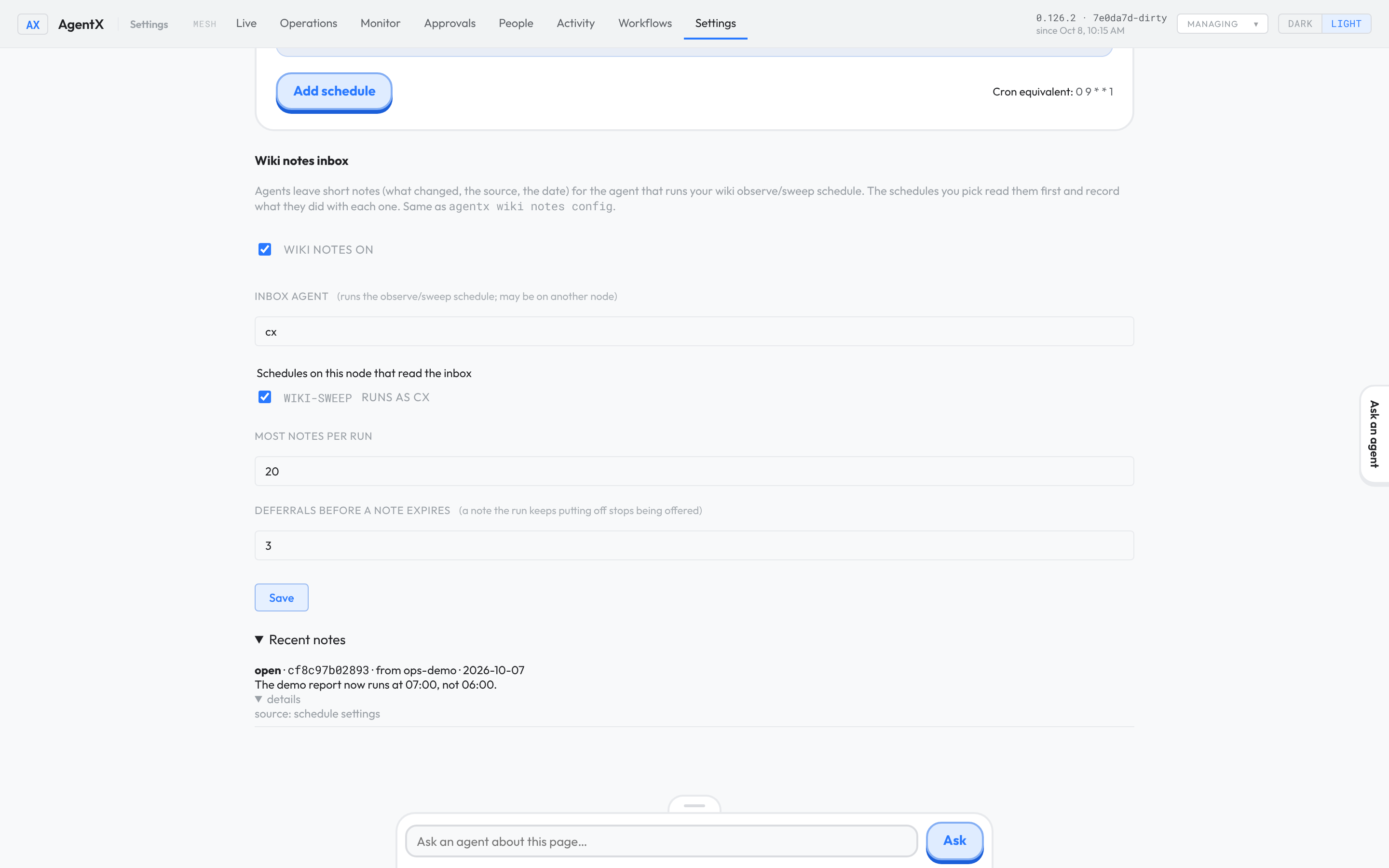
On the dashboard, open Recent notes under Wiki notes inbox. Click details under a note for its source and the run it was given to.
Settings
| Setting | Default | What it does |
|---|---|---|
wikiNotes.enabled | false | Turns wiki notes on for this machine. Needs wikiNotes.inbox. |
wikiNotes.inbox | — | The agent that runs the wiki observe/sweep schedule. Notes are addressed to it and kept on its machine. |
wikiNotes.crons | [] | Schedule ids on this machine that read the inbox when they start. Each must run as the inbox agent. |
wikiNotes.absorbAgent | — | The agent whose wiki absorb step reads and answers the notes. Must be on the inbox agent's machine. Set it on the Absorb that reads the inbox field, or with agentx wiki notes config --absorb <agent>. |
wikiNotes.maxNotesPerRun | 20 | Most notes one run is given (1 to 100). The rest wait for the next run. |
wikiNotes.maxDeferrals | 3 | Times a note may be deferred before it expires and is no longer offered (1 to 20). Set it on the Deferrals before a note expires field, or with agentx wiki notes config --max-deferrals <n>. |
Notes are stored in .agentx/wiki/_notes.json on the inbox agent's machine.
Check it worked
- Terminal: run
agentx wiki notes add --from agent-a --change "Test note" --source "manual test". It printsnote <id> left for <inbox agent>. - Terminal: on the inbox agent's machine, run
agentx wiki notes list. The test note is listed asopen. - Terminal: run
agentx schedule listto find the schedule, then start it from the dashboard or wait for its next run. - Terminal: run
agentx wiki notes list --status all. The test note showsgiven to:with the run, and, once the run has handled it, its outcome and reason. - Terminal: if you set an absorb agent, run
agentx wiki absorb --agent <absorb agent>and check that the test note is printed with an outcome. A test note like this one is usually deferred or rejected, since nothing confirms it.
If something is wrong
wiki notes are off on this node: runagentx wiki notes config --inbox <agent> --enableon the machine you posted from.could not reach the daemon: AgentX is not running on this machine, or runs on another address. Start it withagentx daemon start, or pass--daemon http://127.0.0.1:<port>.the node hosting "<agent>" is unreachable: the inbox agent's machine is down or off the mesh. Try again when it is back.not on this node or any known peer: the inbox agent's id is wrong, or the two machines are not connected. Check the id, and see Add a second machine.runs as "<agent>", not the inbox agent: only schedules that run as the inbox agent can read the inbox. Pick another schedule, or change the inbox agent.- Wiki absorb never prints
Wiki notes:: check that Absorb that reads the inbox names the agent you absorb, that wiki notes are on, and that you did not pass--no-notes. no agent "<agent>" on this node to run the absorb: the absorb agent must be listed in this machine'sagentx.json. Set it on the inbox agent's machine.wiki absorb is off for "<agent>": a bulkagentx wiki absorbskips that agent, so it would never read the notes. Turn its Wiki absorb back on (see Leave an agent out of the wiki absorb), then set it again, or pick another agent.- Wiki absorb prints
skipped. It reads the wiki notes inbox, so the inbox was not read.: the absorb agent's Wiki absorb was turned off after it was set. Turn it back on, or runagentx wiki absorb --agent <absorb agent>to read the notes this once. - A note shows
deferredwithpatch refused: absorb's correction broke a rule, so the page was left alone. The note comes back next run. If the note is right, fix the page yourself withagentx wiki edit, then record the note withagentx wiki notes handle <id> --outcome patched --reason "<what you changed>". - The run never mentions notes: check that its schedule is ticked under Wiki notes inbox on the inbox agent's machine, and that wiki notes are on there.
- A note shows
deferred by agentxwith the reasonwas given this note and recorded nothing: the run skipped it. AgentX counts that as a deferral when the next run starts, so a note runs keep skipping expires too. Read the run's answer on the Operations page, or record the note yourself withagentx wiki notes handle <id> --outcome patched|rejected|deferred --reason "<why>". - A note shows
expired: runs deferred it too many times, usually because its source cannot be checked. Read its last reason withagentx wiki notes list --status expired. To try again, leave a new note with a source the run can check. the inbox already holds 500 notes: the run is not keeping up. Handle or reject old notes, or raise Most notes per run.