
Sort wiki events by importance
About half the pages in a wiki are events: something that happened on a date. A disk that filled up sits beside a contract that was signed, and nothing says which one matters more. A new event page also has no link to the thing it happened to, so the page of a laptop or a client does not list it.
agentx wiki events fixes both. For each event page it writes:
- An importance level: minor, normal or major.
- What the event is about: the person, organization, project or machine it happened to. The event then shows in the History of that page.
After a run, a page's History shows major and normal events. Minor ones fold under a count:
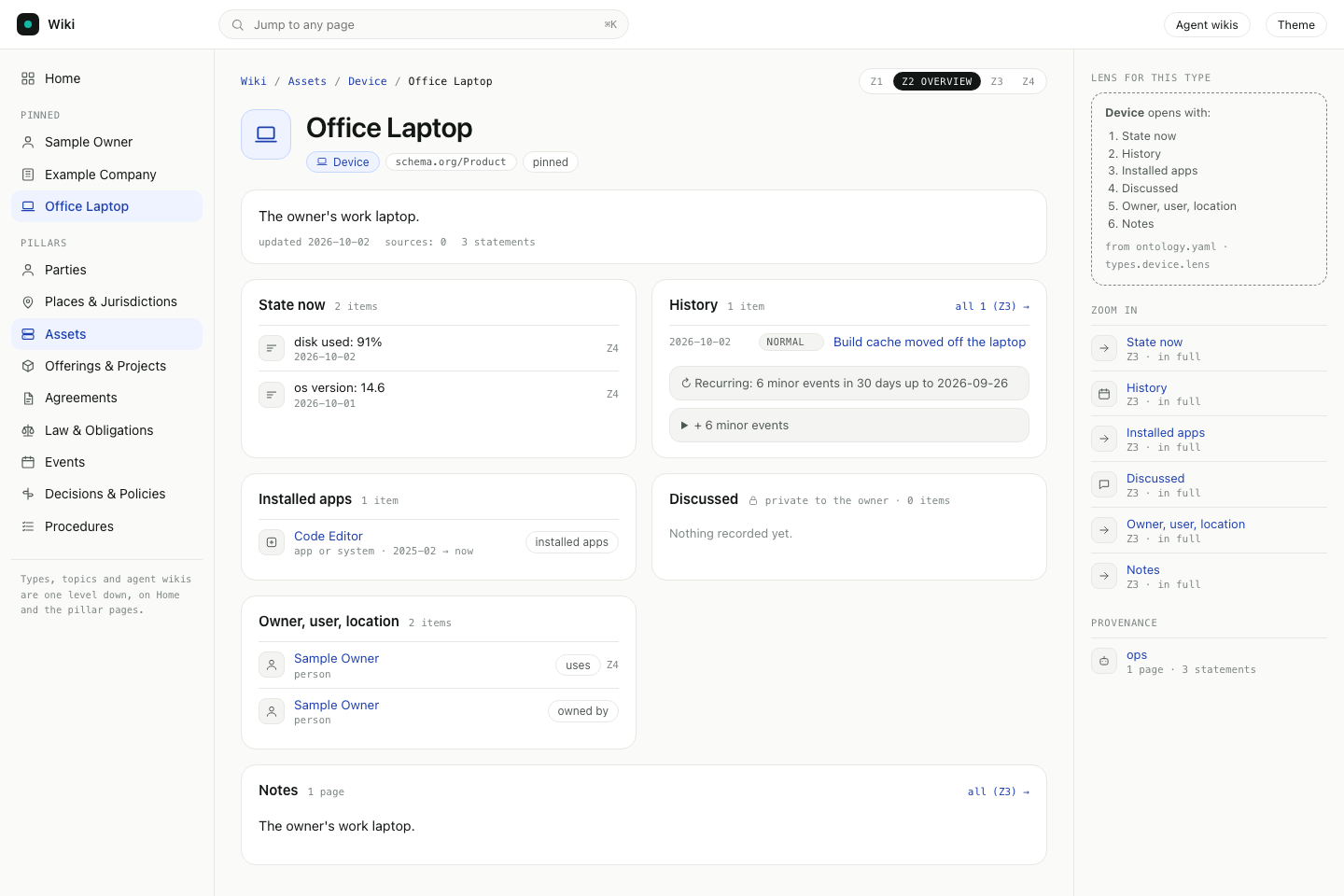
Three words used on this page:
- Level: the importance of one event.
- Rule: a line in
ontology.yamlthat gives a level to events by their title or tags, with no model call. - Proposal: a level the run suggests but does not set. Only you set major, so a run stores "major" as a proposal and leaves the event at normal until you decide.
How the run works:
- Rules go first, and cost nothing. Routine upkeep (a full disk, a cleared cache, a restart) is minor by default. A title that also reports damage, such as "Production down after reboot" or "Health check failed", is left for the model. You can change the rules.
- A model sorts the rest, 20 events per call. It reads the title and the first lines of each event page, never the raw conversations.
- Nothing is invented. The run may only say an event is about a page that the event already links to, or that its title names. Anything else is dropped, and the run tells you.
- The model gets no tools. The call can't run commands, use connected services or send messages. It only returns text.
- Your own choice wins. A level you set yourself is never changed by a later run.
- Old text is kept. Each write saves the previous version of the page.
- The page's date stays. Setting a level or a link does not change the page's "updated" date, so a run does not make every event look new.
- Newer text wins. Just before it writes, the run reads the page again. If the page changed while the run waited for the model, the new level goes onto the newer text. If someone set a level in that time, the run leaves it. While it reads and writes, the run holds the page, so another write waits a moment instead of being lost.
- Spending has a cap. A run stops before the next call once it has spent
--max-cost.
Before you start
- The typed wiki view shows the events and their levels. Open
/admin/wiki/to see them. - The machine runs the
claudecommand line tool, which the agents already use.
Try it on a few pages first
Start with a pilot on two or three pages you know well, such as your company, one client and one machine. A dry run writes nothing.
Terminal: in the folder with
agentx.json, run:bashagentx wiki events --about "Example Company" "Office Laptop" --dry-runRead the list. Each line shows the date, the level, the event, whether a rule or the model decided, what the event is about, and a short reason:
text~ 2026-02-01 minor Office Laptop disk full rule · about Office Laptop · matched an importance rule ~ 2026-02-10 normal (proposed major) Renewal signed model · about Example Company · contract renewed for a year Example Company (organization): 14 events in its History before · after: 0 major, 9 normal, 5 minor (folded)Check the last lines. For each page you named, they give the number of events in its History before the run and how they split after it.
When the levels look right, run the same command without
--dry-runto write them.Browser: open one of the pages under
/admin/wiki/. Its History shows the major and normal events, and + N minor events below them.
Run it on every event
- Terminal: run
agentx wiki events. It does up to 200 events that have no level yet, newest first. - Run it again until it prints
0 left. Use--max 1000 --max-cost 3to do more in one run.
To keep new events sorted, add a scheduled job with a command to agentx.json:
{
  "crons": {
    "wiki-events": {
      "schedule": "30 4 * * *",
      "agent": "<agent>",
      "command": "agentx wiki events --max 200 --max-cost 1",
      "timeout": 1800
    }
  }
}
A day with no new events makes no model call.
Decide the proposed major events
- Terminal: run
agentx wiki events proposed. It lists the events a run suggests as major. - For each one, run
agentx wiki events set "<event title>" majorto accept it, oragentx wiki events set "<event title>" normalto refuse it. - Browser: open
/admin/wiki/. The proposals also show under Needs attention with a proposed label, until you decide.
You can set any event's level this way at any time. No later run changes a level you set.
Change the rules
Terminal: run
agentx wiki ontology initif you have no.agentx/wiki/ontology.yamlyet.Open the file and edit
rulesunderimportance. Rules are tried in order and the first match wins. A rule has alevel, and atitlepattern, a list oftags, or both. It can also have anunlesspattern: when the title matches it, the rule is skipped and the next rule, or the model, decides. A pattern is a search written as a regular expression, and upper or lower case does not matter:yamlimportance: default: normal major_set_by: owner rules: - {level: minor, title: "\\b(restart(ed)?|health ?check)\\b", unless: "\\b(down|failed|outage)\\b"} - {level: minor, tags: [reminder]} - {level: normal, title: "\\binvoice (sent|paid)\\b"}Terminal: run
agentx wiki ontology check.Run
agentx wiki events --rules-only --dry-runto see what the rules alone decide.
Set major_set_by: anyone to let a run write major directly, with no proposal.
Check it worked
- Terminal: run
agentx wiki events --about "<page title>" --dry-run. It prints a level for each event and the History split for the page. - Run
agentx wiki eventstwice. The second run printsnothing to do, because every event has a level. - Browser: open
/admin/wiki/, then Events. The minor, normal and major tabs each list events. - Open the page of a machine or a client. Its History lists the events about it, with minor ones folded.
If something is wrong
no page is titled: …: the name after--aboutdoes not match a page title or alias. Copy the title from the wiki page.dropped: about …: not in the list shown: the model named a page the event does not link to. That link is left out. Add[[Page Title]]to the event page if the event really is about it, then run again with--force.- An event has the wrong level: run
agentx wiki events set "<event title>" <level>. For a kind of event that is often wrong, add a rule, or add anunlesspattern to the rule that caught it. a level was set on the page during the run: someone set the level while the run waited for the model. The run left that level alone.the page was moved or removed during the run: absorb renamed or merged the page. The next run finds it under its new name.the page was busy; run again(from a run or fromwiki events set): another job was writing the page and did not finish within 5 seconds. Run the same command again. If it keeps happening and noagentxcommand is running, delete the page's file under_locks/in the agent's wiki folder.- An event does not show in a page's History: the event neither links to that page nor names it in its title. Add
[[Page Title]]to the event page. no-page: the event's pages are copied from another machine. Run the job on the machine that holds them.no-answer: the model's reply had no usable line for that event. It keeps no level and the next run tries it again.write refused: the page belongs to another agent or was copied from another machine. Run the job where the page lives.stopped at the cap: the run reached--max-cost. The rest wait for the next run, or raise the cap.--max must be a whole number: give--maxor--batcha number such as200.- A red box says ontology.yaml has problems: a rule has an unknown level, no
titleortags, or atitleorunlesspattern that is not valid. Runagentx wiki ontology checkand fix the line it prints. - To undo this job's work on one event: open the page's header, remove
importance:and the facts that carry"by":"wiki-events". The next run does the event again.