
Stop a mistake from coming back
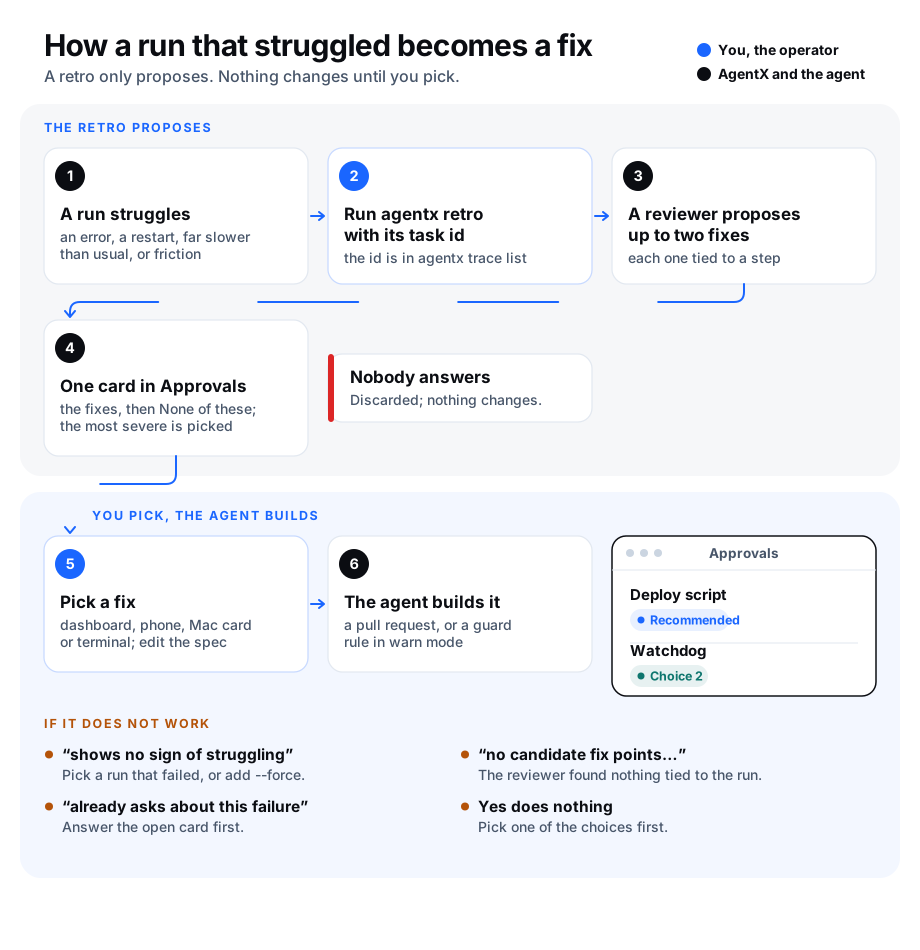
Writing a lesson down doesn't always stop the same mistake from happening again. A retro (short for retrospective: looking back at what went wrong) turns one run that went badly into a change to the agents' setup: a check that fails, a script, a fix to a tool, or wider access to information.
A retro only proposes. It reads the run, suggests up to two fixes (with None of these, three answers: the most a card may offer), and puts them on one decision card in Approvals. Nothing changes until you pick one. If nobody answers, the card is discarded.
What a retro looks at
A run is one task an agent worked on. AgentX keeps a record of each one, called a trace: the message, every tool the agent used, and how it ended. A retro reads the trace and, when there is one, the Monitor review of the same run.
A run counts as struggling when at least one of these is true:
| Sign | What it means |
|---|---|
| Failed | The run ended with an error or ran out of time |
| Cut off by a restart | The daemon restarted while the run was working |
| Slow | It took more than three times as long as the agent's usual successful run |
| Many tool calls | It made more than three times as many tool calls as usual |
| Friction | The Monitor review noted time lost to missing information |
| Delegation failed | A hand-off to another agent failed |
| Recurring | The same failure hit at least two sessions in the last 30 days |
"Usual" is the middle value of the agent's successful runs in the last 30 days, and needs at least five of them.
Where each kind of fix goes
The reviewer must match each fix to what went wrong. A fix in the wrong place is dropped before the card is raised.
| What went wrong | Fix it with |
|---|---|
| A mistake a tool can detect | A guard rule (warn mode first), a hook, a CI check or a script. Never a note in CLAUDE.md |
| The agent searched too long | A pointer in the agent workspace's CLAUDE.md, a wiki entry or a runbook |
| A coding slip that review should catch | A rule in the standards the review agents read |
| Too much context loaded into the prompt | Trim a layer: skills, wiki catalog, patterns or memory |
| A tool call cost too much | Change the tool, or keep its output out of the prompt |
| The agent could not reach information | A token, mesh access or a log file |
| A problem the fleet can't see | A health watchdog or alert |
Every fix must also point to a moment in the run: a step number from the trace together with an exact quote from that step, or an exact quote from the run's error. A fix that can't is dropped.
Run a retro
- Terminal: go to the folder the daemon runs from, and find the run:shEach line starts with the run's task id.
agentx trace list --status error --since 24h - Terminal: preview the card without raising it:shIt prints why the run counts as struggling, any fix it dropped and why, then the card.
agentx retro <taskId> --dry-run - Terminal: raise the card:shIt prints the card's key, such as
agentx retro <taskId>card:2026-01-05-service-left-stopped-after-a-deploy-ab12.
The reviewer runs claude -p with no tools, so the Claude Code command must be installed on this computer. A retro takes a minute or two.
Pick a fix
The card lists the fixes, most severe first, then None of these. The most severe fix is already picked. Below the fixes is a short description of each one; you can edit it before you answer.
Browser: open Approvals on the dashboard. Find the card, pick a fix, and change the text below it if you like.
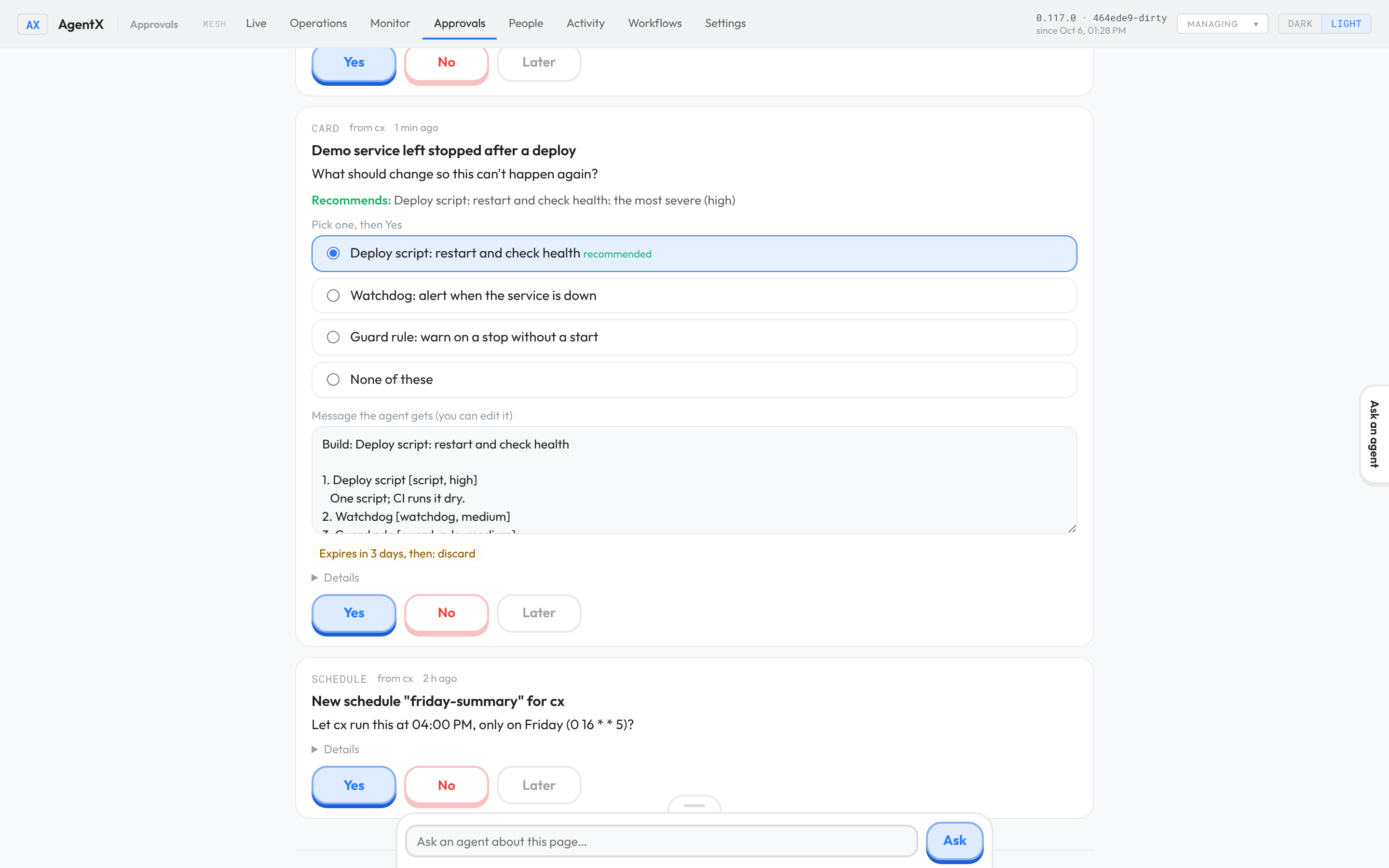
Browser: click Yes.
Or from the phone app:
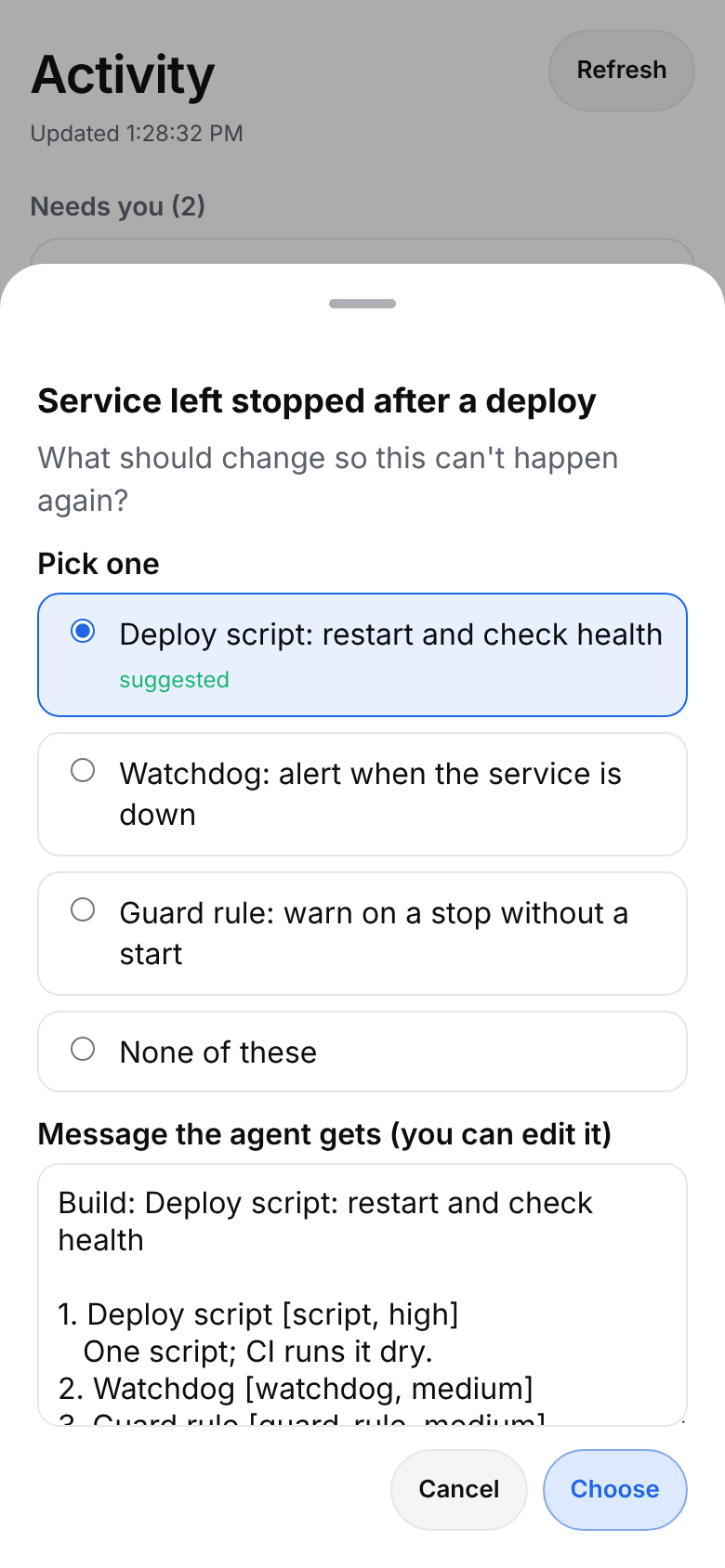
Phone: tap Activity, then Choose… on the card.
Phone: pick a fix, edit the message if you like, and tap Choose.
Or in the terminal:
- Terminal: run
agentx approvals approve <key> --choice 2. Add--text "…"to change the message.
Fictional demo data. No real agents, people or machines.
Within a minute the agent that ran the task is told your pick, with the description of that one fix only. The description was written by the reviewer, so the agent is told to check it rather than follow it word for word. If you edited the message, the agent gets your text as your note. It builds the fix as a pull request, or as a guard rule in warn mode, so you review it a second time before anything is enforced. What it adds is tagged retro:<taskId>, so you can find it later. If you pick None of these (even with Yes) or answer No, the agent is told to change nothing.
Limits on noise
- One card per failure. While a retro card about the same failure is waiting,
agentx retrorefuses to raise another. - No second asking. A fix you passed over on an answered card is not offered again for the same failure for 30 days.
- Never on its own runs. The run in which an agent builds a picked fix is never read by a retro.
- Never applied by silence. Every retro card is discarded when it expires.
- Separate from the agent's own cards. Retro cards are counted apart from the cards an agent raises itself, so they never use up its room for its own questions.
- At most three a day. The nightly pass below raises no more than three retro cards in any 24 hours, and cards you raised by hand count toward that limit. Change it with
--max.
Let it run every night
agentx retro sweep finds the runs that struggled without you picking them. It reads the last 24 hours of runs and gives each one points for its signs of struggling:
| Sign | Points |
|---|---|
| Failed, or cut off by a restart | 3 |
| Recurring, or a delegation failed | 2 |
| Slow, many tool calls, or each friction note | 1 |
It keeps one run per failure (the one with the most points), skips failures that already have a card waiting, and takes the worst first. On its own it only shows the list. With --commit it runs a retro on each of the worst runs and raises their cards, up to the daily limit. A run whose fixes can't be used makes room for the next one in line.
- Terminal: go to the folder the daemon runs from, and preview tonight's pass:shIt prints how many runs struggled, the worst ten with their points and signs, and a line starting
agentx retro sweep→ would retrofor each run it would read. Nothing is raised. - Terminal: add a nightly job that runs it for real. Use any agent that can run commands in this folder:shCheck the job it prints, then run the same command without
agentx schedule "daily at 2am" --agent <agent> --do "Run: agentx retro sweep --commit" --dry-run--dry-run. - Browser: the next morning, open Approvals. The night's retro cards are waiting there, at most three.
Review the checks a retro added
A check that warns on work that went well wastes the agents' time, and they learn to ignore it. Once a month, agentx retro checks looks at every guard rule (a rule that checks each command an agent is about to run) that a retro asked for, and asks you about the ones that warn too often.
It finds a rule by its tag. The agent that builds a picked fix puts retro:<taskId> in the rule's tags list, like this in .agentx/guardrails/policy.yaml:
rules:
  - id: no-stop-without-start
    match: { tool: Bash, command_regex: "stop-the-service" }
    action: warn
    tags: ["retro:<taskId>"]
For each tagged rule it counts, over the last 30 days, how often the rule fired (matched a command), and how each of those runs ended. It also compares the agent's runs in the 30 days before the rule was added with the 30 days after: how many ended well, and how long they usually took. The rule counts as added on the day you picked the fix on its retro card.
A rule that fired five times or more on runs that went well comes back as a card with three choices:
| Choice | What happens |
|---|---|
| Keep it | Nothing changes |
| Loosen it | The agent opens a pull request that narrows the rule so it stops firing on good work |
| Remove it | The agent opens a pull request that deletes the rule |
The card recommends Loosen it when the agent's runs went better after the rule was added, and Remove it when they did not. If nobody answers, the card is discarded and the rule stays. A rule is asked about at most once every 30 days.
Only guard rules are reviewed here: they are the only checks that record each time they fire. A hook, CI check or script a retro added is changed through its own pull request.
- Terminal: go to the folder the daemon runs from, and list the checks:shEach rule shows its file, its tag, how often it fired, and the before and after numbers. A
agentx retro checks!marks a rule that fires often on good work, and a line starting→ would ask aboutnames each card it would raise. Nothing is raised. - Terminal: add a monthly job that raises the cards. Use any agent that can run commands in this folder:shCheck that the job it prints says
agentx schedule "first of every month at 3am" --agent <agent> --do "Run: agentx retro checks --commit" --dry-runon day 1 of the month, then run the same command without--dry-run. - Browser: after the job runs, open Approvals and answer the cards.
Settings
A retro has no settings in agentx.json. These options and environment variables change how agentx retro, agentx retro sweep and agentx retro checks run:
| Option or variable | What it does |
|---|---|
--dry-run | Print the card without raising it |
--force | Raise a card even when the run shows no sign of struggling, or a card about the same failure is still waiting |
--model <model> | The reviewer model |
--path <db> | The trace database. Default: .agentx/db.sqlite |
sweep --since <window> | How far back the nightly pass reads, in hours or days, such as 24h or 2d. Default: 24h |
sweep --max <n> | Retro cards allowed in any 24 hours, counting the ones raised by hand. Default: 3. 0 raises none |
sweep --commit | Run the retros and raise the cards. Without it, the sweep only shows what it would do |
checks --min-fires <n> | Fires on runs that went well, in the last 30 days, before a rule is reviewed. Default: 5 |
checks --max <n> | Review cards raised in one pass. Default: 3 |
checks --commit | Raise the review cards. Without it, the command only lists the checks |
AGENTX_RETRO_MODEL | The reviewer model when --model is not given. Unset: AGENTX_MONITOR_MODEL, else opus |
Cards follow your usual Approvals settings, such as how long they wait. Retro cards can't be sent to another machine yet: when approvals.forwardTo is set, agentx retro refuses to raise the card. Run it on a machine that keeps its own cards, or use --dry-run to read the fixes.
Check it worked
- Terminal: run
agentx retro <taskId> --dry-runon a run that failed. It lists at least one sign, such asfailed: the run ended error, and prints a card that ends with None of these. - Terminal: run
agentx retro <taskId>. It prints✓ card:… raised for <agent>. - Browser: open Approvals. The card is there with its fixes and Expires in 3 days, then: discard.
- Browser: pick a fix and click Yes. The page says
<agent> will be told yes (<your pick>). - Browser: within a minute, the Activity tab shows a run for that agent on the
approvalschannel. That is the agent starting on the fix. - Terminal: run
agentx retro sweep. It printsstruggled run(s), one per failureand how much room is left today, and raises nothing. - Terminal: run
agentx retro checks. It printscheck(s) added by a retrowith each tagged rule's numbers, orNo guard rule carries a retro:<taskId> tag yet, and raises nothing.
If something is wrong
- "shows no sign of struggling": the run ended well and nothing in it looks unusual. Pick a run that failed, or add
--forceif you know it went badly. - "no candidate fix points to a moment in the run": the reviewer's fixes were not tied to a step, or were in the wrong place, so they were dropped. The lines starting with
✗ droppedsay why. Try again later, or with--modelset to a stronger model. - "already asks about this failure": a retro card about the same failure is still waiting. Answer it first, or add
--force. - "was itself started by a retro": that run is an agent building a fix you picked. Retros never read those.
- "the reviewer's answer could not be used": the reviewer failed or returned something that isn't the expected answer.
claude CLI not foundmeans Claude Code is not installed for the user running the command. Run it again; if it keeps failing, runclaude -p "hello"to check that Claude Code works. - "retro cards can't be forwarded to another machine yet": this machine sends its cards to another one (
approvals.forwardTo). Run the retro on a machine that keeps its own cards, or use--dry-runto read the fixes. - The sweep says
Room for 0 more retro card(s) today: three retro cards (or your--max) were raised in the last 24 hours, by the sweep or by hand. Answer them, or wait; the next night's pass has room again. - The sweep lists runs but raises nothing: check the
✗lines.already asks about this failuremeans a card is waiting for you. Other reasons are the same as foragentx retroabove. - The sweep says
Invalid --since: use hours or days, such as24hor2d. agentx retro checkssaysNo guard rule carries a retro:<taskId> tag yet: no rule in.agentx/guardrails/has aretro:tag in itstagslist. Open the rule the agent built and addtags: ["retro:<taskId>"]. A rule inagents/<id>.ymlis not read; rename the file to end in.yaml.- A noisy rule shows
0 fire(s): the guard writes a line to the trace database each time a rule fires. Check that the guard hook runs (agentx guard log), and that you run the command in the folder the daemon runs from. - A check shows a
!but no card is raised: the✗line says why.reviewed it onmeans it was asked about in the last 30 days. - The before and after numbers say
no runs: the agent ran nothing in that span, or the rule's retro card was never answered and it has never fired. The card then recommends Loosen it. - "No trace database": run the command in the folder the daemon runs from, or pass
--path. - Yes does nothing on the dashboard: the card offers choices. Pick one first; the page says so in red.
- A plain yes enacted a fix I didn't pick: a Yes with no choice (for example
agentx approvals approve <key>without--choice) takes the suggested fix, the first one in the recommendation. The agent is told it was a plain yes. To pick another fix, use--choice <n>, or choose on the dashboard. - The agent never started on the fix: check the daemon log for a line starting
[approvals], and thatnotifyAgentis on in Approvals settings.