
Keep track of what you asked for
You give agents requests all day. Some need more than one answer: the agent hands the work to another agent, the task runs out of time, or the computer restarts in the middle. Open requests keeps a record of each of these until someone closes it, so nothing is forgotten without you knowing.
It is off until you turn it on.
What it records
AgentX notes every message you send to an agent. Most leave nothing behind: the agent answers and that is the end. A request stays on your list when:
- the agent hands the work to another agent,
- the task fails or runs out of time,
- a restart cuts the task off,
- or the agent says it is taking the request on (agents have a tool for this,
agentx_request).
Each request has one state:
| State | What it means |
|---|---|
| In progress | Work is going on. |
| Waiting on you | The agent asked you a question and needs your answer. The question is shown. |
| Waiting on another agent | The work was handed on and the answer is not back yet. |
| Needs attention | The work failed, ran out of time, was cut off and not picked up again, or nothing happened for a day. |
| Done, declined, dropped | Closed. Done has a link to the proof, or the words of the check that closed it. Declined and dropped have a reason. |
A request waits on you when the agent raises a decision card for it, or says so with its tool. The card reminds you the usual way: the Approvals inbox, the Mac card, check-ins and the daily digest. When you answer, the request goes on. If the card expires without your answer, the request needs attention; it does not close. A card never approves itself.
When a request needs attention you are told once, through your normal notifications. They are held while Focus is on. After that the request stays on the list. Nothing closes because it got old. One kind of failure is tried again for you first: see Resend once after a limit or a restart.
Turn it on
In the dashboard: open Approvals, scroll to Open requests, open Settings: open requests, tick Record and follow my requests and save. Or from the terminal:
- Terminal: go to the folder that holds
agentx.json. - Terminal: run
agentx requests settings --enabled on. - Messages you speak to the Mac, type in the phone app or type in the dashboard now count as yours. They count because this computer's own surfaces vouch for them: the daemon marks the turns it starts itself, and the dashboard shows the daemon a key it keeps in
.agentx/operator.key, next toagentx.json, for the phone app. A program that merely names one of those surfaces when it calls the daemon is not you. - Every agent on this computer gets AgentX's own tool server in its workspace at the next daemon start, so it can say what it is doing with a request and close it. A workspace whose
.mcp.jsonyou wrote by hand is left alone. - To count your messages on Telegram, WhatsApp, Slack, Discord, GitLab or GitHub too, give your id on that channel:
agentx requests settings --from telegram:123456789,github:your-login. On GitLab and GitHub it is your login, on Telegram your numeric id, on WhatsApp your number. Telegram usernames and display names are not accepted, because the person chooses them. Each entry ischannel:idand only applies to that channel.
Other people's messages are never recorded.
See what is open
- Terminal: run
agentx requests. - You see every open request, oldest first, with when and where you asked, the agent, your words and the state.
- For one request and what is linked to it, run
agentx requests show <id>.
In the dashboard, the same list is under Approvals, in Open requests. Each request is a card. What it shows is described in the next section.
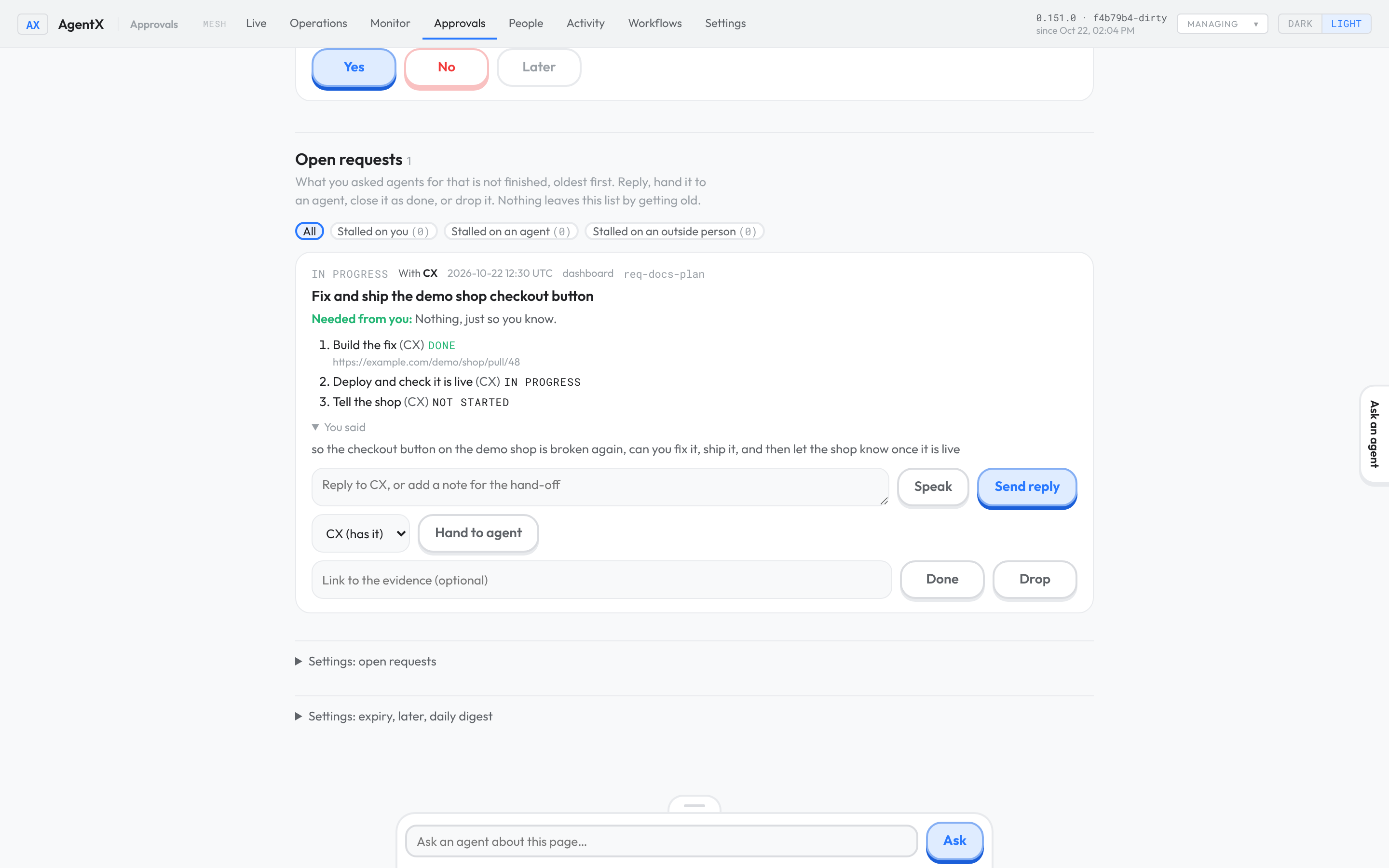
What a request's card shows
Every place that shows you a request uses the same words: its card in Approvals, its line on the phone app's Desk, the Mac card popup, and the notification when it needs attention.
- The headline: a few plain words that say what the request is, for example "Check the invoices batch". The agent writes it when it takes the request on. When it did not, AgentX writes it once with one short model call (
requests.headlines). Until then, or with that setting off, the title is the start of your own words. - Needed from you: the one thing the request needs from you. When nothing is needed, it says "Nothing, just so you know.". A request waiting on your answer shows the question. A request that stopped asks you to hand it back or drop it.
- You said: your own words, in full, below the headline. For a request you spoke, this is the transcript.
- Its state, the agent that has it, and why it is not finished.
- Last answer from …: what the agent last told you about it, when it answered.
A headline must say what the request is in words. One that is only a reference, such as "#412" or a link, is refused. A popup card whose title is only a reference is not shown, and its agent is told to describe the request.
Decide on a request
On its card in the dashboard, one step each:
- Send reply: write your reply in the box, or press Speak and say it, then press Send reply. The agent that has the request gets your reply together with the request, within a minute, and goes on. Speak shows only in a browser that can turn speech into text (Chrome, Edge, Safari); it fills the box and sends nothing until you press Send reply.
- Hand to agent: pick an agent and press Hand to agent. Pick the same agent to make it try again, or another agent on this computer to give it the work. Text in the reply box goes along as a note. The card then shows that agent after With, and the request stays on the list until it is closed. Another agent does not answer in the chat where you first asked: that chat belongs to the first agent, and the new one may have no way to write there. Read its answer on the card, under Last answer from …. If it has a chat of its own with you, it may also write to you there.
- Done: closes it as finished. A link to the evidence is optional when you close it yourself.
- Drop: closes one you no longer want. Text in the reply box is kept as the reason.
Reply and hand-off need open requests turned on, because the daemon's check is what tells the agent.
You can also ask any agent "what is still open?". It reads the same list.
A request with several steps can be run as a workflow that AgentX follows to the end; the request then closes by itself when the workflow is done. See Let a workflow follow a request.
When a request needs attention
You are told once. On a Mac with the card popup on, the request then shows as a card that stays on screen like a decision card, when no decision card is waiting: Hand it back, Drop or Not now. It shows once, and only for a request that came to need attention in the last day. After that it waits in the Approvals inbox as a Request, and counts in the daily digest:
- Yes (or
agentx approvals approve request:<id>) hands it back to the agent, which gets your request again and works on it. If the agent is still busy with the earlier attempt, your yes waits its turn and runs right after; the request stays in progress meanwhile. If the hand-back fails, it comes back. - No (or
agentx approvals reject request:<id>) drops it. - Later puts it off.
Resend once after a limit or a restart
Some requests stop for a reason a second try fixes: the agent hit its usage limit (the most it may use in a window of time), or the computer restarted while the agent worked. Such a request is sent back to its agent once, on its own, before you hear about it.
- Usage limit: it is sent again once the limit has reset, and at least 5 minutes after it stopped.
- Restart: it is sent again 5 minutes after it stopped. This covers work handed to another agent and lost in a restart, an answer a restart kept from reaching you, and work cut off by a restart that AgentX could not pick up again: it was too old, it had no way back in or nowhere to answer, or the attempt to pick it up failed. Work that AgentX chose not to pick up again is not resent, and you are told at once: work you stopped with a stop-all (it resumes from its plan), work another part of AgentX runs again, a computer restarting over and over, work already cut off once while being picked up, a workflow step, and work where picking up after a restart is turned off or set to report only.
The agent gets your request again, with a line saying why it comes back. While the resend waits, you are not told. You are told as before, once, when:
- the resent request stops again. The notice then says
Resent once at …, stopped again. - the limit has not reset after 12 hours.
Each request is resent at most once. These are never resent: promises, requests in a tracked plan (the plan follows its own steps), requests with a check of their own, and requests whose agent is not on this computer.
Turn it off with agentx requests settings --auto-resend off. Change the wait with --resend-after <minutes> and how long your notice waits with --resend-hold-hours <n>.
Close a request
- It is finished:
agentx requests done <id> --evidence <link>. The link is the proof: a pull request, an issue, a message, a deploy. In the dashboard, press Done on the card; the link is optional there. - You checked it yourself:
agentx requests done <id> --reason "checked by hand". This also closes a request whose check cannot tell. The proof then readsclosed by owner: checked by hand. In the dashboard, a card with a check asks for the reason in the box next to Done. - You no longer want it:
agentx requests drop <id>. Add--reason "…"to say why.
Agents close their own requests as done or declined. When work an agent handed on comes back, it is reminded to close the request. Only you can drop one.
When handed-on work came back and nobody closed it
Agents often forget to close a request after the work they handed on comes back. Such a request used to come back to you as "Not finished", even though the work was done. Now the daily check closes it:
- It applies to a request that is in progress, has had no activity for
staleAfterHours(default 24), and whose handed-on work all came back done. - It is closed as done. Its proof is the first link in the other agent's answer, for example a pull request or a deploy page. Nothing opens that link to check it, so the request is marked
unverified. - With no link in the answer, the proof reads
unproven: …. Look at it in the done list if you want to be sure. - Once you send a request back (a reply, a hand-off, Pick it up again), the work that came back before no longer counts. Only work handed on and done after that can close it. If none comes back, the request returns to you as before.
- You are not told. It simply leaves your list.
- A due time does not stop it. The agent sets that time itself, for example from its own estimate of how long the work takes. Once the work came back done, the request is not sent to you as "Past its due time"; it waits to be closed this way.
- A request already sent to you as "Past its due time" is closed the same way, once its handed-on work has been back for
staleAfterHours. - It does not apply to promises, to requests with a check, to tracked plans, to requests with a follow-up workflow, or when any handed-on work failed or is still out. Those still come back to you as before.
- Any other request that already needs attention is left as it is.
To keep the old behaviour, run agentx requests settings --settle off.
Promises an agent makes
An agent often promises something to someone: "I will send the file by Friday", "I will deploy once the review is in". A promise is a request the agent opens itself, so the promise stays on your list until it is kept. It is the same kind of record as your own requests, and it shows in the same list.
The agent records it with its agentx_request tool, action promise:
| Field | What it holds |
|---|---|
owedTo | Who it is owed to: owner (you), the id of another agent, or the id of a person in people. |
text | What was promised, in one sentence. |
due | Optional. When it is due, as a date such as 2030-01-31T17:00:00Z. |
closeWhen | Optional. What proves it is kept: a check, see below. |
home | Optional. Where the work lives, see Where a request landed. |
For example: {action:"promise", owedTo:"client-a", text:"Send the signed contract", due:"2030-01-31T17:00:00Z"}.
When one agent hands work to another, the hand-off itself is already followed. A promise is only for work that goes on after the answer: the agent that says "I will do it later" opens a promise owed to the agent that asked.
One agent can hold up to 200 open promises.
A promise closes with proof, and leaves a fact
An agent's done on a promise needs a proof. One of four kinds:
| Kind | What the agent gives |
|---|---|
| Link | A link as the evidence, or proof: {kind:"link", url}: the pull request, the deploy page, the sent message. |
| Test | proof: {kind:"test", passed, failed:0, command}: a test run where every test passed. |
| Output | proof: {kind:"output", text}: what the work produced, such as the version a host reports. |
| Check | proof: {kind:"check", value}: a check that ran and what it found. A promise with a closeWhen check gets this one by itself. |
A done without one is refused, and the promise stays open. Your own requests still close on a link or on the agent's word, as before.
When a promise closes with a proof, the daemon writes a checked fact to the wiki's fact ledger: what was promised, done: yes, the proof as its source, and when the proof was made as its check date. The fact stays trusted for factTtlDays (7 days by default), then shows as stale. So "is the login fix deployed?" has a dated answer:
agentx wiki facts listThe request shows the fact's id, and agentx wiki facts show <id> shows the fact.
The same record follows the other things someone owes:
- Task watchers. A watched task that is not finished in time raises the request that follows it. With none, it becomes a promise of the agent that has the task. You are told once, through the same check as every other request, under the title A task is not finished. Marking the task done closes that promise, with the task's evidence as its proof. Turn this off with
promises.watchers: false, or by giving watchers their own address inwatchers.owner. - Plan steps. A blocked step is told through the same check, in the plan's own words.
- Follow-up waits. When handed-on work ends to wait for something with a due time, the request waits on it and is due then. If the wait runs out, the request comes back to you like any other past its due time.
- Decision cards (off by default). With
promises.cards: true, a card an agent raises outside a request is a promise you owe. It closes when you decide the card, with your answer as a fact, or is dropped when the card expires.
Promises caught in a reply
Agents often end a turn with "I'll tell you when it is live" and never open a promise for it. With requests.catchPromises.enabled: true, the daemon reads the reply at the end of each of your turns, with one short model call, and decides between three things:
| The reply | What happens |
|---|---|
| A firm promise: the agent itself will do a named thing later, with no condition left on you ("I'll send the report at 18:00", "I'll tell you once it is live") | A promise of that agent, owed to you, due when the reply said. On a request that is already open, the request gets that due time instead. |
| A question you must answer before the work can go on ("Which account should I use?", "Say yes and I'll publish it") | The request waits on you, with the question. When you write to that agent again in the same chat, the wait ends. |
| Anything else: a report of finished work, an offer ("Want me to…?"), something another agent will do | Nothing changes. |
A word match is not enough: about half of all replies contain "I'll" or "will", and most of them are offers or conditions. So the model decides, and a promise also needs the reply's own sentence that makes it, in the first person and the future, with no "if". The word check only skips replies with no future and no question, without a call.
It is off by default, because it spends one model call on most of your turns. dailyCap (300 by default) bounds the calls a day. Turn it on with:
agentx requests settings --catch onTo see how well the model reads replies on your own data, label a set of real replies and run pnpm bench:catch <labelled.jsonl>. See bench/README.md.
Close on evidence, not on a claim
A request or a promise can carry a check: what proves it is finished. The agent gives it as closeWhen, with promise, accept or wait. Then:
- The daemon runs the check every 10 minutes. When the check finds the evidence, the request closes as done by itself, with the check's own words as the proof.
- When the agent says
done, the daemon runs the check first. If the check finds the work is not finished, the agent's done is refused. If the check cannot tell (the address is down, the forge refuses to answer), the request stays open and is marked unverified. Sayingdoneagain does not count as progress: the request still shows as stalled once it has been quiet too long. - A request without a check closes on the agent's word, as before.
- You can always close it yourself, with a reason. See Close a request.
The checks:
| Kind | Fields | Finished when |
|---|---|---|
url | url, contains (optional) | The address answers with success, and holds the text when contains is given. |
issue | provider (github or gitlab), ref, state (optional), notePattern (optional) | The issue or merge request is in that state (default closed; a merged one counts as closed), or one of its comments contains the text notePattern (plain text, upper or lower case does not matter). ref is owner/repo#12, group/project!12 for a GitLab merge request, or the item's web address. |
git-ancestor | repo, commit, ref (optional, default HEAD) | The commit is part of that branch in a local copy of the repository. repo is a name you set up in requests.checkers.repos; the agent never gives a folder. |
reply | channel, chatId, from | The person from (an id from people) wrote in that chat after the request was opened. |
For example: closeWhen:{kind:"issue", provider:"github", ref:"example-org/app#12", state:"merged"}.
The issue check reads through the GitHub and GitLab settings you already have (channels.github, channels.gitlab), or through requests.checkers.github and requests.checkers.gitlab when you set them. The git-ancestor check does not download anything: keep the local copy up to date yourself. For another computer, check the build it reports with a url check on its version address.
When an issue's status is behind the work
An issue can say Doing or Review after its work has merged and gone live, or say Done before it is live. AgentX can catch this. Every 30 minutes it reads the merge requests merged in the last 7 days on the projects you list under requests.statusDrift.projects. It finds the issue each one closes, and compares that issue's status label with what happened:
| Drift | Means |
|---|---|
| merged, not in Review | The change merged, the issue still says To Do or Doing. |
| live, not Done | The change runs on every place listed under the project's live, and the issue is not Done. |
| Done, not live | The issue says Done (or is closed), and a change it names does not run there yet. |
A merge request closes an issue when its title or description says so with a closing word (Closes #12, Fixes group/app#3), or when its branch starts with the issue number (12-fix-login). A plain mention (Part of #12, Refs #12) is not a close, even when the branch carries that number. A step of a larger issue does not finish it.
Each drift is told to you once, in one notice per check. By default nothing is written: the issue keeps its labels. With write on and the project in writeProjects, an issue whose work is live gets its Done label and a comment that quotes the merge and the running commit. It is never closed. List only your own projects. A label change on a client's project can send the client an email.
To check by hand, run agentx requests drift --project group/app. It prints the drifts and changes nothing. Add --live self to compare with this computer's build, or a health address whose JSON holds commit.
See what is stalled
A request is stalled when it is past its due time, or, without a due time, when nothing has happened for a day (--stale-hours). One that needs attention is stalled too. Stalled requests are grouped by what they wait on:
| Group | Means |
|---|---|
| Waiting on you | It waits for your answer, or for your decision because nothing is retrying it. |
| Waiting on an agent | The agent that has it, the agent of the current step of its plan, or the agent it is owed to. |
| Waiting on an outside person | A promise owed to a person who is not you. |
To see them:
- Terminal: run
agentx requests --stalled. Each group is listed with its requests and why each one is stalled. Add--jsonfor a script. - Browser: open Approvals and scroll to Open requests. Press Stalled on you, Stalled on an agent or Stalled on an outside person to show only that group; the number in brackets is how many it holds. All shows every open request again.
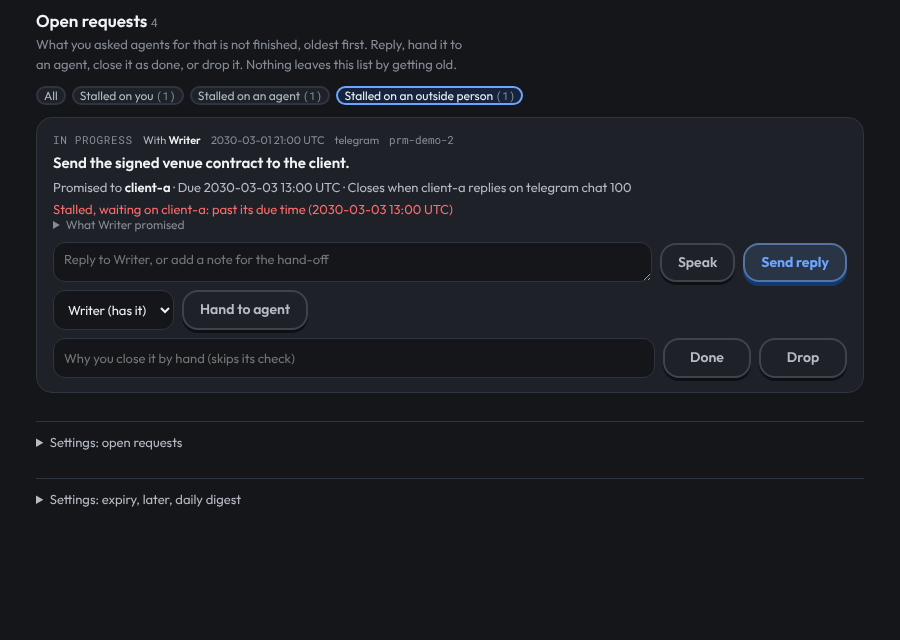
Each card also says who a promise is owed to, when it is due, and what check closes it, with what the check last said. A check that could not tell is shown in amber, with the reason.
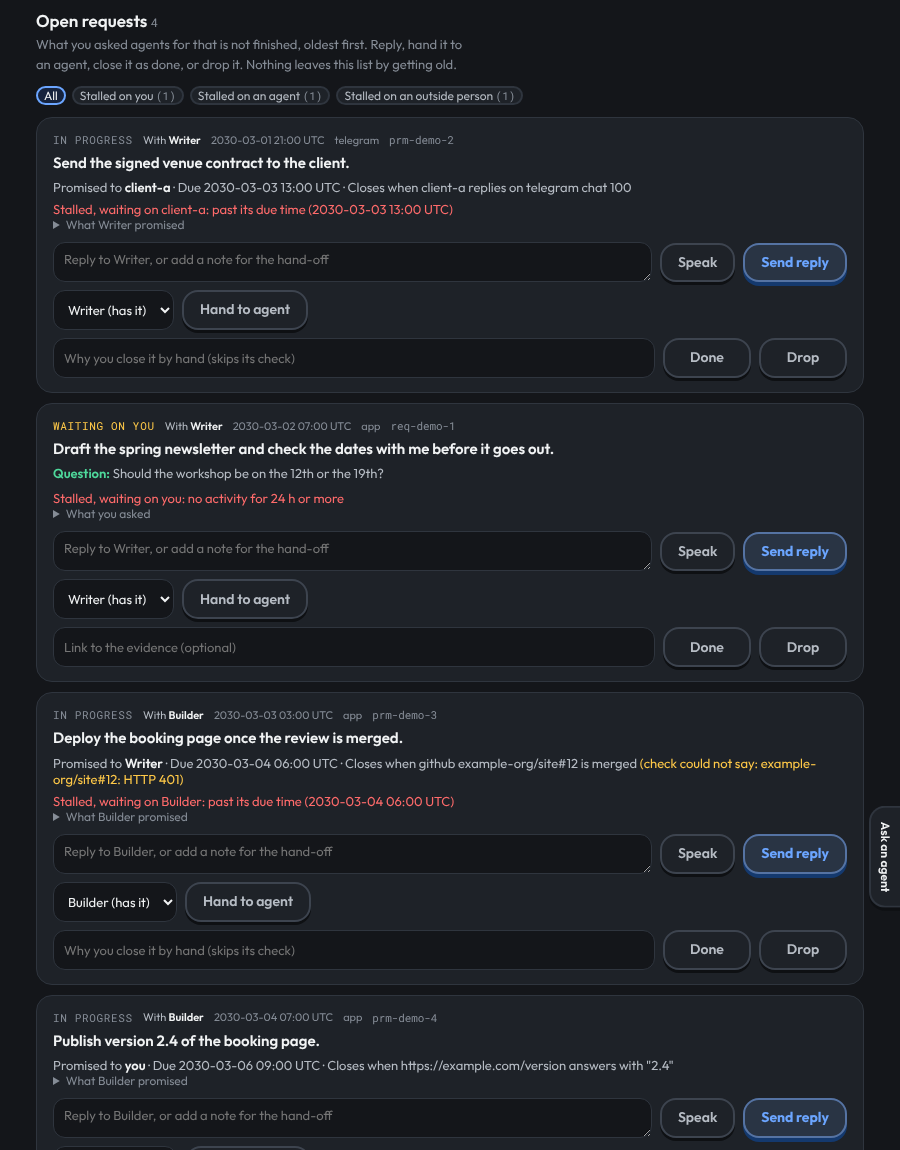
A promise past its due time comes back to you once, like a request that needs attention, with the title Promise not kept and the group it waits on.
QA sign-off
Some work should be checked by a second agent before it counts, for example a QA agent that tests a change. A request can carry that check's result, called a QA verdict. There are three verdicts:
| Verdict | What it means |
|---|---|
block | It must not ship as it is. The note says what is wrong. |
risk | It can ship, but with a risk the note names. |
pass | Signed off. |
It works in two parts:
- The agent doing the work marks the request as needing QA. It passes
needsQa: truewithaccept,wait,promiseordescribe, for example{action:"accept", work:"code", estimateMinutes:30, needsQa:true}. - The QA agent records its verdict with its own
agentx_requesttool, actionqa, and the request's id:{action:"qa", id:"req-…", verdict:"block", note:"The export fails on an empty list."}. Ablockorriskneeds a note. Apassdoes not.
Any agent on the computer can give a verdict, on an open request or on one that is already done. The verdict is kept with who gave it and when. Recording it does not tell anyone and does not count as progress on the work.
A request is awaiting QA while it is marked as needing QA and has no verdict since it was marked. After a fix for a block, the agent marks it again with needsQa: true, and the request waits for a new verdict. The earlier verdicts are kept and agentx requests show <id> lists them all. needsQa: false removes the mark.
Where you see it:
On the request's card under Approvals › Open requests: Awaiting QA sign-off, or QA: PASS by … with the time and the note.
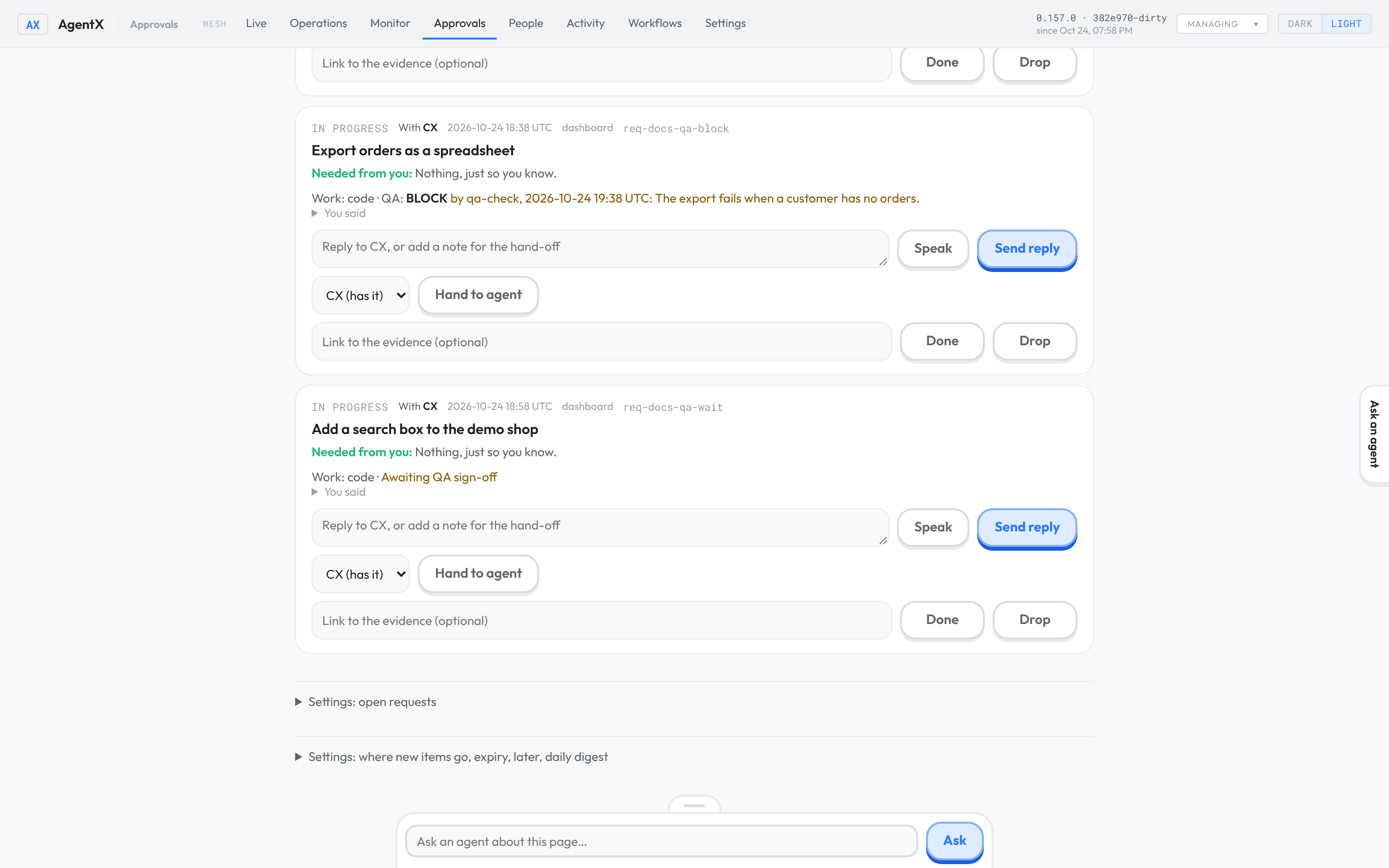
On the request's post on the Hub, with Awaiting QA only in its filters.
In the terminal:
agentx requests show <id>, andagentx requests --qa awaitingfor every request still waiting on QA, open or done.--qa block,--qa riskand--qa passlist the requests whose latest verdict is that one.From a script:
GET /requests?qa=awaiting(see Read the list from a script).
Group requests under a goal
A goal is the larger aim a request serves, such as "Relaunch the shop" or "Monthly newsletter". Naming one lets you see, for each goal, how far along it is and what it cost so far. Goals are optional: a request without one works as before.
An agent names the goal when it takes the request on. It passes goal with accept: an id (a short name made of letters, digits and dashes) and a title in a few plain words. For example: {action:"accept", work:"code", estimateMinutes:30, goal:{id:"shop-relaunch", title:"Relaunch the shop"}}. A title alone also works; the id is made from it ("Relaunch the shop" becomes relaunch-the-shop). A title with no Latin letters or digits, such as one in Arabic, gets an id like goal-3f9a0c12be; the same title always gets the same id. Requests that give the same id share the goal. Only accept takes a goal; a later accept with another goal moves the request to it.
A plan made with accept and steps has the goal of its request. Each step's agent, and an agent you hand the request to, is told the goal's title when it is given the work, so it knows why the task exists.
To see your goals in the dashboard:
- Browser: open Approvals and scroll to Open requests.
- Browser: find Goals above the request cards. Each line shows the goal's title, a bar, how many of its requests are done, how many are open, and what they cost.
- Browser: click a goal to list its requests, with the state and cost of each.
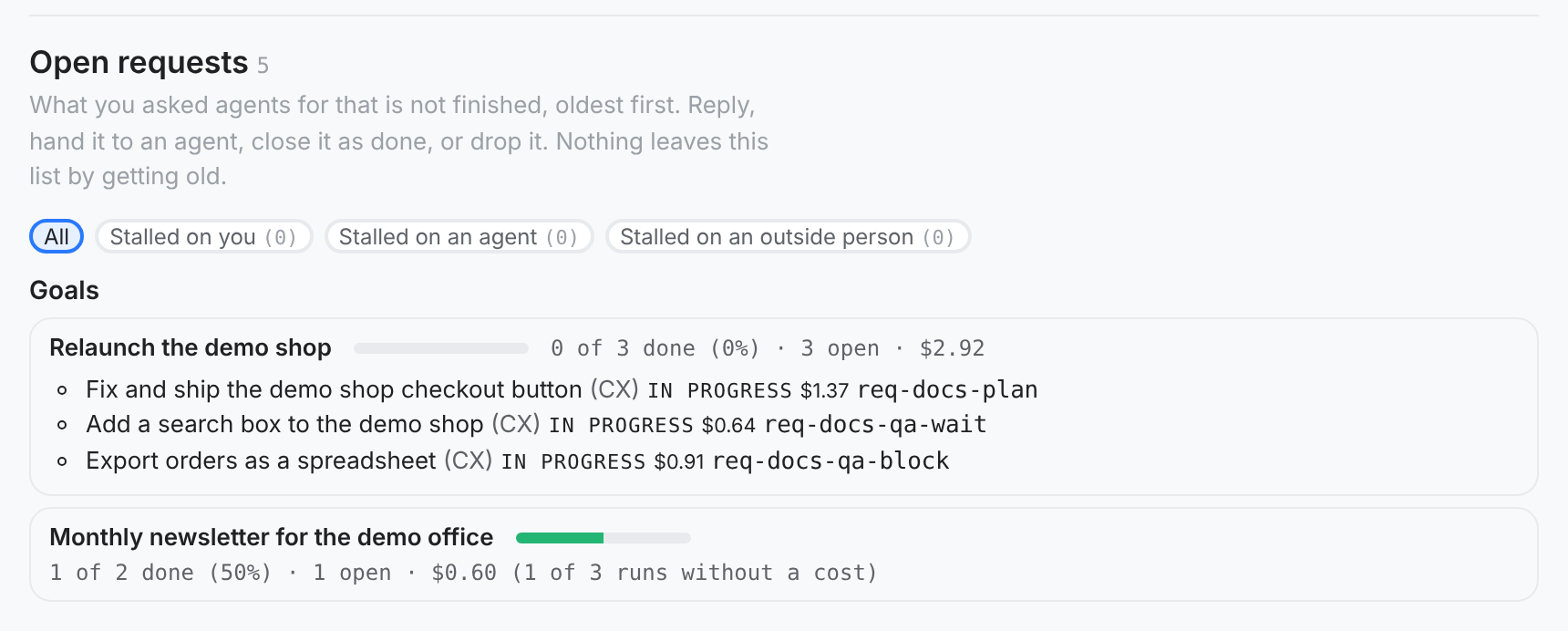
How the numbers are counted:
| Number | What it counts |
|---|---|
| done | Requests of the goal closed as done. |
| open | Requests of the goal still open. |
| dropped | Requests declined or dropped. They count neither for nor against how far along it is. |
| % done | done ÷ (open + done). |
| cost | The cost of the runs of the goal's requests: your turns, the agent's resumed runs and pick-ups, and every plan step, including steps another agent runs. Each run counts as it reported its cost. Work an agent hands to another agent outside a plan (a delegation) is not counted yet, so for that kind of work the cost is a lower bound. Runs on an engine that reports no cost add nothing; the line then says how many runs had no cost. |
A closed request is kept for retentionDays (90 days by default). After that it leaves its goal's numbers too.
On the Hub, select Goal: on a post to see every post for that goal under the same numbers: see Follow one goal. Agents can read the same list with {action:"goals"}. From a script, GET /requests/goals on the daemon gives it as JSON.
Where a request landed
When an agent takes a request on, waits on you, or closes it as done, it can say where the work lives: its home. One of:
| Kind | Link |
|---|---|
issue | the GitLab or GitHub issue URL |
idea | the idea file, e.g. ideas/home-tv.md |
approval | the decision card id |
erp | the ERP record |
card | the Desk card id |
The agent passes it with agentx_request, e.g. {action:"accept", home:{kind:"issue", link:"https://…/issues/394"}}. The request shows its latest home. Every issue, idea, approval and erp home is also kept as a link of the request, so a request that moved from an idea to an issue keeps both, and agentx requests show <id> lists them. Two requests can share a home; the link then stays with the first one, and the second keeps it as its home.
What did I ask today
Run agentx requests today. It lists every request made since 00:00 Tunis time, one row each: the time, its first words, its state, the agent that owns it, and where it landed (issue, idea, approval, ERP record, Desk card, plan, or the evidence it closed with). Requests with nowhere to land are in red, at the top. A declined or dropped request is never red. --json gives the same list for the Desk and for voice.
How many requests get closed: the flow rate
The flow rate says how many of the requests you asked in a day are closed. A request counts as closed when it is done, declined or dropped. Declined and dropped requests always carry a reason, and the reasons are listed beside the rate, so you can see whether a drop was right.
- Terminal: run
agentx requests flow.
It prints today's figure first, then one line per day for the last 7 days:
Today (2030-03-02, Africa/Tunis): 17 of 38 closed, 45%.
  13 done, 4 dropped, 9 moving, 7 waiting on the owner, 5 stuck.
  Dropped because:
    3 × a retry of an earlier request
    1 × asked twice

Day         asked  done  dropped  moving  waiting  stuck  rate
2030-02-24     30    28        2       0        0      0  100%
…| Word | Meaning |
|---|---|
| asked | Requests made that day. |
| done | Closed as done. |
| dropped | Declined or dropped, each with its reason. |
| moving | In progress, or waiting on another agent. |
| waiting | Waiting on you. |
| stuck | Needs attention. |
| rate | (done + dropped) ÷ asked. |
A request is counted on the day it was asked, and the counts are worked out again every time, so a request closed today moves the day it was asked. When some were resent once, the figure also says how many, and how many of those are done.
--days 14shows 14 days (up to 90).--jsongives the same numbers for a script.- Agents read it with
agentx_requestand{action:"flow"}, so you can ask an agent "what is our rate today?". - The day starts at 00:00 in
requests.flow.timeZone(defaultAfrica/Tunis). Change it withagentx requests settings --flow-zone Europe/Paris.
Read the list from a script
GET /requests on the daemon (loopback, or a mesh token) lists requests. Without filters it gives the open ones, oldest first, at most 100. Filters, all optional:
| Filter | What it does |
|---|---|
state=needs_attention,waiting_owner | Only these states. Also open, closed and all. |
closed=1 | Open and closed alike, like state=all. |
since=<epoch ms> | Made since then, open or closed, each with its links. |
closedSince=<epoch ms> | Closed since then, whenever it was made. |
qa=awaiting | Marked as needing QA, with no verdict yet. Also qa=block, qa=risk or qa=pass: the latest verdict is that one. Open and closed alike, unless state is given. See QA sign-off. |
links=1 | Each request with its links: runs, delegations, cards and homes. |
limit=<n> | 1 to 500. Default 100. |
offset=<n> | Page from the oldest; the reply gives nextOffset while there is more. |
Every reply says total, the number of requests that match, and truncated: true when it shows fewer. Without offset, a since list past its limit keeps the newest; any other list keeps the oldest.
GET /requests/flow?days=7 gives the flow rate: zone, days (oldest first, each with day, asked, done, dropped, moving, waiting, stuck, rate, dropReasons, resent and resentDone), and today. days is 1 to 90; without it, requests.flow.days (default 7).
GET /requests/goals lists every goal a request names, most recently active first (at most 50): its title, the counts open, done and dropped, progress (0 to 1), costUsd, runs, unpriced (runs that reported no cost), and its newest requests (at most 50), each with its own costUsd. See Group requests under a goal.
Measure what agents tell you
Agents often hand work to each other. The second agent may hand it on again. What they make, and where the work stopped, can stay inside those agent-to-agent chats, which you never see. AgentX can measure how much of it reaches you. It reads what it has already recorded, changes nothing and tells nobody.
To see it:
- Terminal: go to the install folder, the one that holds
agentx.json. - Terminal: run
agentx requests contract. It reads the last 7 days. - Read the Five numbers block:
| Number | What it counts | Aim |
|---|---|---|
| Chain coverage | Turns in agent-to-agent chats that can be traced back to something you asked. Today, only the first agent asked is traced. The note says how many would be traced if every agent passed your request on. | 95 % or more |
| Delivery reach | Answers in your request's chain that name a link or a file, and that you were told about with a link within 10 minutes. | 90 % or more |
| Openable proof | Requests closed as done whose proof is a link you can open, not a file on the agent's computer, and not nothing. | 90 % or more |
| Quiet breaches | Open requests where nothing you can see changed for 2 hours. | 0 |
| Status pulls | Your own messages that ask where something stands ("what is … doing", "any update"). It is a word match, so the real number can be higher. | Going down |
Below them, Per agent lists each agent that talked to other agents. A line in amber marks an agent with 20 or more such turns that never told you anything.
To see what AgentX would write once these are fixed:
- Terminal: run
agentx requests contract --dry-run. - Read the three lists at the end:
- Step 1: agent-to-agent chats that would be linked to your request.
- Step 2: links and files that would be put on your request. A file is marked
path → served link: it would become a link you can open. - Step 3: the status line each quiet request would get. It says when the agent last worked on it, what it waits on, and its last output.
would pushmeans it has been quiet long enough (6 hours by default) to be sent to your phone too.
| Flag | Default | What it does |
|---|---|---|
--since <span> | 7d | How far back to read, as 90m, 36h or 7d. Up to 90d. |
--agent <id> | — | Only this agent's turns and requests. |
--deliver-within <minutes> | 10 | How soon you must be told for an output to count as delivered. |
--rhythm <hours> | 2 | How long an open request can stay unchanged before it counts as quiet. |
--push-after <hours> | 6 | How long a quiet request waits before its status line would also be pushed. |
--dry-run | — | Add the three lists above. |
--limit <n> | 20 | How many rows each list shows. |
--json | — | The same numbers for a script. |
Requests of several steps
When a request takes two or more steps (build, deploy, check it is live, tell the client), the agent can write it as a plan. The daemon then follows each step, nudges a step that goes quiet, sends a message you approved once, and tells you at the end. See Follow a request of several steps.
Change the settings
| Command | What it does |
|---|---|
agentx requests settings | Shows the settings. |
agentx requests settings --enabled off | Stops recording. Open requests stay on the list. |
agentx requests settings --channels voice,app | Records only on these channels. all goes back to every channel. A name that is not a channel a person writes on (a typo, say) is refused. |
agentx requests settings --from none | Clears the list of who counts as you. |
agentx requests settings --stale-hours 48 | Hours without activity before a request comes back to you. Default 24. |
agentx requests settings --retention-days 30 | Days a closed request is kept. Default 90. |
agentx requests settings --headlines off | Stops AgentX from writing a headline for a request its agent did not describe. Such a request is then titled with the start of your words. on turns it back on. Default on. |
agentx requests settings --settle off | A quiet request whose handed-on work all came back done comes back to you instead of being closed. on turns closing back on. Default on. See When handed-on work came back. |
agentx requests settings --checks url,issue | The checks agents may use to close a request. Default all four: url, issue, git-ancestor, reply. none turns them all off; a request whose check is off is then unverified. |
agentx requests settings --check-every 30 | Minutes between two runs of a request's check. Default 10. |
agentx requests settings --auto-resend off | Stops sending a request stopped by a usage limit or a restart back to its agent once. on turns it back on. Default on. See Resend once. |
agentx requests settings --resend-after 10 | Minutes after it stopped before such a request is resent. Default 5. |
agentx requests settings --resend-hold-hours 6 | Hours your notice waits for the resend before you are told anyway. Default 12. |
agentx requests settings --flow-zone Europe/Paris | The time zone whose day the flow rate counts by. Default Africa/Tunis. |
In the dashboard, the same settings are under Approvals › Settings: open requests. The box Write a headline when the agent gave none is the --headlines switch:
- Browser: open Approvals and scroll to the bottom.
- Browser: click Settings: open requests.
- Browser: tick or untick Write a headline when the agent gave none.
- Browser: click Save settings.
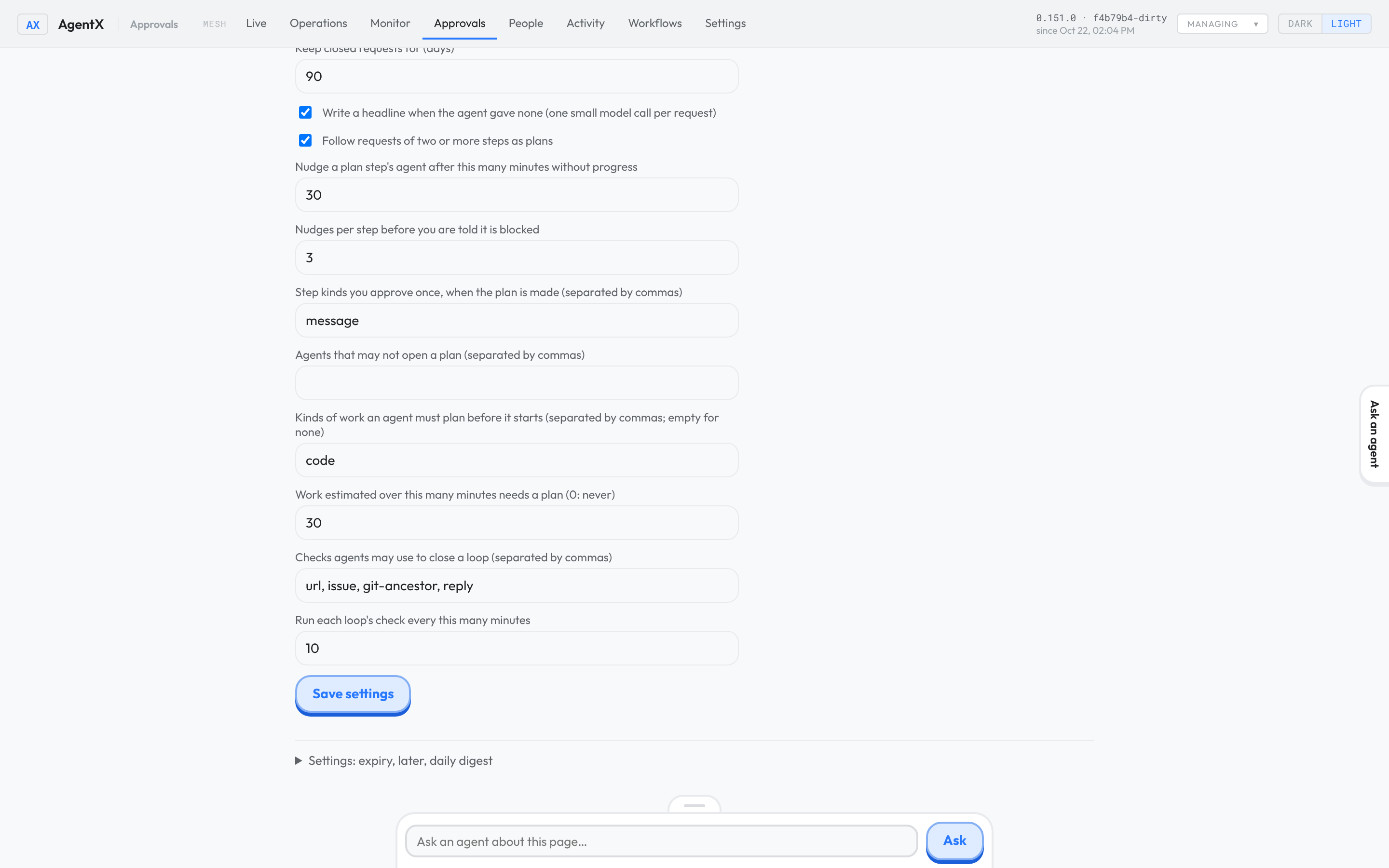
The engine and model used for the headline are set only in agentx.json, under requests.headlines.
The folders for the git-ancestor check are set only in agentx.json, as requests.checkers.repos: { "app": "/srv/app" }.
The same settings are the requests block in agentx.json: see Configuration: automation.
Check it worked
- Terminal: run
agentx requests settings. The first line saysRequests on. - Ask an agent, by voice or in the app, for something it must hand to another agent.
- Terminal: run
agentx requests. The request is listed aswaiting on another agent, thenin progressonce the answer is back. - Terminal: run
agentx requests done <id> --evidence <link>, thenagentx requests. It is gone from the list. - Terminal: run
curl -s "http://127.0.0.1:18800/requests?since=$(( $(date +%s) * 1000 - 86400000 ))". The request is there, statedone, with itshomewhen the agent gave one. - Ask an agent to promise something with a check, for example: "promise me you will close issue example-org/app#12, and close it when the issue is closed".
- Terminal: run
agentx requests show <id>. It showsPromised to ownerandCloses when github example-org/app#12 is closed. - Close the issue. Within 10 minutes,
agentx requestsno longer lists the promise, andagentx requests show <id>gives the check's words as the evidence. - Terminal: run
agentx requests --stalled. It prints the stalled requests by group, ornothing is stalled. - Terminal: run
agentx requests today. Each request you made since midnight is listed; the ones with no home are red, at the top. - Terminal: run
curl -s "http://127.0.0.1:18800/requests?state=needs_attention&links=1". Only the requests that need attention come back, each with its links. - Ask an agent, by voice, for something long and loosely worded. Within a few minutes, its card under Approvals › Open requests is titled with a few plain words, shows Needed from you, and keeps your words under You said.
agentx requests show <id>shows the sameheadline. - Terminal: run
agentx requests settings. The lineHeadlinessayson: written when the agent gave none, oroffafter--headlines off. - Terminal: in the same output, the line
Handed work came backsaysclosed when quiet, with its link or marked unproven. A day after an agent hands work on and gets a done answer without closing the request, the daemon log has asettledline for it, andagentx requests show <id>shows it done, with the link orunproven: …as its evidence. - Ask an agent to make a change and mark it as needing QA, then ask a second agent to check it and give its verdict.
- Terminal: run
agentx requests --qa awaitingbefore the verdict. The request is listed withAwaiting QA. After the verdict, runagentx requests show <id>. It showsQA: PASS by <agent>, <time>(orBLOCKorRISKwith the note). - Ask an agent for some work and tell it the goal, for example: "this is for the shop relaunch goal".
- Browser: open Approvals. Under Open requests, Goals lists the goal with
0 of 1 done. The request's card shows Goal: with its title. - Terminal: run
curl -s http://127.0.0.1:18800/requests/goals. The goal is there, with itsopenanddonecounts and itscostUsd. - Terminal: run
agentx requests contract --since 1d --dry-run. It prints Five numbers, the three dry-run lists, and ends withRead only: nothing was told or written. - Terminal: run
agentx requests flow. The first line gives today's date, the time zone, and how many of today's requests are closed. The table below it has one line per day. - Terminal: run
agentx requests settings. The lineResend oncesayson: after a usage limit resets or a restart, 5 minute(s) on; …. After an agent stops on its usage limit, the daemon log has aresent onceline for the request once the limit resets, and you are told nothing unless it stops again.
If something is wrong
The flow rate counts a day differently from your clock: the day starts at 00:00 in
requests.flow.timeZone. Set yours withagentx requests settings --flow-zone <zone>, for exampleEurope/Paris.days must be a whole number from 1 to 90: pass--days(or?days=) between 1 and 90. Closed requests are deleted afterretentionDays, so older days would be wrong anyway.A request stopped by a usage limit was never resent: the limit has not reset yet, or it was already resent once, or it is a promise or part of a tracked plan.
agentx requests show <id>says why it stopped. After 12 hours you are told anyway.You were told about a limit or a restart failure at once: auto-resend is off (
agentx requests settings), the agent is not on this computer, the request had already been resent once, or AgentX chose not to pick the work up again after the restart. The reason in brackets afternot picked up againsays which.A request was closed that was not finished: its handed-on work came back done and nothing happened on it for a day, so it was settled. Ask the agent again, or run
agentx requests settings --settle offif you want such requests to come back to you instead.no agentx.json here: you are not in the install folder, the one that holdsagentx.json. A folder inside it does not count. Go to that folder and run the command again.The list says
requests are off: runagentx requests settings --enabled on.A message you sent on Telegram or GitHub is not recorded: your id on that channel is not in
from. Add it with--from, aschannel:id.A request you only got an answer to is not listed: that is expected. A request is kept only when work goes on after the answer or goes wrong.
A request came back as
No activity for 24 h: nobody closed it. Close it withdoneordrop, or ask the agent to carry on.No Goals list in the dashboard: no request names a goal yet. It appears once an agent accepts a request with
goal.only accept takes a goal: the agent passedgoalwith another action. It gives the goal when it accepts the request.goal.id must be letters, digits, dashes, dots or colons: the id has spaces or other signs. Give a short id such asshop-relaunch, or only the title.A goal's cost shows
$0.00with runs without a cost: the agents run on an engine that does not report what a run cost. The counts and progress are still right.home.kind must be one of …: the agent gave a home kind that does not exist. Use issue, idea, approval, erp or card. A declined request takes no home.a finished request needs --evidence <link>: add the link to the proof. From the terminal, and for agents, a request cannot be closed as done without it.A message from the phone app is not recorded: the dashboard must run from the install folder, the one that holds
agentx.json, so it can read.agentx/operator.key. Start it there. A message sent through the phone app to an agent on another computer is recorded there when the computer the phone is paired with checks its own key and vouches for you to the other one. That needs three things: both computers run 0.83.1 or later, the other computer lists the first one inmesh.peerswith the sametokenthe first one sends, and the request reaches it from another machine. A token that sits only inMESH_TOKEN, two different tokens, or a proxy on the same machine in front of the daemon means it is not recorded.You handed a request to another agent and no answer came in the chat: that is expected. The chat where you asked belongs to the first agent. Open the request's card in the dashboard and read Last answer from ….
An agent's done is refused with
Not closed: its check says it is not finished: that is the check working. The request closes by itself once the evidence is there. If the check is wrong, close the request yourself withagentx requests done <id> --reason "…".A request is marked
unverified: its check could not tell.agentx requests show <id>says why. Common causes: the address is down, the GitHub or GitLab token is missing or cannot see the issue, the local copy of the repository does not have the commit yet (update it), or the person in areplycheck is not inpeople. Fix the cause and wait for the next check, or close it yourself with--reason.no repos are set up for this check on this node: add the folder underrequests.checkers.reposinagentx.json.the … check is turned off on this node: add the kind back withagentx requests settings --checks.A card is still titled with your own words: the agent did not describe the request and no headline could be written. The daemon log has a line
[requests] <id>: headline not written: …with the reason. A common cause is that the engine set inrequests.headlines.provideris not signed in on this computer. Each request is tried once, and not again after a restart; the agent can still describe it. To see the start of your words as the title on purpose, runagentx requests settings --headlines off.--headlines takes on or off: writeonoroff, nothing else.An agent's describe is refused with
headline is only a reference: the headline was only an issue number, an id or a link. Say what the request is in words, and put the link in the request'shomeinstead.A QA verdict is refused with
a block verdict needs a note: ablockorriskneeds a sentence that says what is wrong. Addnote.A QA verdict is refused with
qa needs id: the QA agent's turn is not the request's own, so it must name the request.agentx requestsor the agent'slistshows the ids.A request stays in
--qa awaitingafter a verdict: it was marked as needing QA again after that verdict, so a new one is awaited.agentx requests show <id>lists every verdict with its time.agentx requests contractshows–for a number: nothing in the time you asked for counts toward it. For example, no request was closed as done. Try a longer--since.Chain coverage stays low with
--dry-run: the agent that started the hop runs on another computer, or its turn ended before the hop started. Run the command on that computer too.--since takes a span such as 90m, 36h or 7d: write a number and one ofm,hord, with nothing else, up to90d.An agent says it has no
agentx_requesttool: the tool server is added when the daemon starts with requests on. Restart the daemon. If the agent's workspace has a.mcp.jsonyou wrote yourself, add the server there:agentx serve --stdio --cwd <install folder>.