
Live — who's working now
Live shows every agent, on every connected machine, and what each one is doing right now. Use it when you have just sent a task and want to see whether an agent picked it up.
Live is a current view. For completed work and the route it took, use Activity. For work that needs your attention, use Monitor.
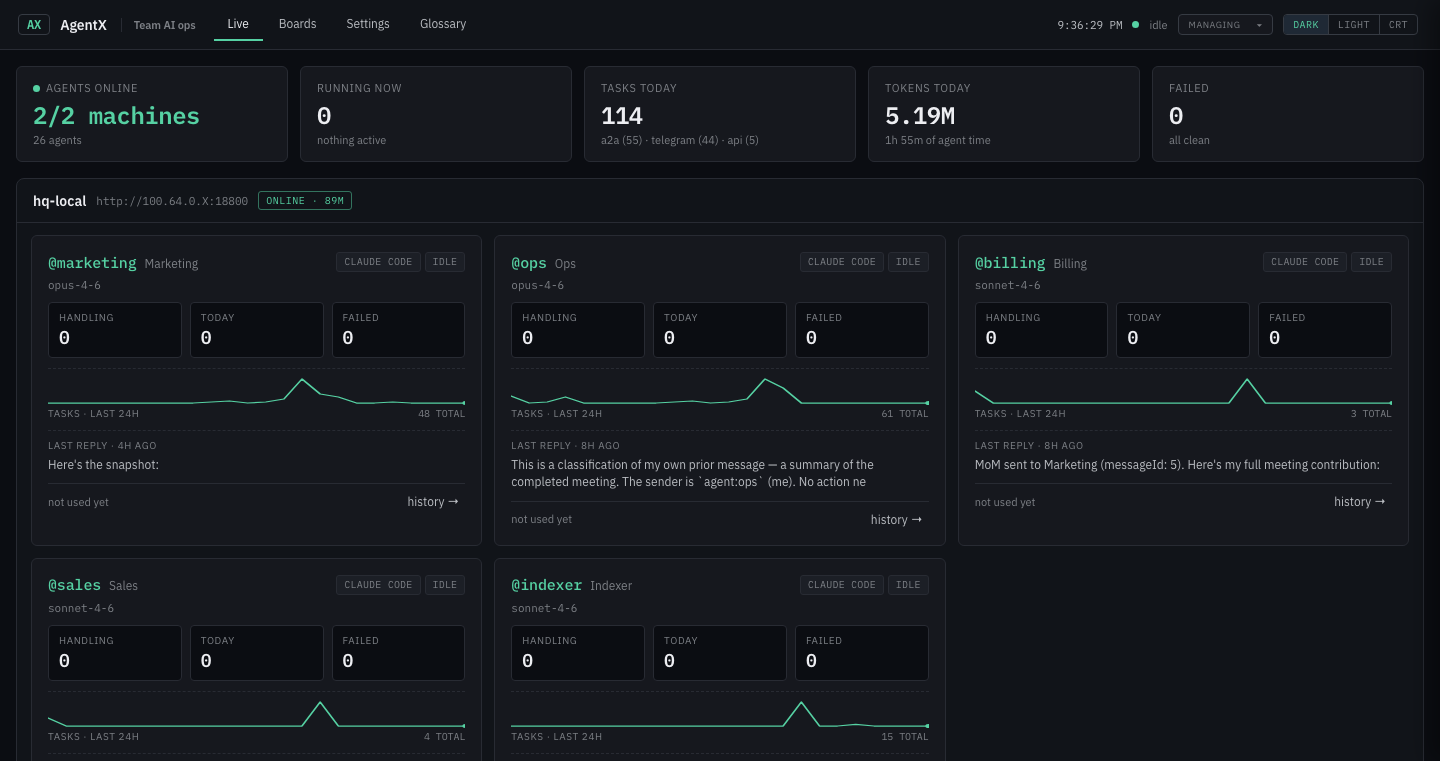
Scripted demo data; your team's names and machines will differ.
Watch, update or stop a running task
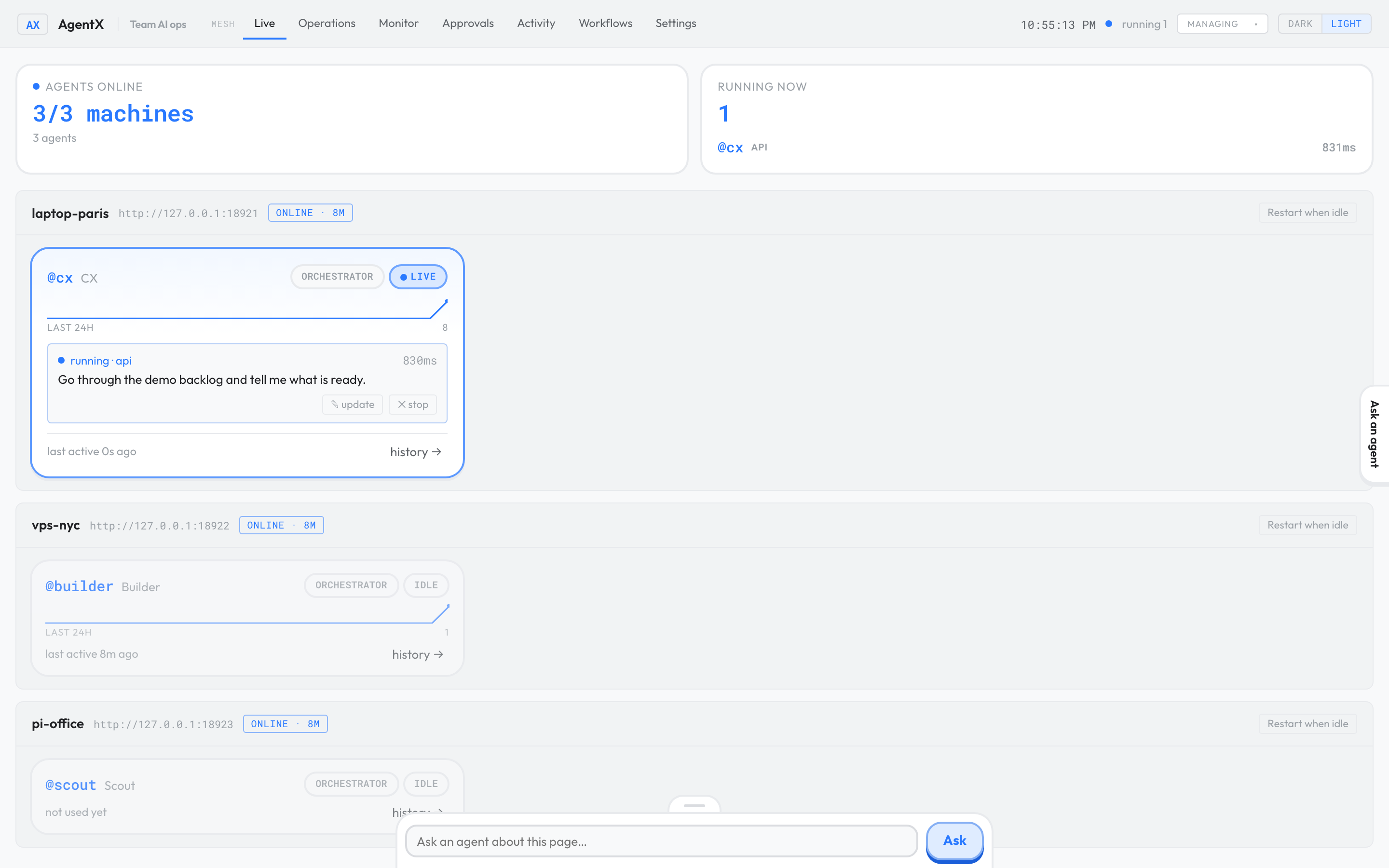
A busy agent shows a running card with the channel the task came from, how long it has been running, and the start of the message.
- Browser: open the dashboard and select the Live tab.
- Find the agent's card. A running task shows running ·
channel, wherechannelis where the task came from, and a timer. - To watch the agent work, select the task card. Its progress opens as it happens.
- To add something to the conversation, select ✎ update. The Task page opens; type your message and send it. The current step keeps running, and your message is handled next.
- To stop the task, select ✕ stop, then confirm.
When an agent is idle, its card shows its last reply. Select history → to see its recent tasks.
If the agent is running an on-screen lesson through the desktop assistant, the card shows on screen with the step number. Select ✕ stop on that line to end the lesson and give the screen back.
See which Claude Code session answers for an agent
When you run agentx attach as <agent> in a Claude Code session, messages for that agent go to your session instead of starting a new run. Live shows this:
- Under the machine's name, Claude Code sessions lists every session on that machine, by project folder, with the agent it answers for (or not attached) and when it was last active.
- The agent's card shows attached, and its footer names the project, so you can tell a person is answering, not a spawned run.
- waiting means the binding is saved but the session hasn't reported since the daemon restarted or the session sat idle. It gets its binding back as soon as you type in that session again.
Bindings survive daemon restarts. They end only when you run agentx attach detach or close the session. Live shows sessions for the machine the dashboard runs on; other machines keep this list private.
A machine shows "not responding"
If a machine is slow to answer, Live keeps showing its last known agents for up to five minutes and marks the machine not responding · data from …. The cards come back to normal as soon as it answers again. After five minutes without an answer, the machine shows offline.
Check it worked
- Browser: open Live. Every agent you configured appears, grouped by machine.
- Send an agent a small task from a channel or in-page chat.
- Within a few seconds, that agent's card shows running, then its last reply when it finishes.
- Terminal: in a Claude Code session, run
agentx attach as <agent>, then type anything in that session. Within a few seconds, Live lists the session under Claude Code sessions and the agent's card shows attached.
If something is wrong
- No agent appears: the daemon (the AgentX background service) isn't running or the dashboard can't reach it. See It's not answering.
- The agent never shows running: the message didn't reach AgentX. Check that the channel is connected in Settings.
- A machine is missing: its daemon or the connection to it is down. See Add a second machine.
- An attached session doesn't appear: type a message in that session so its hooks report to the daemon, then check
agentx attach list. If the session isn't listed there, runagentx attach installonce and restart the session. - A machine stays on "not responding": its daemon is busy or restarting. Check it with
agentx daemon statuson that machine. - The card still shows running after ✕ stop: reload the page after a few seconds. Stopping ends only that task; the agent stays available for new work.