
Let agents read data from outside services
Give an agent read-only access to numbers held by another service, such as page views or audience figures. You sign in to the service once. AgentX keeps the sign-in on your own computer and gives the agent the numbers, never the password or token.
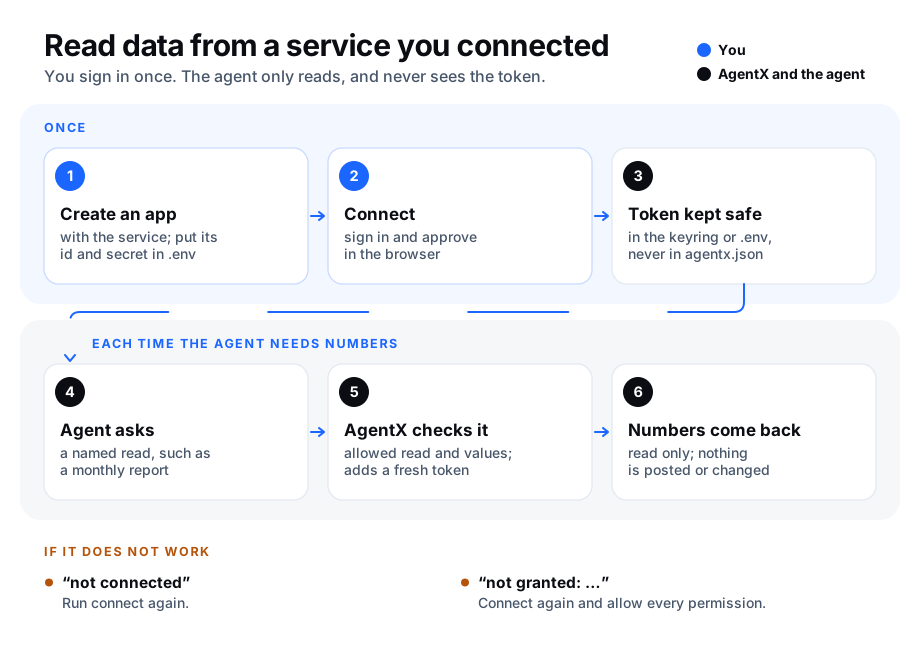
At a glance
| Question | Answer |
|---|---|
| The problem | The numbers you want an agent to report on sit behind another service's sign-in, and handing an agent your password is not safe. |
| What AgentX does | Signs in to the service for one agent, keeps the token on your computer, renews it when it runs out, and lets the agent ask only for a fixed list of reads. |
| What you approve | The sign-in, in your browser. The agent can only read: no posting, no changes. |
| What it costs | No AgentX fee. The service's own limits and prices apply. |
| First result | agentx agent integrations status <agent> shows connected. See Check it worked. |
Words used on this page:
- Integration: one service an agent has access to, listed under the agent in
agentx.json. - App: a registration you create on the service's developer site. It gives you a client id and a client secret (a password for the app, not for you). Each person who runs AgentX creates their own.
- Token: what the service gives back after you sign in. AgentX uses it to ask for data on your behalf. Some tokens run out after an hour; AgentX renews them by itself.
- Keyring: your computer's password store (Keychain on a Mac, the Secret Service on Linux).
- Read: one named question the agent may ask the service, such as "page totals for a period". The agent picks a read by name; it cannot write its own request.
Which services
Built in: Facebook Pages and Instagram (kind meta), see Facebook and Instagram, and YouTube (kind youtube), see YouTube.
You need:
- AgentX installed, with an
agentx.json. See Install. - A terminal in the folder with
agentx.json, on the computer that runs AgentX. - An account on the service, with access to the pages or channels you want numbers for.
1. Create an app with the service
Browser: on the service's developer site, create an app. Ask only for read permissions.
Browser: in the app's settings, add this address to the allowed sign-in return addresses (often called "redirect URIs"):
texthttp://localhost:19876/callbackBrowser: copy the app's client id and client secret.
Terminal: put both in the
.envfile next toagentx.json. Use the service's kind in capitals as the start of the name, for example for a kind calledexample:bashecho 'EXAMPLE_CLIENT_ID=paste-the-client-id-here' >> .env echo 'EXAMPLE_CLIENT_SECRET=paste-the-client-secret-here' >> .envTerminal: restart the daemon so it reads them:
bashagentx daemon restart
Keep the secret in .env only, never in agentx.json: that file is shown in the dashboard and often shared.
2. Connect an agent
Terminal: start the sign-in for the agent. Replace
helperwith your agent andexamplewith the service's kind:bashagentx agent integrations connect helper exampleBrowser: a sign-in page opens. Sign in, check the permissions it asks for, and approve every one.
Browser: the page says AgentX is connected. Close the tab.
Terminal: the command prints
✓ helper: ... connected; token kept in the OS keyring.
On a computer without a browser (a server you reach over SSH), add --paste:
- Terminal: run
agentx agent integrations connect helper example --paste. It prints a sign-in address. - Browser, on any computer: open the address and approve. The page then fails to load; that is expected.
- Browser: copy the whole address from the address bar.
- Terminal: paste it at the prompt.
Where the token goes:
- The keyring when your computer has one. This is the default.
.envotherwise, or with--store env. Restart the daemon after connecting so it reads the new value. When the service sends a new refresh token, AgentX writes it to.envfor you.
Options of connect:
| Option | What it does |
|---|---|
--label <text> | Which account, when an agent has more than one of the same kind. A new one is created when missing. |
--client-id-env <name>, --client-secret-env <name> | Read the app's id and secret from other .env names. |
--with <names> | Ask for extra permissions the service offers, such as revenue. |
--reads <names> | Allow only these reads for this integration. Default: every read the service offers. |
--store keyring or --store env | Where to keep the token. |
--port <n> | Use another return port. Change the address in the app's settings to match. |
--paste | Paste the return address instead of waiting for the browser. |
--redirect-uri <url> | With --paste: use this return address instead of http://localhost:19876/callback, when the service does not accept localhost. Add the same address in the app's settings. |
--no-browser | Print the sign-in address without opening it. |
3. Ask the agent
Ask in plain words, for example: How many views did the page get last month?
The agent uses the agentx_integration_read tool. Without a read name, the tool lists the reads the agent may run and the values each accepts. With one, AgentX checks every value against that list, adds the token, asks the service and returns its answer, cut at 16,000 characters.
The agent can never:
- see or copy the token;
- send anything other than a read;
- ask for a value that is not on the list.
A routine set to read only (autonomy: "report") may use the tool too, so a weekly digest of the numbers works. See Routine autonomy.
To allow only some reads for one integration, list them when you connect (an empty list allows every read again):
agentx agent integrations connect helper example --reads account_reportFacebook and Instagram
Kind: meta. The agent can read the numbers of the Facebook Pages you manage and of the Instagram professional accounts linked to them: views, reach, followers, engagement, audience, video, and earnings for a Page that earns money. It cannot post, reply or change anything.
You need:
- A Facebook account that manages the Pages.
- Each Instagram account switched to a professional account (Business or Creator) and linked to one of those Pages. Instagram calls this "Connect a Facebook Page" in the account's settings.
Create the Meta app
Browser: open the Meta for Developers site (developers.facebook.com) and sign in with the Facebook account that manages the Pages.
Browser: select My Apps, then Create App.
Browser: choose the use case Facebook Login for Business, and the app type Business if asked.
Browser: in the app, add these permissions (Meta lists them under the use case or under App Review › Permissions and Features):
pages_show_list,pages_read_engagement,read_insights,instagram_basic,instagram_manage_insights.Browser: in Facebook Login for Business › Settings, add
http://localhost:19876/callbackto Valid OAuth Redirect URIs.Browser: in App settings › Basic, copy the App ID and the App secret.
Terminal: put them in
.envnext toagentx.json:bashecho 'META_CLIENT_ID=paste-the-app-id-here' >> .env echo 'META_CLIENT_SECRET=paste-the-app-secret-here' >> .envTerminal: run
agentx daemon restart.
You do not need Meta's App Review or Business Verification while the app reads only Pages and accounts of people who have a role on the app (you, and anyone you add under App roles). Leave the app in Development mode. Meta asks for App Review only before the app reads accounts of other people.
Return address in Live mode
In Development mode Meta accepts the localhost return address. If you switch the app to Live, Meta wants an https address. Add any https page you own to the app, then connect with --paste --redirect-uri https://your-page.example/callback. The page does not need to do anything: you copy the address the browser lands on.
Connect
Terminal: run, with your agent in place of
helper:bashagentx agent integrations connect helper metaBrowser: Facebook asks which Pages and Instagram accounts to share. Select every one the agent should read, and keep every permission ticked.
Terminal: the command prints
✓ helper: Meta (Facebook and Instagram) connectedand a line such asThis token cannot refresh itself; it expires on ....
Meta's tokens last about 60 days and Meta gives no way to renew them without you. agentx doctor, status and the dashboard warn a week before the date. Run connect again then.
Choose the default Page and Instagram account
The agent can find the ids itself with the pages read. To save it that step:
Telegram, or the dashboard chat: ask the agent
List my Facebook Pages with their ids. Note the Page id and the Instagram id under it.Terminal: open
agentx.json, find the agent'smetaintegration and add both undermetadata:json"metadata": { "page_id": "1234567890", "ig_user_id": "17840000000000000" }Terminal: run
agentx daemon restart.
What the agent can read
| Read | What it returns |
|---|---|
pages | The Pages the account manages, with the linked Instagram account of each. |
page_insights | Page totals: page_media_view (views), page_total_media_view_unique (people who viewed), page_follows, page_daily_follows, page_daily_follows_unique, page_daily_unfollows_unique, page_post_engagements, page_video_views, page_video_view_time, and the earnings metrics monetization_approximate_earnings and page_daily_video_ad_break_earnings. |
page_posts | Recent posts of a Page: id, time, link. |
post_insights | One post: post_media_view, post_total_media_view_unique, post_reactions_by_type_total, post_clicks, post_video_views. |
ig_account_insights | Instagram account totals: views, reach, total_interactions, accounts_engaged, likes, comments, shares, saves, replies, follows_and_unfollows, profile_links_taps, follower_count, and audience by age, city, country or gender (follower_demographics, engaged_audience_demographics). |
ig_media | Recent posts, reels and stories: id, type, time, link, likes, comments. |
ig_media_insights | One post or reel: views, reach, total_interactions, likes, comments, shares, saved, profile_visits, follows, and reel watch time. |
Good to know:
- Earnings come back only for a Page that earns money on Facebook. Instagram has no earnings figures in Meta's API.
- Meta retired the old "impressions" and "fans" figures. Views (
page_media_view,views) replace them; AgentX does not offer the retired names. - For Page reads AgentX asks Meta for a token for that one Page, keeps it in memory for an hour, and never shows it.
YouTube
Kind: youtube. The agent can read the YouTube channel you sign in with: its counts, its uploads, and YouTube Analytics (views, watch time, likes, comments, shares, subscribers, audience by age and gender, traffic sources, devices, Shorts against long videos), and estimated revenue if you opt in. It reads only the channel that signed in. It cannot upload, comment or change anything.
You need:
- A Google account that owns or manages the channel.
- For revenue: a channel in the YouTube Partner Program.
Create the Google project
Browser: open the Google Cloud console (console.cloud.google.com) and create a project.
Browser: under APIs & Services › Library, enable YouTube Data API v3 and YouTube Analytics API.
Browser: under APIs & Services › OAuth consent screen, choose External, fill in the app name and your email, and add yourself as a test user.
Browser: set the publishing status to In production. In Testing, Google ends the sign-in after 7 days. With fewer than 100 users you do not need Google's verification: at sign-in, select Advanced, then Go to (your app).
Browser: under APIs & Services › Credentials, select Create credentials › OAuth client ID, type Web application, and add
http://localhost:19876/callbackunder Authorised redirect URIs. Copy the Client ID and the Client secret.Terminal: put them in
.envnext toagentx.json:bashecho 'YOUTUBE_CLIENT_ID=paste-the-client-id-here' >> .env echo 'YOUTUBE_CLIENT_SECRET=paste-the-client-secret-here' >> .envTerminal: run
agentx daemon restart.
Connect
Terminal: run, with your agent in place of
helper. Add--with revenueonly if you want revenue figures:bashagentx agent integrations connect helper youtubeBrowser: choose the Google account, then the channel if the account has several. Approve every permission.
Terminal: the command prints
✓ helper: YouTube connected.
Google's access tokens last an hour, and AgentX renews them by itself.
Choose the default uploads list
The agent can find it itself with the channel read. To save it that step:
Telegram, or the dashboard chat: ask the agent
What is my YouTube uploads playlist id?. It starts withUU.Terminal: open
agentx.json, find the agent'syoutubeintegration and add it undermetadata:json"metadata": { "playlistId": "UUxxxxxxxxxxxxxxxxxxxxxx" }Terminal: run
agentx daemon restart.
What the agent can read
| Read | What it returns |
|---|---|
channel | The channel: title, subscriber, view and video counts, and the uploads playlist id. |
uploads | Recent uploads: video id, title, publish time. |
videos | Up to 50 videos: details, duration, privacy status, and public views, likes and comments. |
report | YouTube Analytics for a date range: views, engagedViews, estimatedMinutesWatched, averageViewDuration, averageViewPercentage, likes, dislikes, comments, shares, subscribersGained, subscribersLost, playlist adds and removes, card figures, and viewerPercentage by ageGroup and gender. Split by day, month, video, country, traffic source, device, Shorts (creatorContentType) and more. |
revenue_report | estimatedRevenue, estimatedAdRevenue, grossRevenue, cpm, playbackBasedCpm, monetizedPlaybacks, adImpressions. Needs --with revenue. |
Good to know:
- Impressions and click-through rate of thumbnails are not in the YouTube Analytics API, so the agent cannot read them.
- Revenue comes back only for a channel in the Partner Program. For any other channel YouTube answers 403.
Disconnect
Terminal: forget the sign-in:
bashagentx agent integrations disconnect helper exampleIf the token was in
.env, the command names the line to delete. Terminal: delete it, then runagentx daemon restart.Browser: to end the app's access completely, remove it in the service's account settings.
Check it worked
Terminal: run
agentx agent integrations status helper. The line for the service starts with ✓ and says connected.Terminal: run
agentx doctor. It shows no warning foragents.helper.integrations.Browser: in the dashboard, open Settings, select Agents, select the agent, then the Channels tab. Under Integrations, the service shows a green connected label. One that needs you shows not connected or needs attention; open to fix to see what to do.
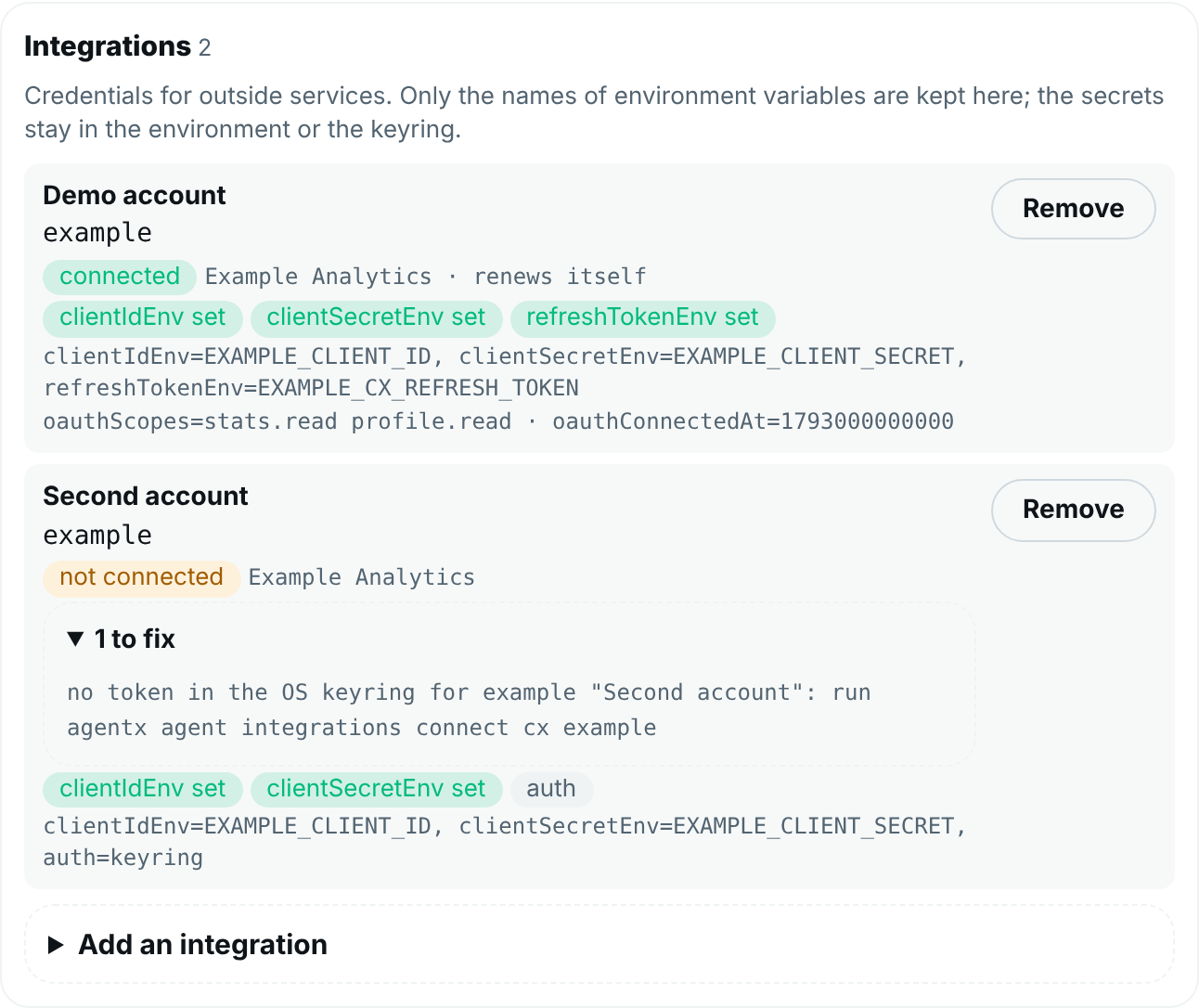
Telegram, or the dashboard chat: ask the agent which reads it has. It lists the service and its reads.
If something is wrong
| What you see | What to do |
|---|---|
No sign-in support for "<kind>" | That service is not built in yet. See the Which services note near the top of this page. |
env var EXAMPLE_CLIENT_ID is unset | Put the app's client id and secret in .env (step 1.4) and run the command again. |
| The browser says the return address is not allowed | The address in the app's settings must be exactly http://localhost:19876/callback, or the port you passed with --port. |
no answer from the browser within 5 minutes | Run connect again and approve sooner, or use --paste. |
the sign-in answer does not match this request | An old sign-in tab was used. Close it and run connect again. |
No OS keyring on this machine | Use --store env, then restart the daemon. |
status says not connected, or the agent says to connect again | The sign-in was removed or ran out. Run connect again. |
not granted: ... | You unticked a permission at sign-in. Run connect again and approve every one. |
the token expires on ... | That service does not renew its tokens by itself. Run connect again before that date. |
Meta: does not manage Page ... | The account you connected is not an admin of that Page, or you did not select the Page when you signed in. Run connect again and select it. |
Meta: connect says it could not read the granted permissions | Meta did not answer the permission check right after sign-in. The connection works, but status cannot tell you if you unticked a permission. Run connect again later to get the full check. |
| Meta: the browser says the return address is not allowed, after you switched the app to Live | Use an https return address with --paste --redirect-uri. See Return address in Live mode. |
| Meta: an Instagram read says the account does not exist or has no insights | The Instagram account must be a professional account linked to a Page you selected at sign-in. Run the pages read: the account should show under its Page. |
Meta: (#100) ... metric | Meta does not offer that figure for this Page or period, for example earnings on a Page that does not earn money. Ask for another metric or period. |
| YouTube: the agent says to connect again a week after connecting | The Google project is still in Testing, where Google ends sign-ins after 7 days. Set it to In production (see Create the Google project) and run connect again. |
YouTube: revenue_report says 403 | Connect again with --with revenue. If it still says 403, the channel is not in the YouTube Partner Program. |
YouTube: report says 400 with The query is not supported | YouTube does not allow that mix of metrics and dimensions. For example, viewerPercentage needs ageGroup or gender as the dimension, and the video dimension needs maxResults and sort. |
The agent gets ... said 403 | The account or app lacks a permission for that read, or the account is not the right type. Check the service's own setup steps. |