
Jobs — every piece of assigned work, and what it is doing now
Work reaches an agent in several ways: you ask, another agent hands it over, someone mentions the agent on an issue, a schedule fires, a workflow reaches a step. Jobs lists all of it in one place. Each piece of work is one job, and each job has one status line that says what is happening to it now.
Jobs is a page of the Hub, the dashboard's home. It only reads. Nothing on it changes a job.
The page that lists your recurring jobs and their value line is now called Schedules (it was called Jobs before). See See recurring jobs and their value line.
What a job is
A job is one record for one piece of assigned work. It names who asked, which agent owes the work, and where the work lives (its issue or merge request, when it has one). The record stays until the work is done or dropped, across as many runs as it takes.
The door is how the work came in:
| Door | The work started when |
|---|---|
| Owner | You asked an agent in a chat. This is also one of your open requests. |
| Agent hand-off | One agent gave work to another. |
| Issue mention | Someone mentioned the agent on an issue or a merge request. |
| Cron | A schedule fired. |
| Workflow | A workflow reached a step that an agent runs. |
| API | A script or another program started the work through the daemon. |
Open the page
- Browser: open the dashboard. On the Hub, select Jobs in the nav, under Work. On a phone, select More, then Jobs.
- The page opens on the Open jobs, most recently active first. Its address is
/hub#page=jobledger. - The number beside Jobs in the nav is how many jobs are stalled or blocked. It shows after the page has been opened once.
The page reads every machine the Hub reads. With more than one machine, each row names its machine. A machine that does not answer is named above the list. The list is read again every minute while the page is open.
Read a row
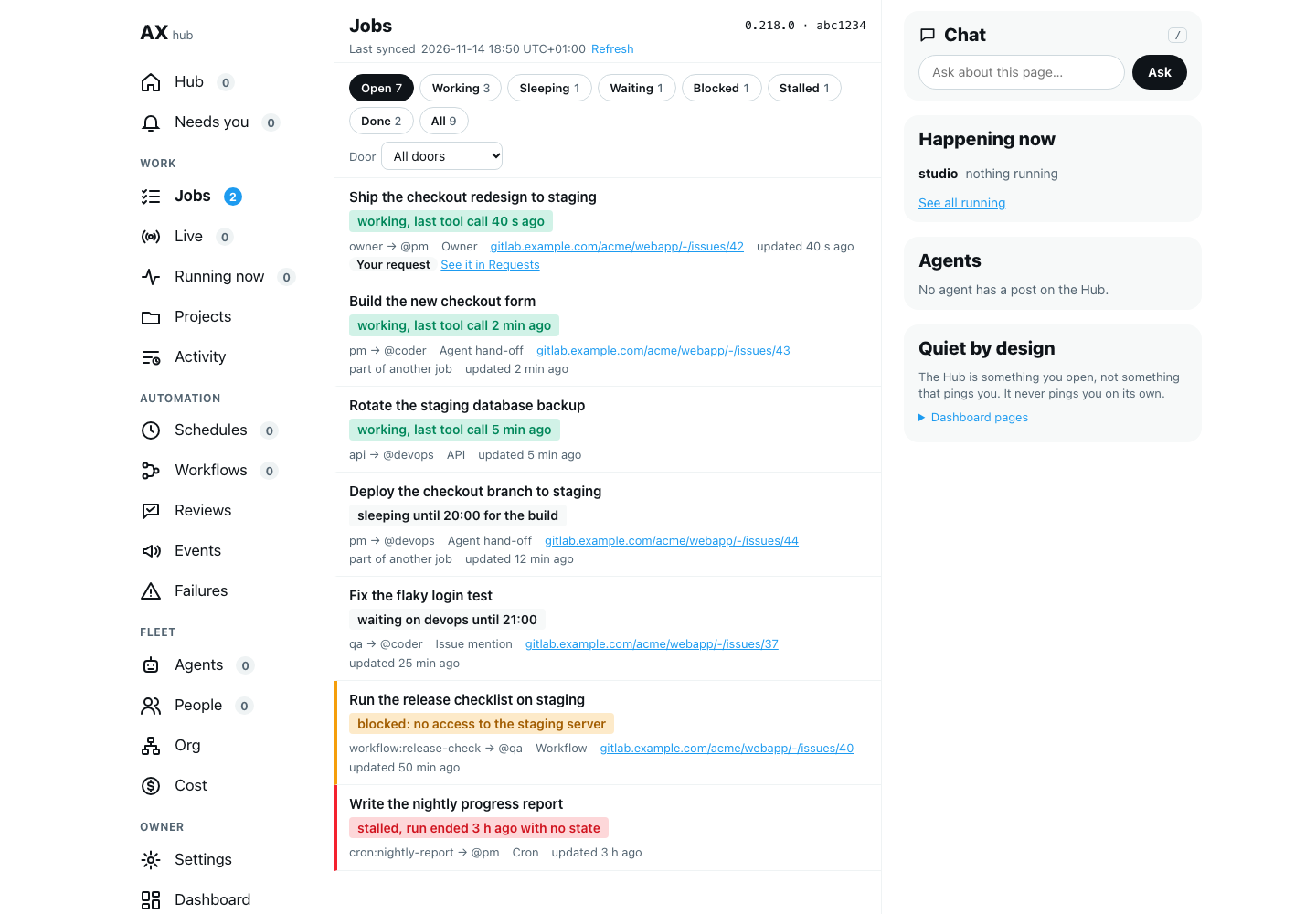
Each row has:
- The job's name: its headline, or the start of what was asked.
- The status line: the main thing on the row. See What the status line means.
- Who asked and who owes it: for example
pm → @coder. - The door.
- The home: a link to the issue or merge request, when the job has one.
- Updated: how long ago the job last moved.
- Your request: a tag on a job that you asked for yourself. See it in Requests opens Needs you on its Requests chip, where you can answer or close it.
What the status line means
The daemon writes the status line from facts it has: the run that is live now and its last tool call, the wake that is set, the name and due time of whoever the job waits on, or the absence of all three. It is never what the agent says about itself.
| State | Chip | A status line looks like | It means |
|---|---|---|---|
| Working | Working | working, last tool call 40 s ago | A run is on the job now. |
| Continue | Sleeping | sleeping until 18:00 for the build | The last run ended with work left. The daemon starts the next run at that time. |
| Waiting | Waiting | waiting on devops until 19:00 | The job waits on someone named, until a due time. |
| Blocked | Blocked | blocked: no access to the server | The job cannot go on. The line says why. Shown in amber. |
| Stalled | Stalled | stalled, run ended 3 h ago with no state | No run is on it, no wake is set and it waits on nobody. The daemon found this itself. Shown in red. |
| Done | Done | done: merged in the release | Finished, with its proof. |
| Dropped | under All | dropped | Declined or dropped. |
A line that starts with nobody on it is an open job that nothing holds right now. The daemon marks it stalled at its next check. It is shown in red too.
Every open job is meant to have one of three things: a live run, a set wake, or a named person or agent it waits on with a due time. A job with none of them is stalled, and that is what the page is for: to make such a job visible instead of quiet.
How long a job is kept
Jobs leave the list by themselves after the number of days set in Keep closed requests for (days) (requests.retentionDays, 90 by default; see open requests).
- A finished job leaves that many days after it finished.
- A working, blocked or stalled job leaves that many days after it last moved. This clears the jobs of a schedule that keeps failing, and jobs whose run was cut by a restart.
- A sleeping or waiting job is kept: its wake or its due time decides what happens to it.
- Your own requests follow the rules of open requests: an open request is never removed.
Filter by state or door
- Select a chip to list one state: Open (every state that is not finished), Working, Sleeping, Waiting, Blocked, Stalled, Done or All. Each chip shows how many jobs it holds.
- Choose a door under Door to keep only the jobs that came in that way.
- The address keeps both, so you can share or bookmark a filtered list.
The list shows the 100 most recently active jobs that match. A line under the list says so when there are more.
Open a job and follow its tree
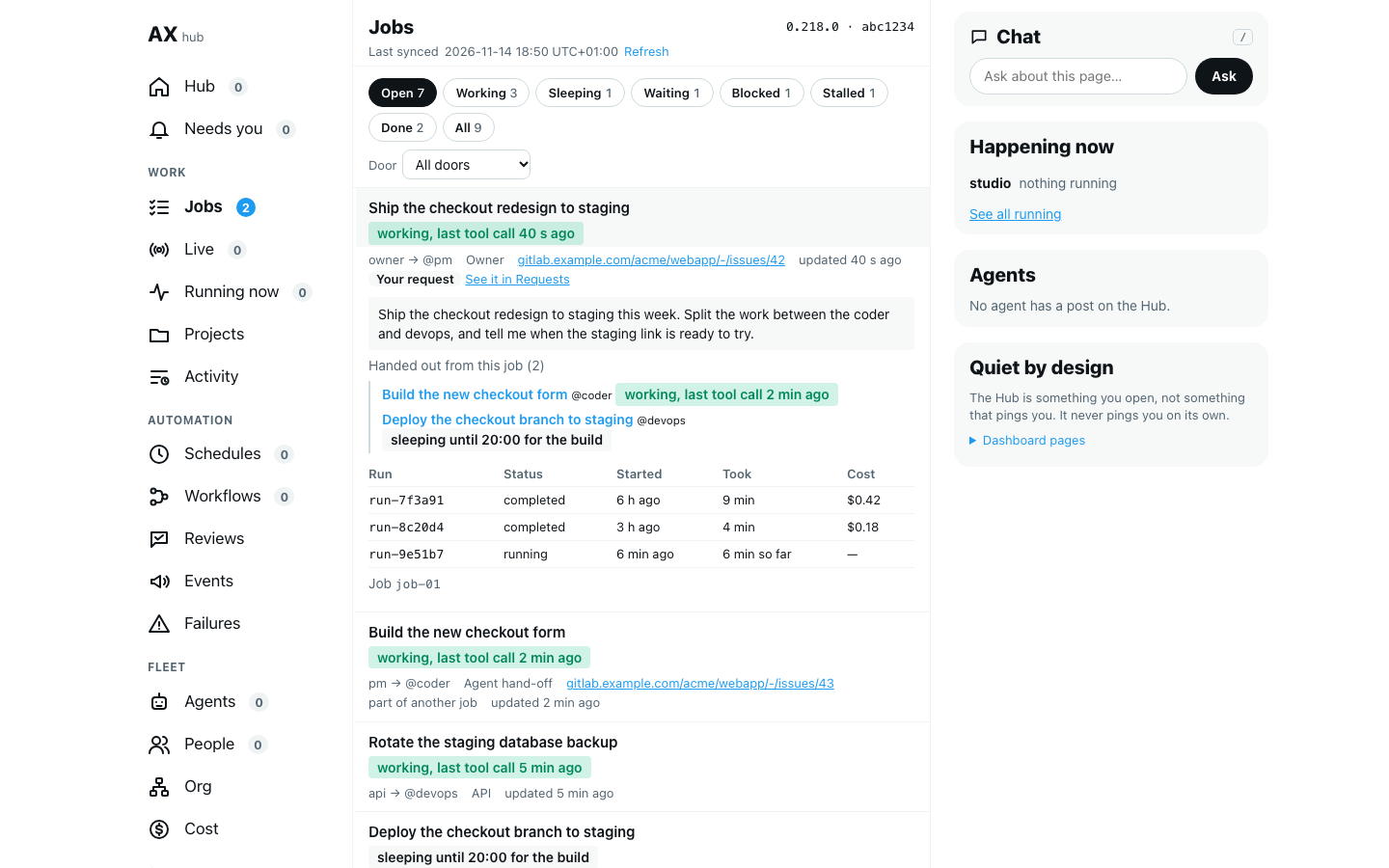
- Select a row. It opens in place.
- The details show the full text of what was asked, and every run of the job: its status, when it started, how long it took and what it cost.
- Part of names the job this one came from, when an agent handed it out while working on another job. Select it to open that job.
- Handed out from this job lists the jobs this one started. Select one to open it.
- Select the row again to close it.
A job handed to another machine. When an agent hands work to an agent on another machine, the job is kept on both: here it waits on that machine, there the agent works on it. The two rows have the same id. Opened here, the job shows On and the machine's name, with the job's status line as that machine gives it now and the jobs it handed out there. Select one to open it on that machine. In the list, the row here quotes the other machine's line, for example waiting on devops@clawd (there: working, last tool call 40 s ago); the daemon reads it again every minute, 30 jobs at a time. With more than 30 open jobs on other machines, each is read in turn, so a line can be a few minutes old. If the Hub does not read that machine, or that machine keeps no jobs or runs an older AgentX, the details say the job was not read and the row keeps its own line.
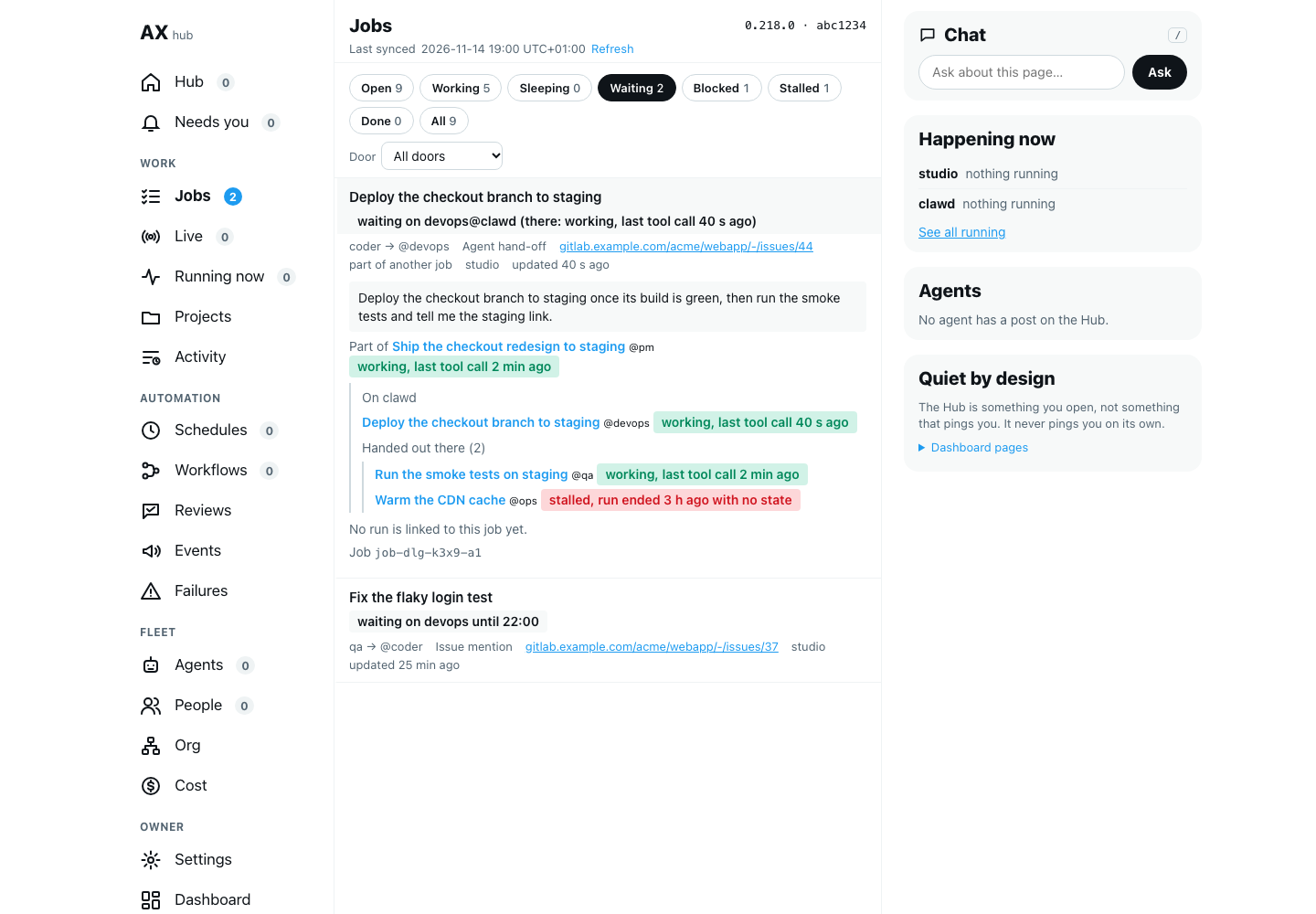
Parent and children are the job's tree. Start at your own request and follow it down to see which agent has each part now, and which part is stalled.
How a job keeps going
Work often takes more than one run. The daemon, not the agent, keeps a job going between runs.
- Continue: a run that ends with work left says when to go on and what is left. At that time the daemon starts the next run, in the same chat, and gives it the job's note. The job shows
sleeping until …in between. - A cap on every job: the daemon wakes one job at most 20 times, and stops once its runs have cost 10 US dollars. The reply an agent writes on its own when background work ends counts toward that cost too. A job at its cap is marked stalled, and its line says which cap. Change the caps with
requests.jobs.wake.maxWakesandrequests.jobs.wake.maxCostUsd. - A wake that cannot start: when the agent is busy, the woken run waits for a free slot; it is never put in the chat's message queue, so its reply is not posted in a chat where nobody asked for it. If no run could start at all, the daemon tries again 5 minutes later. If the run started and then failed (a time limit, a model error), the daemon does not try again: the job shows
blockedwith the reason. - Background work: when a run ends but left a script or a build running, the job waits on it (
waiting on its background work until …) instead of closing. When that work ends, the daemon wakes the job that waits on it and gives it the work's closing reply; another job in the same chat is left as it is. Before, that reply was dropped. The agent's process is kept for up to 3 hours while such work is open (processPool.maxBackgroundSeconds); before, it was stopped after 45 minutes. - The check each minute: an open job must have a live run, a set wake, or someone named it waits on with a due time. The daemon checks this every minute. A job with none of the three for 10 minutes (
requests.jobs.wake.graceMinutes) is marked stalled, with the reason on its status line. - A stalled job is told: at the same check, the daemon tells the agent that asked for the work, once, with a
[Job stalled]line that gives the job, the reason and what was asked. The line is a notice: the agent reads it at the start of its next run, and no run is started for it. A schedule has nobody who asked, so its own agent is told. The agent that owes the job is told when the one who asked is not an agent on this machine (a person's request, a comment on an issue, an agent on another machine). Notices are kept in memory: one not yet read when the daemon restarts is lost, and the job still shows as stalled on this page. - A job handed to another machine: the check above leaves it to that machine. When that machine still has no record of the job 6 hours after it last moved here, the hand-off never started there or was lost. The job is marked stalled with that reason, and the one who asked is told. Every open job on another machine is checked this way, however many there are and however old. This applies only when that machine keeps jobs and says it has no such job. A machine that keeps no jobs (
requests.jobs.enabledis off there), or that runs an older AgentX that cannot say which, may have done the work: the job here is left as it is. - A schedule's job that says
continue: the daemon does not wake it. The schedule's next firing goes on with the same job, so it is not marked stalled while its schedule is on. It is marked stalled when the schedule was turned off or removed.
Your own requests keep their own checks (quiet time, resend, pick-up). The check each minute holds one of them only after a run has stated a job state on it.
Two older paths now go through the job's wake:
- Watchers: when a watcher fires on work a job handed to another agent, the daemon wakes the job that handed it out, with the watcher's alert as its note. Before, the alert started a run of its own. With no such job (jobs turned off, or work handed out from a person's chat), the alert run starts as before.
- Resend once: a request that a usage limit or a restart stopped is sent back once by waking its job, with the reason as its note. If the wake does not take it, the pick-up turn sends it, as before.
Both count toward the job's caps. Time-limit continuation and pick-up still work as before, and a run they start stays on the same job. They and the older delegation log and watcher table are due to be removed on Monday 16 November 2026 at 12:00 UTC, unless Anis decides otherwise.
Jobs are kept while requests.enabled is on. To keep jobs on a node where requests are off, set requests.jobs.enabled to true: every run that is not your own turn gets its job, and your own requests leave no record there. Set it to false to keep no jobs at all.
To turn the wake and the check off, set requests.jobs.wake.enabled to false in agentx.json. An agent's process with background work open is then stopped after 45 minutes again, not 3 hours. The settings are listed under requests.
Read the jobs from a script
GET /jobs on the daemon (loopback, or a mesh token) gives the same list as JSON. Agents and scripts use it. Without filters it gives the open jobs, most recently active first, at most 100. Filters, all optional:
| Filter | Keeps |
|---|---|
state= | open (the default), all, or one or more of working, continue, waiting, blocked, stalled, done, dropped, separated by commas |
door= | owner, a2a (agent hand-off), mention, cron, workflow or api |
agent= | Jobs this agent owes |
requester= | Jobs this requester asked for |
parent= | The children of this job |
roots=1 | Jobs with no parent |
limit=, offset= | A page of the list. limit is 1 to 500. |
The reply has jobs (each with its status line), total and counts (jobs per state). GET /jobs/<id> gives one job with its runs, its parent and its children. Add ?tree=1 and a job handed to another machine also comes with remote: that machine's own job, runs and children, or an error saying why it could not be read. Both only read.
When the daemon has no job with that id, GET /jobs/<id> answers 404 with ledger: "on" means this machine keeps jobs and has no such job; "off" means this machine keeps no jobs, so it cannot say whether the work happened.
Check it worked
- Browser: send an agent a small task that it must hand to another agent.
- On the Hub, select Jobs in the nav. The Open list has a row for the hand-off, with the door Agent hand-off and a status line that starts with
working. - Select the row. Its details list a run, and its status is running.
- When the work ends, select Done. The job is there, and its status line starts with
done. - Terminal: run
curl -s "http://127.0.0.1:18800/jobs?state=all". The same job is injobs, with the samestatus.
If something is wrong
- Jobs is not in the nav: this machine runs an older AgentX. Update it, then reload the page.
- The list is empty but agents are working: the jobs may be on another machine. Check for a Not read line above the list; it names each machine that did not answer. A machine with an older AgentX has no jobs to show; update AgentX on it.
- A job stays
workingwith no recent tool call: open it and look at its runs. A run that is still running may be on a long step. If no run is running, the daemon marks the job stalled at its next check. - A job is stalled: open it to see its last run and its tree. Ask the agent that owes it to pick it up, or, when it is your own request, select See it in Requests and decide on it there.
- A job handed to another machine stays
waitingfor days: that machine may keep no jobs, or run an older AgentX. Open the job: it shows Not read from and that machine's name. The daemon does not mark such a job stalled, because it cannot tell whether the work happened. Update AgentX on that machine, or setrequests.jobs.enabledtotruethere. - The page says "Could not read the jobs": the machine answered with an error or refused the dashboard's key. Select Refresh on the Hub. If it stays, see It's not answering.
- You were looking for your recurring jobs: they are under Schedules in the nav, under Automation.