
Soak a release before it reaches a second machine
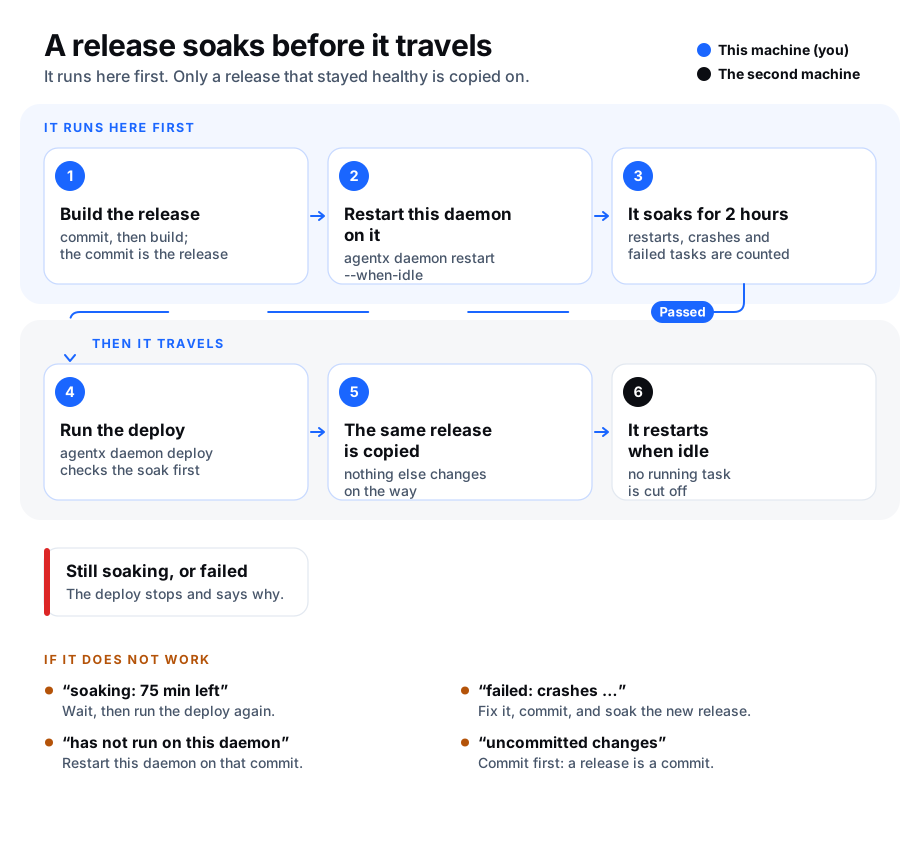
A release is one commit of AgentX: the short code that git gives it, such as 1a2b3c4. When you run AgentX on two machines, a broken release should break only the first one. The canary soak makes sure of that.
With the soak switched on, agentx daemon deploy copies a release to the second machine only after that same release has run on this machine's daemon for a while (2 hours unless you change it) without new trouble. The daemon is the AgentX program that keeps running in the background.
During the soak, AgentX counts, from what it already records:
- restarts: times the daemon was restarted on this release, after the restart that started the soak.
- crashes: times it stopped without being asked to (a crash, or a forced kill).
- crash loop: several restarts close together (
resume.crashLoop: 3 within 10 minutes unless you change it). - failed tasks: tasks that ended with an error or ran out of time. A task someone stopped on purpose does not count.
- error rate: the share of failed tasks, compared with the release that ran before. This check is skipped when there were fewer than 10 tasks to compare.
When the soak time is up and every check is within its limit, the release is marked soak: passed. When a check goes over its limit, the release is marked failed right away, and the deploy says which check failed. The first pass or fail is kept, so trouble after the soak does not undo a pass.
The soak is off unless you switch it on. While it is off, agentx daemon deploy works exactly as before.
Only agentx daemon deploy is held back. Other ways of putting a release on a machine, such as copying files by hand, running git pull there, or a self-update, are not checked.
Switch the soak on
- Terminal: go to the folder that holds
agentx.jsonand the AgentX code you deploy from. - Editor: add this to
agentx.json:json"quality": { "canary": { "enabled": true } } - Terminal: restart the daemon so it records which release it runs:
agentx daemon restart --when-idle.
Write true exactly as shown. Any other value, such as "true" in quotes or a ${…} placeholder, leaves the soak off.
The settings and their limits are listed under quality.
Deploy a release
- Terminal: commit your changes. A release is a commit, so a folder with uncommitted changes is refused.
- Terminal: build and restart this machine's daemon on it:
pnpm build, thenagentx daemon restart --when-idle. The soak starts now. - Terminal: see how far along it is:shIt prints the release,
agentx daemon soaksoak: soaking,passedorfailed, the minutes left, and each check with a ✓ or ✗. - Terminal: once it says
passed, try the deploy without changing anything:shIt printsagentx daemon deploy second-host --dry-run✓ Canary soak: 1a2b3c4: soak passedand the commands it would run. - Terminal: deploy for real:
agentx daemon deploy second-host --restart. AgentX builds the release again from the same commit, so the second machine gets exactly what soaked here. If the folder moves to another commit while the deploy runs, AgentX stops before copying anything.
Replace second-host with the name or address of your second machine.
Deploy anyway (override)
Use this only when waiting is worse than the risk, for example to ship the fix for an outage.
- Terminal: run the deploy with a reason:sh
agentx daemon deploy second-host --override-soak "fix for the login outage" - AgentX prints
⚠ Canary soak: soak override (…), then deploys. - The override is written, with your reason, the release, the machine and your user name, to
.agentx/canary/events.jsonl.
A --dry-run, with or without --override-soak, shows what would happen and writes nothing: no soak result is kept and no event is logged.
See the soak history
- Terminal: run
agentx daemon soak --history. It prints how many releases passed, failed and were blocked, then one line per release. - Terminal: add
--since 7for the last 7 days only, or--jsonfor output that other tools, such as a weekly quality report, can read.
Check it worked
- Terminal: run
agentx daemon soakright after a restart on a new commit. It sayssoak: soakingwith about 120 minutes left. - Terminal: run
agentx daemon deploy second-host --dry-run. It prints✗ Canary soak: soaking: … min leftand changes nothing. - After the soak time, run the same two commands again. They say
passedand✓ Canary soak: … soak passed.
If something is wrong
has not run on this daemon yet: this machine's daemon has not been restarted on that commit. Build, thenagentx daemon restart --when-idle.has uncommitted changes, so it is not a release: commit first, then restart this machine's daemon on the new commit.interrupted: replaced after …: another release was started here before the soak ended. Restart the daemon on the release you want to deploy, and wait again.failed: crashes (1 unclean stop(s) …): the daemon stopped without being asked to during the soak. Readagentx daemon logs, fix the cause, commit, and soak the new release.not judged: task history unavailable …: AgentX could not read its task history in.agentx/db.sqlite. Check that you run the command from the daemon's own folder, then runagentx doctor. Nothing is recorded, so the release is judged again once the history can be read.not judged: the release ledger (.agentx/canary/releases.json) can't be read: the file that keeps each release's pass or fail is damaged. AgentX will not judge a release again, because it might have failed before. Open the file and repair it, or move it aside if you accept losing the kept results, then deploy again.this checkout moved from … to …: the folder changed commit during the deploy. Run the deploy again; it checks the soak of the new commit.failed: error-rate (…): more tasks failed than on the release before. Look at the failed tasks on the dashboard, fix the cause, and soak a new release.⚠ Canary soak: … is not valid JSONor… is "…", not true: the deploy went ahead without the soak, because the switch could not be read astrue. Fixagentx.json(it must be valid JSON, and the switch must be the wordtruewithout quotes), then deploy again.- The deploy is not gated at all: check that
quality.canary.enabledistruein theagentx.jsonof the folder you deploy from, or pass that file with--config. - A release passed, but you want to block it after all: the first decision is kept in
.agentx/canary/releases.json. Deploy a newer release instead.