
Install
Pick the path that matches you. All three end up at the same place: a working daemon and a dashboard at http://127.0.0.1:4202.
Option A: One-line installer (recommended)
curl -fsSL https://raw.githubusercontent.com/anis-marrouchi/agentx/master/install.sh | bashThis:
- Checks for Node.js 20+ (uses nvm if available).
- Installs
agentix-cliglobally. - Runs
agentx setup— the daemon starts in the background and your browser opens athttp://127.0.0.1:4202/setup.
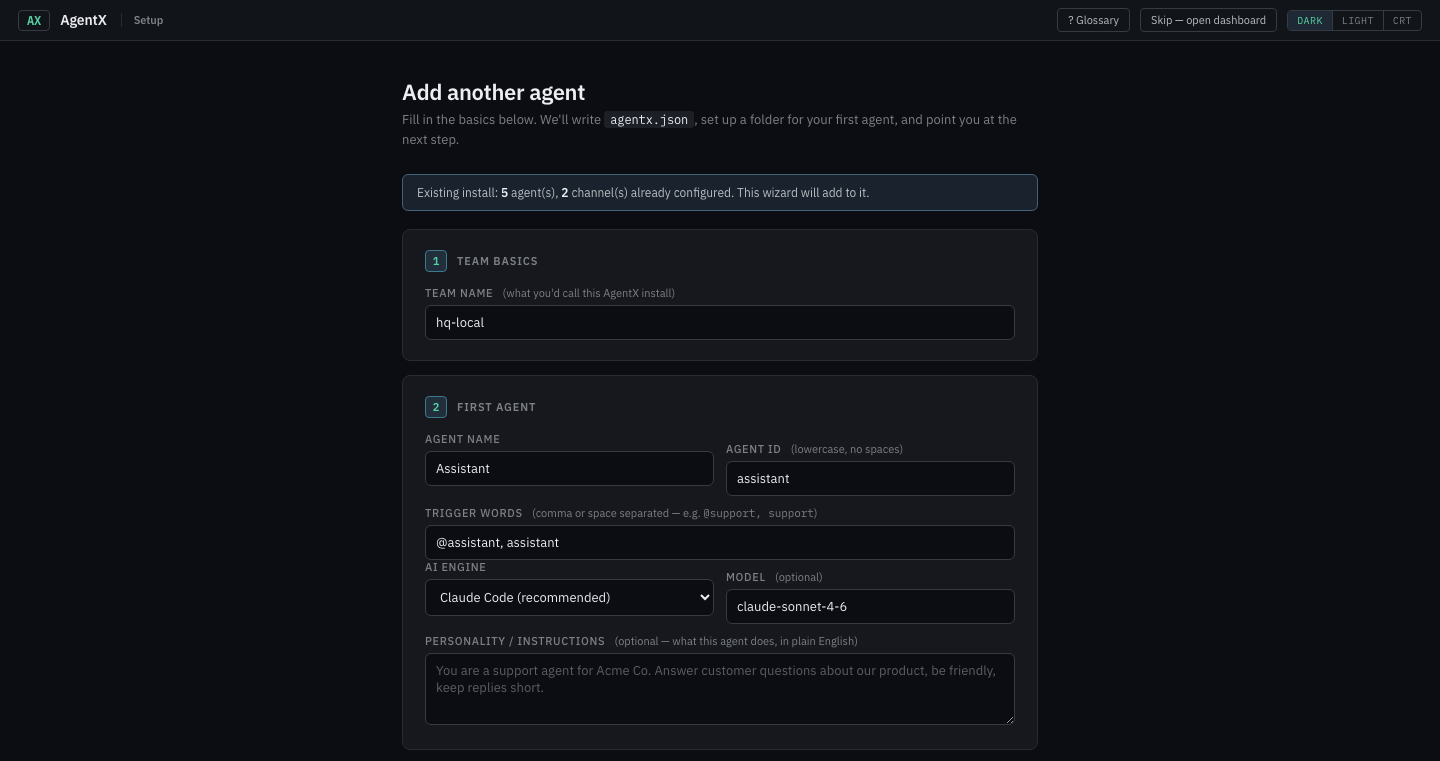
The wizard collects: team name, first agent (name, trigger words, personality), optional Telegram bot token, optional Anthropic API key. It writes agentx.json + .env + scaffolds the agent's folder for you — no hand-editing.
From that moment on, everything is in the dashboard: agents, channels, schedules, webhooks, mesh peers, tokens, the intent graph. The CLI is always there as a parallel control plane — every button maps to a verb — but you never need to open an editor.
Jump straight into → Journey 1 — Your first agent on Telegram for a guided walkthrough.
Option B: Docker
Best for servers you don't want to install Node on.
git clone https://github.com/anis-marrouchi/agentx.git
cd agentx
cp agentx.example.json agentx-data/agentx.json   # or empty, and run `docker compose run daemon setup`
cp .env.example .env                              # add your API keys here
docker compose up -d
The docker-compose.yml runs two containers (daemon + dashboard) sharing a bind-mounted ./agentx-data directory — nothing is stored inside the image, so upgrades are docker compose pull && up -d.
Option C: Manual npm
npm install -g agentix-cli
agentx setup               # opens the wizard
If you'd rather skip the wizard and edit JSON by hand, agentx init still works:
mkdir my-agentx && cd my-agentx
agentx init
This creates:
agentx.json— the main config file.env— template for secrets (loaded automatically at startup).agentx/— runtime data directory (sessions, wiki, cron logs, task history, tokens — gitignored)
Prerequisites (reference)
- Node.js 20+ —
node --version - Claude Code CLI (for
claude-codetier agents) — install guide. - Codex CLI (for
codex-clitier agents) — install withnpm i -g @openai/codex, then verify withcodex --version. - OpenCode CLI (for
opencodetier agents) — follow the OpenCode install guide, authenticate a provider, then verify withopencode --version. - A channel credential: a Telegram bot token from @BotFather, a Discord bot token, a GitLab API token, or a WhatsApp session. Telegram is the fastest to get started.
3. Add your first agent
agentx agent addYou'll be asked for:
| Prompt | What it means |
|---|---|
| ID | Short slug, e.g. support |
| Name | Display name, e.g. Support Assistant |
| Workspace | Directory for this agent's instructions, skills, MCP config. Defaults to ./agents/<id> |
| Tier | claude-code uses claude; codex-cli uses codex; opencode uses your OpenCode provider configuration; sdk uses the Anthropic Agent SDK; orchestrator uses AgentX's provider loop. See Agent execution tiers |
| Model | e.g. claude-sonnet-4-6, claude-haiku-4-5 |
| Mentions | Handles that route to this agent, e.g. @support_bot, @support |
An agent is just a directory with configuration files. No code required.
4. Add a channel
agentx channel addPick one:
- Account name (free label): default
- Bot token: <from @BotFather>
- Bind to agent: <your agent>- Bot token: <from Discord Developer Portal>
- Bind to agent: <your agent>- GitLab host: https://gitlab.com (or self-hosted)
- API token: <personal access token>
- Webhook port: 18811
- Secret: <random string>
- Project routes: <project_id>:<agent_id>- Default agent: <your agent>
- Session dir: .agentx/whatsapp-sessions
- First run prints a QR code — scan with WhatsApp on your phone5. Start the daemon
agentx daemon startYou'll see each channel come up, each agent register, and (if configured) mesh peers health-check.
Watch it live
In a second terminal:
agentx daemon watchColor-coded activity feed:
10:31:08 → Routing [telegram/You] -> "Support": Hello!
10:31:08 ▶ [support] executing task (1/2)
10:31:15 ✓ [support] completed in 7234ms
6. Verify
agentx daemon status   # PID, channels, agents, crons, mesh peers
agentx config check    # Validate agentx.json + workspaces
agentx config show     # Print resolved configuration
DM your Telegram bot — the reply should arrive within a couple of seconds.
No manual JSON edits required
From now on every config change has a CLI verb:
agentx config set agents.support.model claude-sonnet-4-6
agentx schedule "every morning at 9" --agent support --do "..."
The daemon hot-reloads crons automatically. Sections that still need a restart (agents, channels, mesh) are flagged in the output.
Run in the background
agentx daemon start --detachFor auto-start on boot, use systemd (Linux) or launchd (macOS). A minimal systemd unit:
[Unit]
Description=AgentX Daemon
After=network.target

[Service]
Type=simple
User=your-user
WorkingDirectory=/path/to/your/agentx
ExecStart=/usr/bin/node /path/to/agentx/dist/cli.js daemon start
Restart=always
RestartSec=5

[Install]
WantedBy=multi-user.target