
2. Scheduled reports that page you on failure
Time: 5 minutes · Ends at: a daily job that compiles a report — and alerts your Telegram if it fails three days in a row.
Scenario
Every weekday morning at 9am, the ops agent should check pipeline health, open issues in your issue tracker, and post a 5-line summary to your team's Telegram group. If it fails three mornings in a row (holiday? service outage?), AgentX auto-disables the job and DMs the on-call engineer.
Prerequisites
- A working agent from Journey 1
- A Telegram group chat where reports land (just add your bot to a group)
Step 1 — Find your group's chat ID
AgentX needs the group's numeric ID. Three ways to get it:
From the dashboard (easiest):
Send any message in the group mentioning your bot. Open Live → agent card → the last handled message shows the chat ID in the header.
From the CLI:
agentx channel list # lists every channel + known chat IDsFrom Telegram's HTTP API:
- Send any message in the group
- Visit
https://api.telegram.org/bot<YOUR_TOKEN>/getUpdates - Copy the
chat.id— group IDs start with-100…
Step 2 — Add the schedule
Click Settings → Schedules in the dashboard.
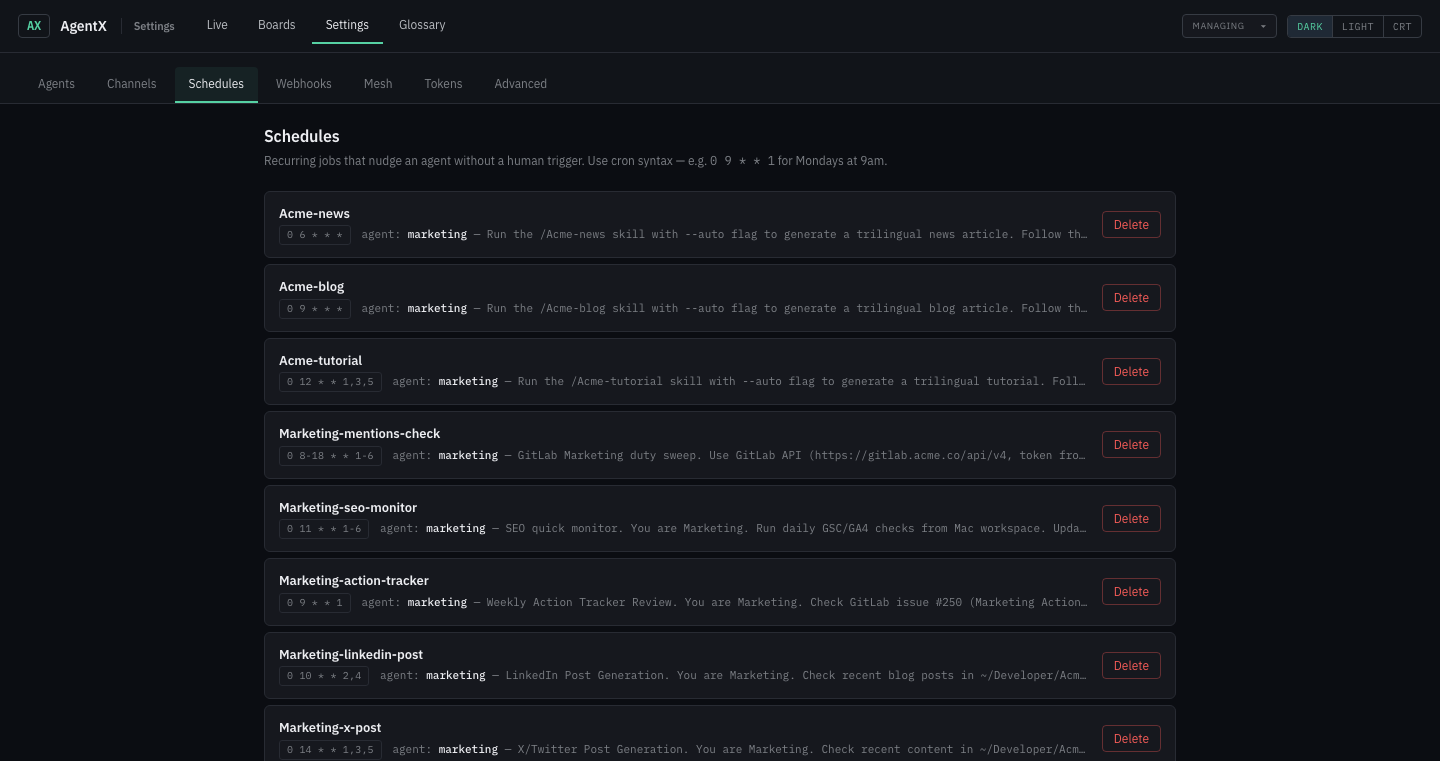
Fill the form at the bottom:
| Field | Example | Notes |
|---|---|---|
| Schedule ID | morning-standup | Lowercase, must be unique. |
| When | every weekday morning at 9 | Plain English — see the phrasings below. |
| Agent | ops | Which agent runs on each tick. |
| Prompt | The work to do on each firing (see below). | Free text; same as a message you'd DM the agent. |
| Timezone | Africa/Tunis | IANA zone — cron fires on local wall-clock time. |
| Notify on error | ✅ | Pings your default notification target if a run fails. |
| Auto-disable | ✅ | Disables the job after 3 consecutive failures. |
Example prompt:
Post the morning standup to the team chat:
1. Pipeline status (passing / failing / in flight)
2. New issues opened in last 24h
3. Deployments since yesterday
4. Alerts pending
5. Top 3 priorities today
Keep each line under 15 words.
Click Save. The daemon hot-reloads — the cron is active immediately.
CLI equivalent
agentx schedule "every weekday morning at 9" \
  --agent ops \
  --do "Post the morning standup..." \
  --notify me \
  --on-error notify,disable \
  --timezone Africa/Tunis
Step 3 — Set a default "notify me"
So every future --notify me goes somewhere sane without you retyping the chat ID. Settings → Advanced → Notifications or:
agentx config set notifications.destination.channel telegram
agentx config set notifications.destination.chatId -1001234567890
agentx config set notifications.destination.accountId support   # the bot account
Step 4 — Watch one fire
Set the schedule to every minute for a moment (in the dashboard or agentx schedule edit morning-standup and change the cron string to * * * * *). Open Live and keep it visible.
Within a minute you'll see:
- The
opsagent card flips to handling - A small
cronbadge appears on the card while the cron run is in flight - The task completes, counter increments, last-reply preview updates
Revert the schedule when satisfied.
English phrasings
You don't have to memorize cron syntax. Both the dashboard and CLI accept:
every morning at 9              → 0 9 * * *
every evening / every night     → 0 18 * * *  /  0 22 * * *
weekdays at 6pm                 → 0 18 * * 1-5
weekends at 10am                → 0 10 * * 0,6
every monday at 10am            → 0 10 * * 1
every tuesday and friday at 3pm → 0 15 * * 2,5
every 15 minutes                → */15 * * * *
every hour / hourly             → 0 * * * *
every 2 hours                   → 0 */2 * * *
1st of every month at noon      → 0 12 1 * *
daily at 9:30am                 → 30 9 * * *
at midnight / at noon           → 0 0 * * *  /  0 12 * * *
Preview any phrase without saving:
agentx schedule parse "every tuesday and friday at 3pm"
#   → 0 15 * * 2,5
#   → At 03:00 PM, only on Tuesday and Friday
The failure pipeline
| Setting | Meaning |
|---|---|
log (always on) | Failures land in the daemon log regardless of other settings. |
notify | Pings your notification target. Triggers on the 2nd consecutive failure by default. |
disable | Auto-disables the job after 3 consecutive failures — no more alerts, no more runs. |
Retry schedule on failure: 30s → 1m → 5m → 15m → 60m. A successful run resets the counter.
Missed-run catch-up: if the daemon was stopped when the cron should have fired, AgentX runs the missed job once on the next startup (not every missed slot). Handy for laptops that sleep overnight.
Managing jobs later
In the dashboard: Settings → Schedules shows a card per cron with Delete and an inline enable/disable toggle. Editing in place (schedule, prompt, agent) hot-reloads the daemon.
From the CLI:
agentx schedule list                   # human-readable table
agentx schedule off morning-standup
agentx schedule on morning-standup
agentx schedule remove morning-standup
What's next
- Run the same agent across WhatsApp + Telegram → Journey 4 — Cross-channel
- Multiple agents in the same team → Journey 3 — Multi-agent group
- Feed the agent a real backlog of tickets → Journey 7 — Business layer
- All cron flags + config fields → Reference — Config schema