
Your data: what leaves your machine
AgentX runs on a machine you control. The AI model that writes your agents' replies does not: it belongs to a model provider, an online company such as Anthropic or OpenAI. To answer, the model has to read what you asked and what the agent needs to know, so that part leaves your machine every time an agent works. AgentX also asks Anthropic's Claude to review most finished tasks (see Task reviews below), whichever provider the agent uses. This page lists everything that leaves, where it goes, and how to keep it at home.
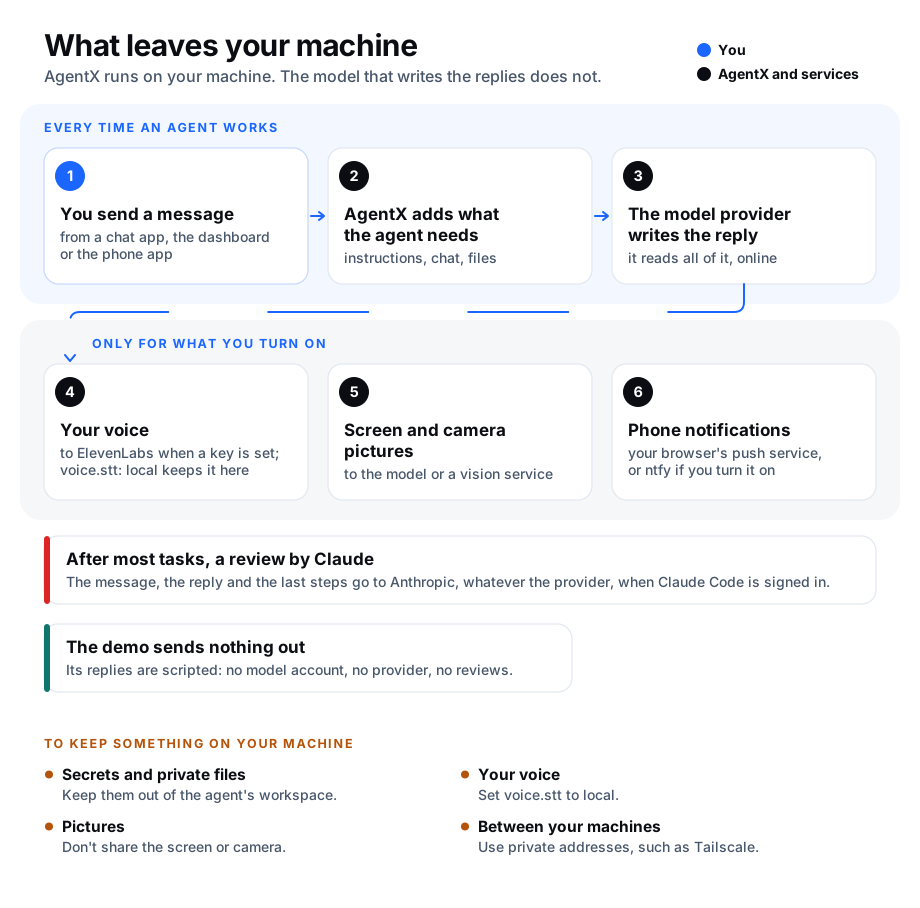
What goes where
| What | Where it goes | How to keep it on your machine |
|---|---|---|
| Your messages and the agent's replies | The agent's model provider. | A model that runs on your own machine keeps them away from the agent's provider. The built-in engines all use online providers. Task reviews (next row) still send them to Anthropic. |
| The agent's instructions and the conversation so far | The model provider, with every message. | As above. |
| Task reviews (the Monitor tab) | Anthropic, whatever provider the agent uses. After most finished tasks, the AgentX background service runs Claude Code (claude -p) with the task's message (up to 16,000 characters), the end of the final reply (up to 24,000 characters) and the last 60 steps of the task. Successful scheduled jobs, internal workflow steps and questions asked with Ask an agent are not reviewed. | No setting turns it off. Reviews only run when the claude command is installed and signed in on the machine that runs AgentX. Without it, each review fails on the Monitor tab and nothing is sent. |
| Files in the agent's workspace (its own folder) | The model provider, whenever the agent reads a file to do its work. Anything in that folder can be read. | Keep secrets and private documents out of the workspace. Put passwords and keys in .env, not in the workspace. |
| The dashboard page you ask about | Ask an agent sends the page name, its tab, and on some pages the filters, counts or rows in view, to the model provider. It never sends a picture of the page. See In-page chat. | Don't ask about a page that shows something you don't want sent. |
| Phone camera pictures | Shown to an agent: one picture each time you ask, to the agent's model provider. Shown to another computer: to that computer, normally straight from the phone. If relay servers (channels.webrtc.turnServers) are set, the video can pass through them when the two can't connect directly. See Share camera. | Share the camera with another computer only, or not at all. Use only relay servers you run or trust. |
| Screen pictures | Only when an agent sends one to its model, or when you run agentx look, which sends it to the vision service (OpenRouter). See Capture the screen. | Don't give the AgentX Helper app the Screen Recording permission. |
| Your voice (phone app and desktop assistant) | ElevenLabs, an online speech service, when an ElevenLabs key is set. This is the default (voice.stt set to auto). Without a key, it is turned into text on your computer, by Whisper or, in the Mac desktop assistant, Parakeet. | Set voice.stt to local. See Phone app: Chat and Desktop assistant. |
| Spoken answers in an agent's own voice | The text of the answer goes to ElevenLabs, only for agents whose voice is set to ElevenLabs. | Keep the free voices built into your computer (the default). |
| Notifications through ntfy | Only when channels.ntfy.enabled is on: the ntfy server, which is the public https://ntfy.sh unless you set your own server. On ntfy.sh, anyone who knows the topic name can read the messages. See Get notified. | Leave ntfy off, or point server at your own ntfy. Otherwise pick a long, random topic and treat it like a password. |
| Phone notifications | The push service of your phone's browser (run by the browser's maker), which delivers them to the phone. See Notifications. | Don't turn notifications on. |
| Profile pictures of agents and people | Nowhere. They stay on the machine where they were set, under .agentx/pictures/, with their metadata (such as where a photo was taken) removed. See Give agents and people a picture. | Nothing to change. |
| Messages on Telegram, WhatsApp, GitLab and other channels | They already live with that service. The agent's reply is posted back there. | Only connect the channels you need. |
| Work for another of your machines | The address you set for that machine (mesh.peers[].url). AgentX sends to whatever address is there, plain http:// included: it does not check that the address is private. See Add a second machine. | Use a private network address, for example a Tailscale one. Or use one machine. |
| Place reminders | Only which saved place, arrived or left, and the time; never where you are. See What leaves your phone. | Don't install the Android app. |
| The dashboard's fonts and text editor | Your browser downloads them from Google Fonts and unpkg (a public library host) when you open the dashboard. Only the request leaves, which shows your internet address; none of your data goes with it. | Nothing to change in AgentX: it needs no setting. Block those hosts in your browser if you prefer: pages fall back to standard fonts, but the text editor on an agent's page won't load. |
| Coding tasks sent to Claude cloud sessions | A copy of the repository goes to a Claude cloud session. See Cloud sessions. | Leave cloud sessions off (the default). |
Nothing goes to the makers of AgentX. AgentX sends no usage statistics anywhere. The Analytics views in the dashboard are counted on your own machines.
The demo sends nothing out. In the demo, the replies are scripted: no model provider is called and no account is needed.
Keep private files out of an agent's reach
- Terminal: list your agents:shUnder each agent, the line
agentx agent listworkspace:names its folder. - Terminal: look through that folder for anything you would not send to the model provider.
- Move those files out of the folder.
- Terminal: check that no password or key is written in
agentx.json:shYou should only see names such asgrep -n "token\|key" agentx.json${GITLAB_TOKEN}. The real values belong in.env. See Keep it safe.
Keep your voice on your computer
- Terminal: open
agentx.jsonin a text editor. - Add or change the
voicesection so it says:json{ "voice": { "stt": "local" } } - Save the file.
- Terminal: restart AgentX:sh
agentx daemon restart
On a Mac with the desktop assistant, you can do the same from its window instead:
- Mac: open Settings… from the AgentX menu and select the Speech tab.
- Under Speech to text, choose On this Mac.
- Select Save.
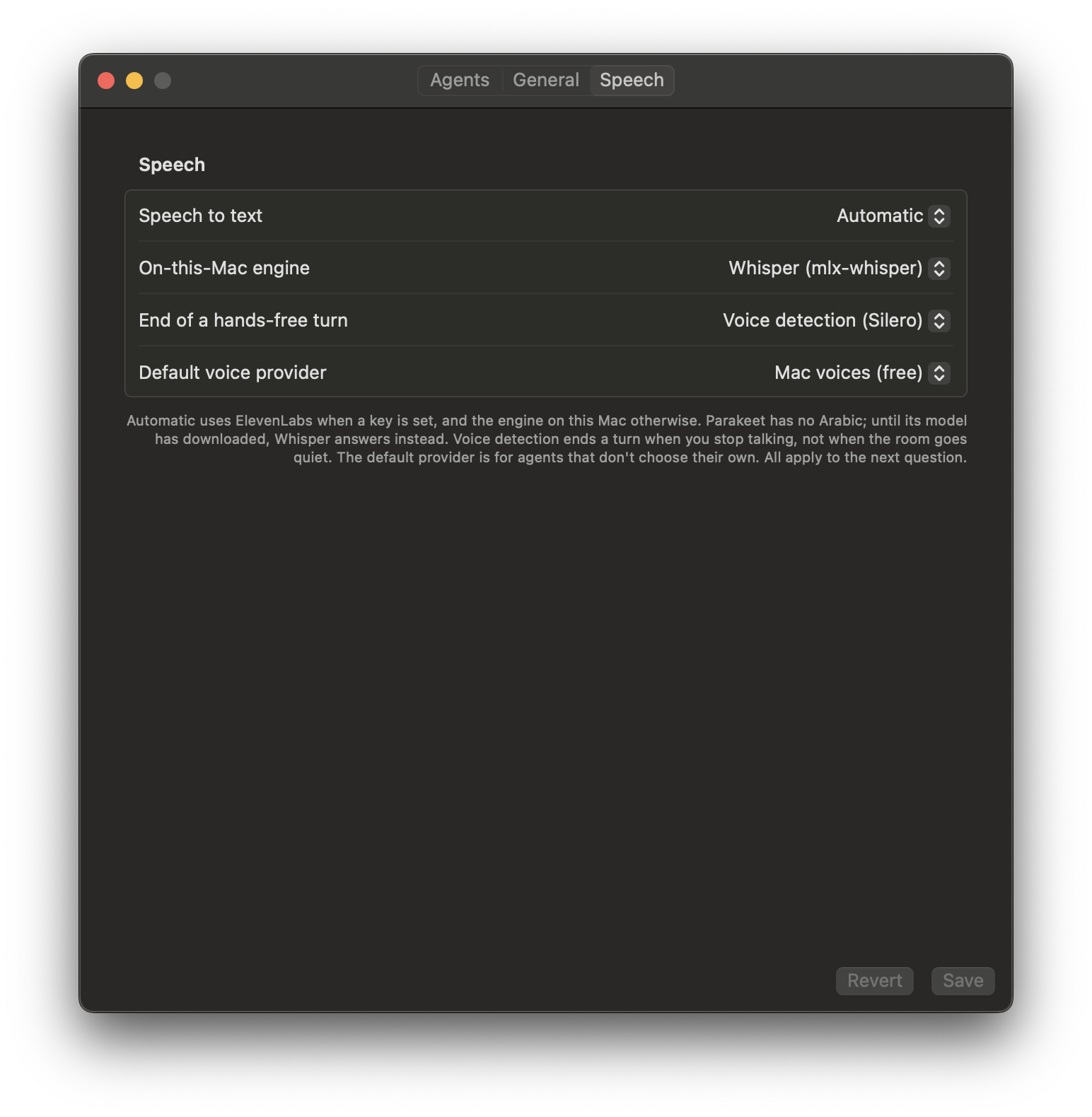
Speech to text on your computer needs Whisper installed. See What the computer needs for voice for the steps. The Mac desktop assistant can use Parakeet instead, which is built in: see Speech to text on this Mac.
What AgentX writes in your folders
AgentX keeps its own files in its own folder. It writes in your folders only in these places:
| Where | What | When | Turn it off |
|---|---|---|---|
| Each Claude Code or Codex agent's workspace | AGENTS.md, if missing. | When the daemon starts and when you add an agent. | Write your own AGENTS.md: AgentX never overwrites one. |
| Each Claude Code agent's workspace | CLAUDE.md and the files in .claude/rules/. A file AgentX wrote is marked as its own and kept up to date; a file without the mark is yours and left alone. | Same. | Remove AgentX's mark from the file. |
| Each Claude Code agent's workspace | .claude/settings.json, if missing; afterwards only the keys AgentX needs are added (its hooks, and the ObservationPack hook when session.observationPack is on). | Same. | session.observationPack.enabled: false for the ObservationPack hook. |
| Each git folder a stopped task's background builders changed, a shared checkout too | One commit, made by AgentX, holding the changes not committed, and a local branch agentx/wip/<taskId> pointing at it. The checkout, its branch, its index and its files are not changed. Nothing is pushed. | On every stop of a task that had started builders. See Background builders. | signals.saveBuilderWork: false |
Check it worked
- Terminal:
grep -n "stt" agentx.jsonshows"stt": "local"if you chose to keep your voice at home. - Phone or Mac: speak a short question. The words appear as before, with no ElevenLabs key needed.
- Terminal: the agent's workspace folder holds only files you are happy to send to the model provider.
- Terminal:
grep -n "url" agentx.jsonshows a private address (for example a Tailscale one) for each machine undermesh.peers.
If something is wrong
- Voice input stopped working after you chose
local: Whisper orffmpegis not installed on the computer. On the Mac desktop assistant, you can choose Parakeet instead. Follow What the computer needs for voice. - You sent something private by mistake: the provider's own rules decide how long they keep it. Read your model provider's privacy policy, and change any password or key that was in it as described in Replace a token that leaked.
- You are not sure which provider an agent uses: run
agentx agent listin a terminal. It shows each agent's engine in brackets, such as(claude-code); the engine's own settings name the provider. See Settings: agents and runtime.