
Follow a request of several steps
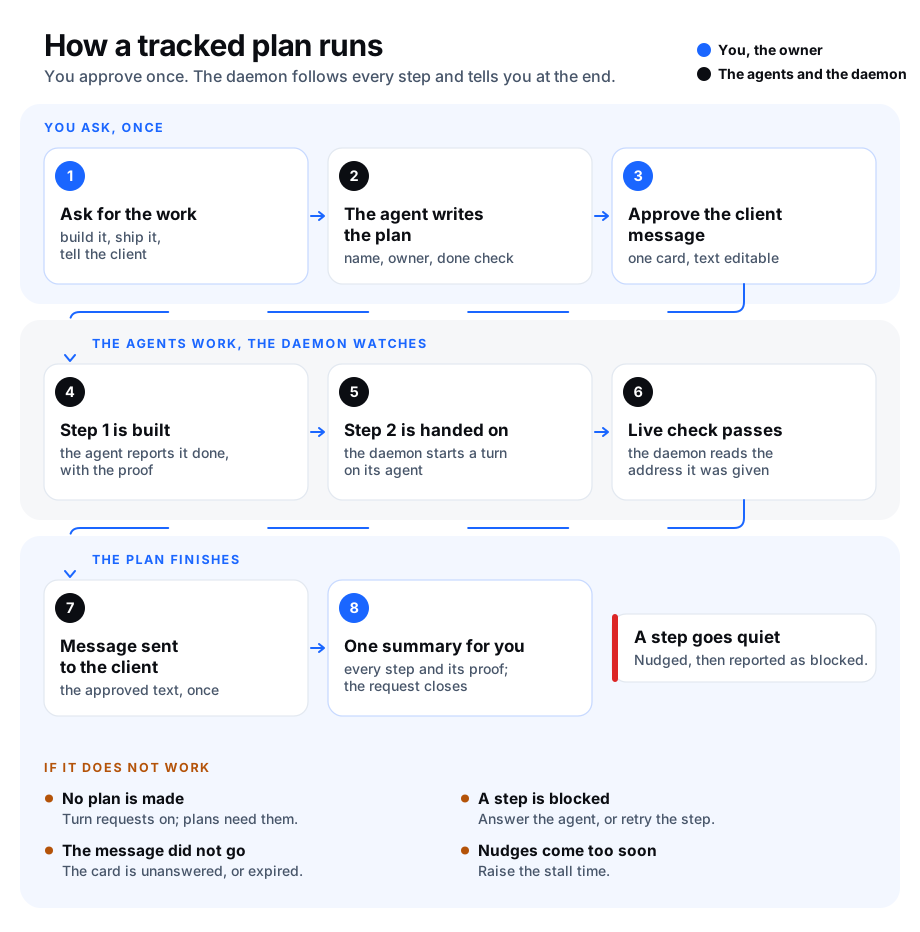
Some requests take several steps, done by different agents: build a fix, deploy it, check it is live, tell the client, tell you. Without a record of the whole chain, a step can wait between two agents and nobody notices. A tracked plan keeps that record. It follows each step until the whole request is done.
A plan is part of open requests, so open requests must be on.
How a plan works
- You ask an agent for work that takes two or more steps.
- The agent takes the request on and writes a plan: the steps in order. Each step has a name, an owner (the agent that does it) and a done check (what proves the step is finished, like "pull request merged" or "the site shows version 2.4.1").
- Some steps need your yes before they run. By default these are message steps: a message the daemon sends for you, for example to a client. When the plan is made, each of these steps raises one decision card. The message is on the card and you can edit it before you say yes.
- The steps run one after the other. When a step starts, the daemon gives it to its owner agent. The agent reports progress, and reports the step as done with the proof.
- A step can carry an address to check. The daemon reads that address every minute and marks the step done as soon as it answers (and shows the expected text, when one is given).
- When the steps before an approved message are done, the daemon sends the message itself. It does not ask you again.
- When a step shows no progress for a while (30 minutes by default), the daemon nudges its agent: it reminds the agent of the step and asks for a report. Every nudge is written to the plan's log. After the last nudge (3 by default), the step counts as blocked. When the agent reports new progress (words that differ from its last report), the nudges count from zero again. The plan's log marks that report with (nudges reset from N), where N is how many nudges the step had. A report that only repeats the last one keeps the count, so a step that has stopped moving is still blocked.
- You hear about a plan only twice at most: once when a step is blocked and needs you, and once at the end, with one summary of every step and its proof. Then the request closes as done.
Plans are on as soon as open requests are on. Agents make a plan only for work of two or more steps. One-step work stays an ordinary request.
Keep a moving step going
A nudge only comes after 30 quiet minutes. With requests.plans.continue on, the daemon does not wait when the work is moving. When an agent's turn on a step ends and the step moved, the daemon starts the agent's next turn on that step at once. The step moved when:
- its count went down during the turn, if it has a count check (see
check.countbelow), or - the agent reported new progress during the turn, if it has no count check. A report that only repeats the last one does not count.
A turn that moved nothing is left to the nudge, as before. A step that is done, blocked, or past its count goes on as usual.
These turns have a daily cap per goal, or per request when it has no goal: 10 turns and $5 by default. At the cap you are told once, and the nudges take over until 00:00 UTC. Every such turn is written to the plan's log as continued.
agentx config set requests.plans.continue.enabled true
# Try it on one plan first: its request id or goal id
agentx config set requests.plans.continue.only '["req-01M672EQ282FFN5VZANBZAJHY2"]'
agentx config set requests.plans.continue.maxTurnsPerDay 10
agentx config set requests.plans.continue.maxCostUsdPerDay 5
A plan follows one chain of steps. To work through a list of issues with several agents at once, the lead runs them as a sprint instead: see Run a sprint in lanes.
Plan before starting
Some work should not start without a plan. By default, that is:
- Code work: changing a program, a site or a script.
- Long work: anything the agent expects to take more than 30 minutes.
When an agent takes on a request, it must say what kind of work it is, and how long it expects it to take. AgentX keeps both on the request, and shows them on its card and in agentx requests show <id>. If the work is code work, or is estimated at more than 30 minutes, the agent is told to plan first: AgentX turns down its "I'm taking this on" until it sends the steps of a plan. This is an instruction to the agent, not a lock: AgentX does not stop the agent from working, it only refuses to record the request as started without a plan.
Other requests are not affected. A quick answer or a short task starts straight away, with no plan.
What is covered:
- Only recorded requests: the messages you send yourself, on the channels where open requests are on (
requests.enabled, see Open requests). - Not covered yet: tasks that start from an @mention by someone else, a scheduled job (cron), or another agent (agent-to-agent tasks). These start without the plan check.
The plan shows in the same places as every other plan: on the request's card under Open requests on the Approvals page, and in agentx requests show <id>.
You choose which kinds of work need a plan, and the time limit. See Change the settings.
See a plan
In the dashboard:
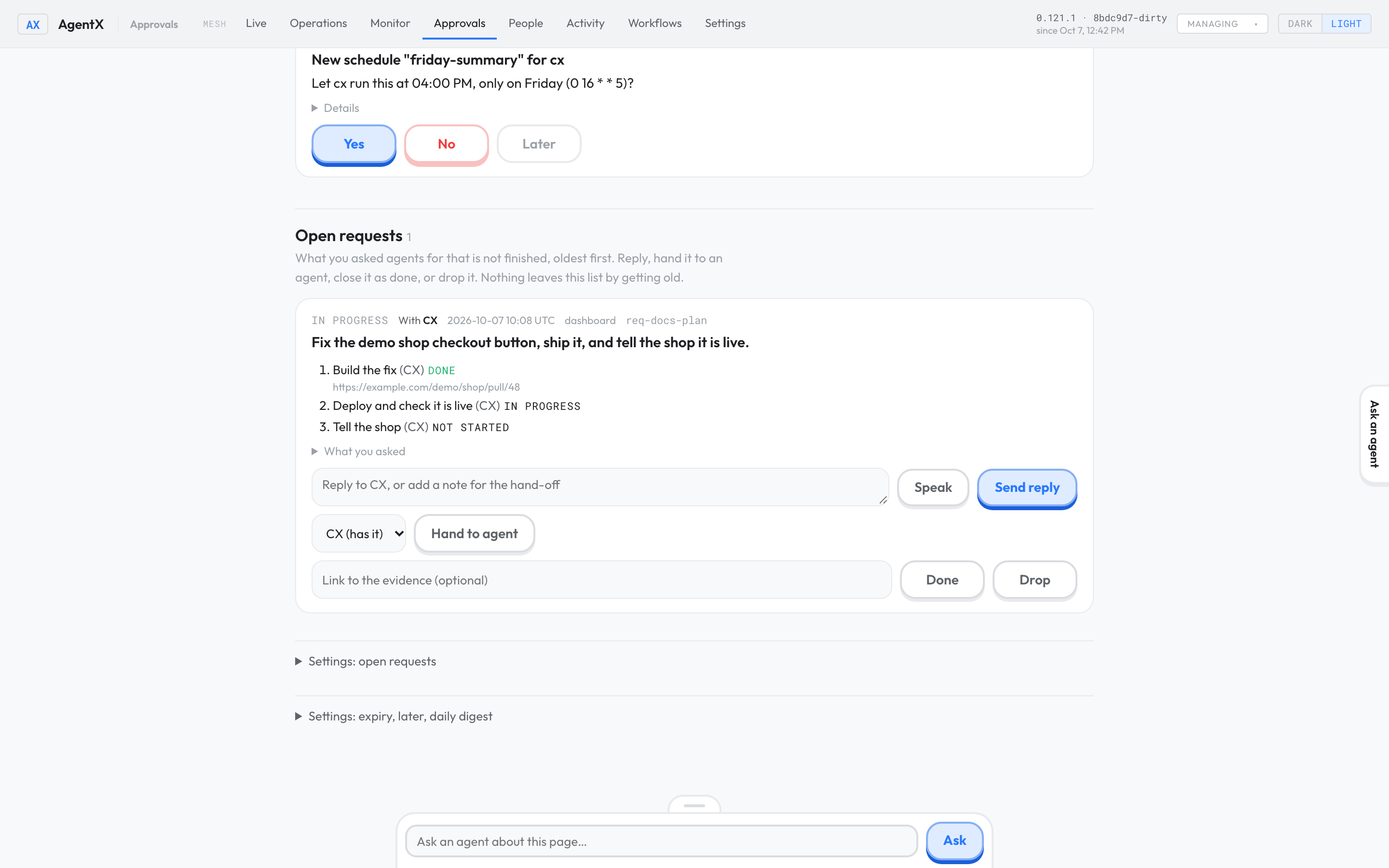
- Browser: open Approvals.
- Browser: scroll to Open requests. A request with a plan lists its steps, in order, with the agent that has each one and its state: not started, in progress, done (with the proof), blocked (with the reason) or skipped.
In the terminal:
- Terminal: go to the folder that holds
agentx.json. - Terminal: run
agentx requeststo list the open requests and find the id. - Terminal: run
agentx requests show <id>. You see the request, then the plan: each step with its owner, kind, state, done check, proof and number of nudges. Below that is the plan's log, which records when each step started, every nudge, each approval and each message sent.
Move a blocked step on
When a step is blocked you get one notice with the reason. You have three ways to move it on:
- Answer the agent. Reply on the request's card in the dashboard, or write to the agent. When the agent reports the step again, it is no longer blocked.
- Try again. Terminal: run
agentx requests step <id> <step> --retry. The daemon gives the step to its agent again, within a minute, and the nudges count from zero. For a message whose card expired, this counts as your yes. - Skip it, or say it is done. Terminal: run
agentx requests step <id> <step> --skipor--done. Add--note "…"to give the reason or the proof. The plan goes on with the next step.
The step number is the one agentx requests show prints: 1 is the first step.
Change the settings
In the dashboard:
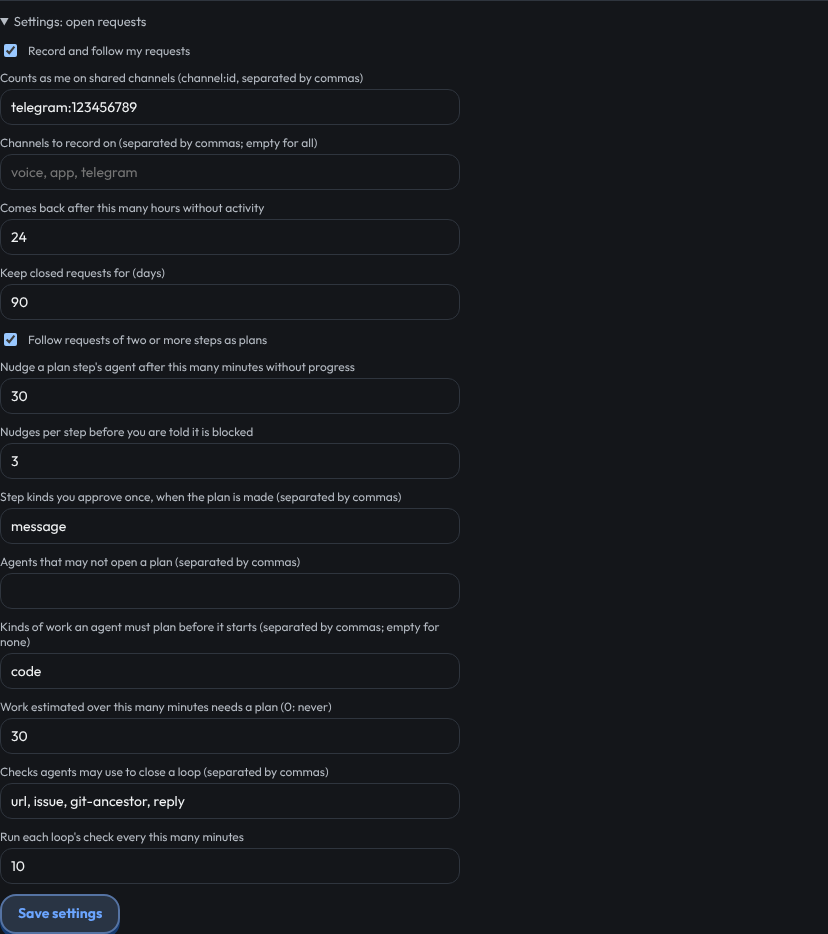
- Browser: open Approvals, scroll to Open requests and open Settings: open requests.
- Browser: set the plan settings: Follow requests of two or more steps as plans, the minutes before a nudge, the number of nudges, the step kinds you approve when the plan is made, the agents that may not make a plan, the kinds of work an agent must plan before it starts, and the minutes of work that need a plan.
- Browser: press Save settings.
In the terminal:
| Command | What it does |
|---|---|
agentx requests settings | Shows the settings, plans included. |
agentx requests settings --plans off | Stops making plans. Plans already made stop moving on. on turns them back on. |
agentx requests settings --stall-minutes 60 | Minutes without progress before a step's agent is nudged. Default 30. |
agentx requests settings --max-nudges 2 | Nudges per step before it counts as blocked and you are told. Default 3. 0 tells you at the first stall. |
agentx requests settings --approve-kinds message,deploy | Step kinds you approve once, when the plan is made. Default message. none approves nothing up front: a message step is then sent without a card. |
agentx requests settings --plans-off-for helper,scout | Agents that may not make a plan. none clears the list. |
agentx requests settings --plan-for code,migration | Kinds of work an agent must plan before it starts. Default code. none clears the list. |
agentx requests settings --plan-over 60 | Work estimated at more than this many minutes needs a plan. Default 30. 0 turns this off. |
The same settings are the requests.plans block in agentx.json: see Configuration: automation.
What an agent sends
Agents make a plan with their agentx_request tool, when they take the request on. For example:
{
  "action": "accept",
  "work": "code",
  "estimateMinutes": 90,
  "steps": [
    { "name": "Build the fix", "done": "pull request merged" },
    { "name": "Deploy", "agent": "deployer", "kind": "deploy", "done": "version 2.4.1 is live",
      "check": { "url": "https://shop.example.com/version", "contains": "2.4.1" } },
    { "name": "Tell the shop", "kind": "message", "message": "The checkout fix is live.",
      "to": { "channel": "telegram", "chatId": "123456789" } }
  ]
}workis one short word for the kind of work, likecode,researchorwriting. It is needed on an accept withoutsteps, unless both plan-before-starting settings are off (--plan-for none --plan-over 0) or plans are off on the node or for that agent (--plans off,--plans-off-for). Without it the agent getsaccept needs `work`.estimateMinutesis how many minutes the agent expects the work to take. It is optional.- AgentX keeps
workandestimateMinuteson the request. A later accept without them uses the kept values. - A later accept can change them. AgentX also keeps the first values the agent gave, so
agentx requests showand the dashboard card show both, likeWork: research (first declared: code, about 90 minute(s)). - When
workis a kind on your plan-before-starting list, orestimateMinutesis over your limit,stepsare needed. Without them the agent getsNot started: … needs a plan before it starts. goalis optional: the larger aim the request serves, as{"id": "shop-relaunch", "title": "Relaunch the shop"}. The plan has the goal of its request, and each step's agent is told its title. See Group requests under a goal.nameanddoneare needed on every step. A message step needsmessageandtoinstead ofdone.agentis the step's owner. It defaults to the agent that makes the plan.kindis one short word. The default istask. Onlymessagechanges what happens: the daemon sends it.checkis optional: anhttporhttpsaddress the daemon reads every minute, and the text it must show.check.countis optional: a count of open items the daemon reads every 5 minutes, through the GitHub or GitLab connector of theissuecheck. The step is done when the count is atmaxor under. For example,"check": { "count": { "provider": "github", "project": "acme/app", "what": "issues", "max": 0 } }.whatisissues(the default),prsorall, andmaxdefaults to0. Each new count is written to the plan's log. A lower count is how a continued turn knows the step moved.stallMinutesis optional. It sets this step's own time before a nudge, for a step that is slow by nature.
An agent reports a step with {"action": "step", "id": "<request id>", "step": 2, "status": "progress" | "done" | "blocked"}. A done report needs evidence, and a blocked report needs a note. Only the step's owner, or the agent that made the plan, can report on a step.
Check it worked
- Terminal: run
agentx requests settings. It saysRequests onandPlans on. - Ask an agent for something of two steps or more: for example, "write the release note, then have the deployer publish it".
- Terminal: run
agentx requests, thenagentx requests show <id>. You see aPlanwith both steps: the first in progress, the second not started. - When the agent reports the first step done, run
agentx requests show <id>again within a minute. The log shows the second stepstartedanddispatchedto its agent. - When the last step is done you get one notice, Plan finished, and the request is no longer listed.
- Terminal: run
agentx requests settings. The linePlan before startinglists the kinds of work and the time limit, for examplecode work; work over 30 minute(s). - Ask an agent for a small code change. Run
agentx requests show <id>: the request showsWork: codeand has a plan, even if the change is quick.
If something is wrong
- The agent says plans are off: turn them on with
agentx requests settings --plans on. When the agent's name is in the agents that may not make a plan, remove it with--plans-off-for none. a plan needs 2 or more steps: for a single step, the agent takes the request on without a plan.- The agent says
Not started: … needs a plan before it starts: the work is code work, or longer than your limit. The agent sends its steps and starts. To stop asking for a plan on that kind of work, remove it with--plan-for(or--plan-for none). To change the time limit, use--plan-over. - Code work started with no plan: run
agentx requests show <id>and read theWork:line. If it names another kind, the agent did not call the work code work. If there is noWork:line, the task did not come from a recorded request (an @mention, a scheduled job or another agent), which this check does not cover yet. Also check--plan-forlistscode, and that plans are not off for that agent (--plans-off-for). - The agent says
accept needs `work`: the agent took the request on without saying what kind of work it is. It accepts again withwork. To stop asking, turn both settings off:--plan-for none --plan-over 0. - A message step stays at "not started" after the steps before it are done: its card is still waiting for you. Answer it in the Approvals inbox. If the card expired, the step is blocked; run
agentx requests step <id> <step> --retryto send it. - The message was not sent and the step is blocked: the daemon tried three times and the channel refused it. Check the channel is connected (
agentx doctor), then run--retry. - Nudges come while the work is simply slow: the agent can report
progressto reset the clock. To wait longer for every step, raise--stall-minutes. For one step, the agent setsstallMinuteson it. - A step with a check is never marked done: the address did not answer, or did not show the expected text. Open the address in a browser. The agent can still report the step done with its proof.
- A plan stopped and its request is gone from the list: someone closed or dropped the request. The plan stops with it, and the log says
closed.