
Use AgentX from your code editor
Code editors with a built-in assistant (Claude Code, Cursor, VS Code and Windsurf) can use extra tools that another program offers. The way they talk to that program is called MCP, the Model Context Protocol, and the program is called an MCP server or a tool server.
AgentX ships one: agentx serve --stdio. Once your editor knows about it, its assistant can check your agents, read recent chats, look at schedules, and, if you allow it, send messages and hand tasks to your agents. Here is the whole path:
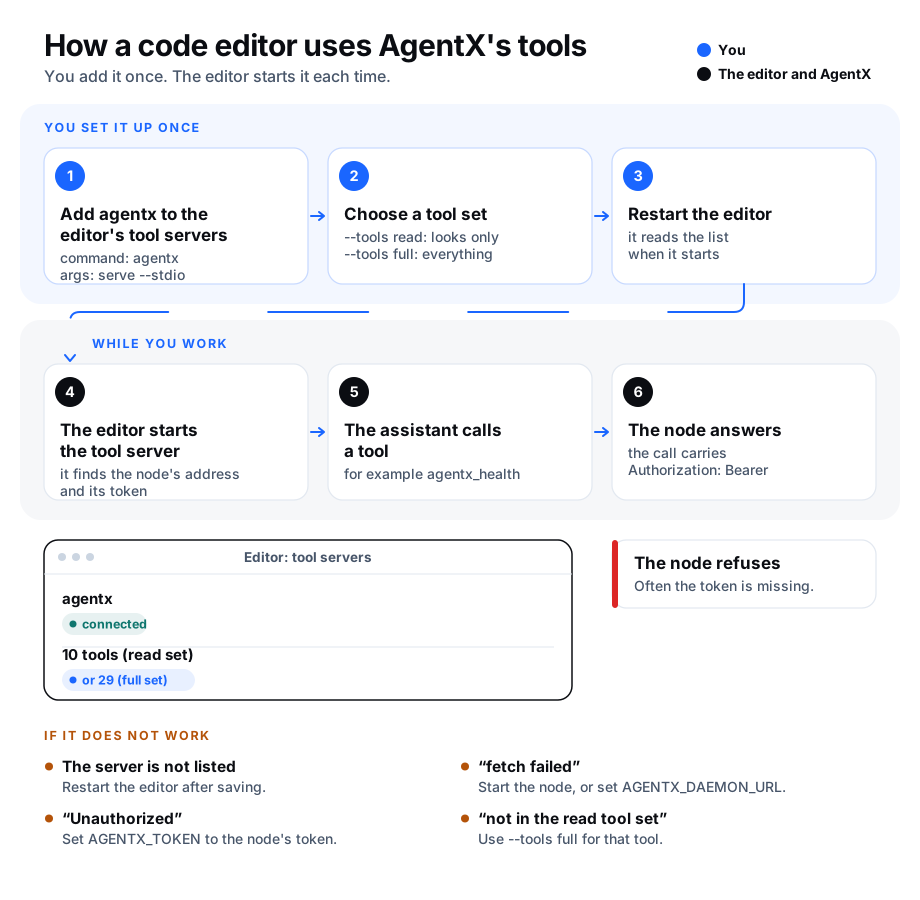
Choose a tool set
A tool set decides which tools the editor gets. You pick it with --tools:
| Tool set | What the assistant can do |
|---|---|
full (the default) | Everything: read, and also send messages, start tasks, change schedules, answer approvals and edit the wiki. |
read | Look only: agents, health, recent chats, events, schedules, the voice queue, the wiki and project details. It sends nothing, starts nothing and changes nothing. |
Start with read if you only want the assistant to see what your agents are doing. With read, a tool outside the set is refused even when the assistant asks for it by name.
Before you start
- Terminal: run
agentx --versionto check that AgentX is installed. - Terminal: run
agentx daemon statusto check that your AgentX node (the background program that runs your agents) is up. - Note the folder AgentX is installed in, the one that holds
agentx.json. The examples below use~/agentx; use your own.
The tool server finds your node and its token by itself:
- Address. It reads
node.bindfromagentx.json. Without one, it useshttp://localhost:18800. SetAGENTX_DAEMON_URLto reach a node on another machine. - Token. Every call to the node carries
Authorization: Bearer <token>. The token comes fromAGENTX_TOKENif you set it, thenMESH_TOKEN(from the environment or the install's.envfile), thendashboard.tokeninagentx.json. A node on the same machine accepts calls without a token; a node on another machine needs one.
Add it to Claude Code
The quickest way is the AgentX plugin. It adds this tool server and two AgentX skills with one command: Install the AgentX plugin in Claude Code. To add only the tool server:
Terminal: run this command, with your own install folder:
bashclaude mcp add agentx -- agentx serve --stdio --tools read --cwd ~/agentxTerminal: to reach a node on another machine, add its address and token instead:
bashclaude mcp add agentx -e AGENTX_DAEMON_URL=http://node.example.com:18800 -e AGENTX_TOKEN=<your-token> -- agentx serve --stdio --tools readTerminal: start a new Claude Code session.
Add it to Cursor
Open
~/.cursor/mcp.jsonin a text editor (create it if it does not exist).Paste this, with your own install folder:
json{ "mcpServers": { "agentx": { "command": "agentx", "args": ["serve", "--stdio", "--tools", "read", "--cwd", "~/agentx"] } } }Save the file.
Restart Cursor.
Add it to VS Code
Open
.vscode/mcp.jsonin your project (create it if it does not exist).Paste this, with your own install folder:
json{ "servers": { "agentx": { "type": "stdio", "command": "agentx", "args": ["serve", "--stdio", "--tools", "read", "--cwd", "~/agentx"] } } }Save the file.
Restart VS Code.
Add it to Windsurf
- Open
~/.codeium/windsurf/mcp_config.jsonin a text editor (create it if it does not exist). - Paste the same block as for Cursor (the one that starts with
"mcpServers"). - Save the file.
- Restart Windsurf.
To reach a node on another machine from Cursor, VS Code or Windsurf, add an env entry next to args:
"env": { "AGENTX_DAEMON_URL": "http://node.example.com:18800", "AGENTX_TOKEN": "<your-token>" }To give the assistant every tool, replace "read" with "full", or leave out --tools and its value.
Check it worked
- Open your editor's list of tool servers (in Claude Code, type
/mcp). - Check that
agentxshows as connected. - Ask the assistant: "Use agentx_health to check my AgentX node."
- The answer is your node's health report. An error instead means the tool server is running but cannot reach the node: see below.
If something is wrong
agentxis not in the list. Check the file for a missing comma or bracket, save it, and restart the editor.- "fetch failed". The node is not running, or it listens elsewhere. Run
agentx daemon statusin a terminal, or setAGENTX_DAEMON_URLto the node's address. - "Unauthorized". The node wants a token. Set
AGENTX_TOKENto the node'sMESH_TOKEN. - "… is not in the "read" tool set". That tool acts on your agents. Change
--tools readto--tools fullif you want to allow it, then restart the editor. - The editor runs an older AgentX. Run
agentx --versionin a terminal and update if needed;--toolsarrived with this page.