
Hand Linear and Jira issues to an agent
If your team plans its work in Linear or Jira (two issue trackers: apps that keep the list of things to do), an agent can pick up an issue from there, just as it does from GitHub or GitLab.
You add a label (a tag on the issue, agentx unless you change it) to an issue. AgentX hands the issue to the agent you chose for that team or project. The agent does the work, opens a pull request whose description says Fixes ENG-12, and its answer is posted on the issue as a comment. When the review gate is on, it checks that pull request against the issue's acceptance criteria (the list of conditions that say the work is done).
Both are off until you turn them on. Here is the whole path:
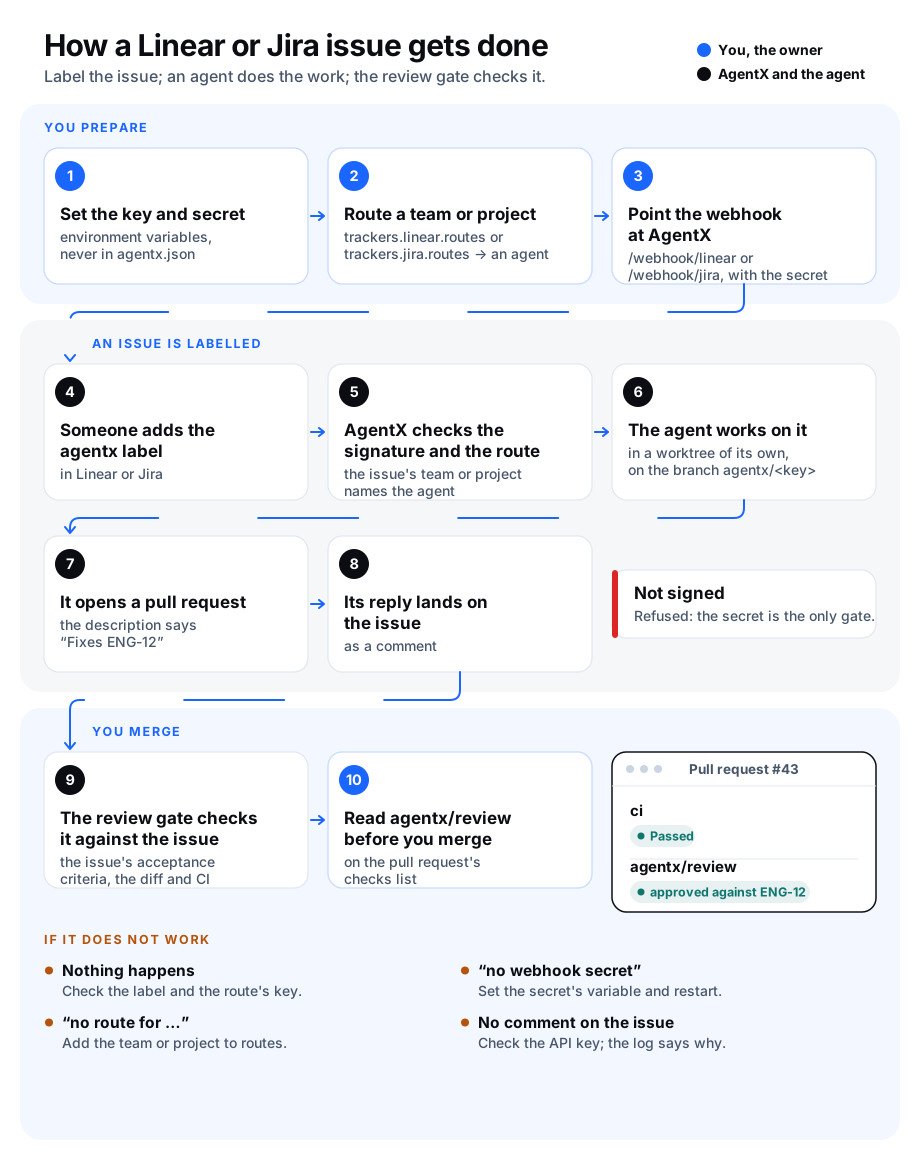
What it does, and what it does not
- Starts work on a labelled issue. An issue created with the label, or one that just got the label, goes to the agent routed for its Linear team or Jira project. Its key (the short name such as
ENG-12orPROJ-4) starts with that team or project's key. - Posts the agent's answer on the issue as a comment. When the run fails, the comment says so in one line.
- Feeds the review gate. A pull request or merge request whose description says
Fixes ENG-12(orCloses,Resolves,Refs,Part of) is reviewed against that issue. A key alone in a sentence ("like ENG-12 did") is not a link. - Does not follow the conversation. A comment on the issue does not reach the agent. To run it again, remove the label and add it back.
- Runs on this computer only. The routed agent must be one of this computer's agents.
- Linear and Jira retry a webhook (a message one app sends another when something happens) they think was lost. A second one for the same issue within five minutes, or while the agent is still working on it, is ignored.
Before you start
- Browser: the AgentX daemon (port
18800unless you changed it) must be reachable from the internet, so Linear or Jira can call it, the same way GitHub's webhooks reach the GitHub channel. Write down that address, for examplehttps://agentx.example.com. - Terminal: pick the agent that will do the work. Run
agentx agent listto see your agents. - Terminal: keep a clone (a copy) of the repository the work lands in on this computer, for example
/home/you/repos/example-repo. To give each issue a folder of its own, turn on worktrees for the agent.
Connect Linear
Browser: in Linear, open Settings › Security & access › Personal API keys, create a key and copy it.
Browser: in Linear, open Settings › API › Webhooks and click New webhook. Set the URL to your address followed by
/webhook/linear, for examplehttps://agentx.example.com/webhook/linear. Tick Issues under the data change events, and save.Browser: copy the webhook's signing secret.
Terminal: add both to the environment of the AgentX daemon, for example in the
.envfile next toagentx.json:shLINEAR_API_KEY=lin_api_example LINEAR_WEBHOOK_SECRET=example-signing-secretTerminal: open
agentx.jsonand add atrackerssection.teamis the Linear team's key, the letters before the number in its issue keys:json"trackers": { "linear": { "enabled": true, "routes": [ { "team": "ENG", "agent": "coder", "checkout": "/home/you/repos/example-repo" } ] } }Terminal: restart the daemon with
agentx daemon restart --when-idle.
Connect Jira
Browser: for Jira Cloud, open your Atlassian account's Security › API tokens, create a token and copy it. For Jira Server or Data Center, create a personal access token in your Jira profile instead.
Browser: in Jira, open Settings › System › WebHooks and click Create a WebHook. Set the URL to your address followed by
/webhook/jira, for examplehttps://agentx.example.com/webhook/jira. Type a long random Secret. Tick Issue › created and Issue › updated, and save.Terminal: add the token and the secret to the daemon's environment. On Jira Cloud, add the account's email too. On Jira Server, leave
JIRA_EMAILout: the token is then sent on its own.shJIRA_EMAIL=bot@example.com JIRA_API_TOKEN=example-token JIRA_WEBHOOK_SECRET=example-webhook-secretTerminal: in
agentx.json, add Jira undertrackers.projectis the Jira project's key:json"trackers": { "jira": { "enabled": true, "baseUrl": "https://example.atlassian.net", "routes": [ { "project": "PROJ", "agent": "coder", "checkout": "/home/you/repos/example-repo" } ] } }Terminal: restart the daemon with
agentx daemon restart --when-idle.
Write the acceptance criteria
The review gate reads them from the issue's description:
- Linear: a heading named Acceptance criteria with one list item each, as on GitHub. Without the heading, every checklist item (
- [ ]) counts. - Jira: a heading such as
h3. Acceptance criteriafollowed by a list (* itemor# item).
Settings
Under trackers.linear:
| Key | Type | Default | What it does |
|---|---|---|---|
enabled | boolean | false | Takes Linear webhooks and reads Linear issues for the review gate. |
apiKeyEnv | string | "LINEAR_API_KEY" | The environment variable that holds the Linear API key. |
webhookSecretEnv | string | "LINEAR_WEBHOOK_SECRET" | The environment variable that holds the webhook's signing secret. Unset, every webhook is refused. |
label | string | "agentx" | Adding this label to an issue hands it to its team's agent. |
routes | list | [] | One entry per team: team (its key), agent (the agent id) and, optionally, checkout (the folder of the repository's clone). |
Under trackers.jira:
| Key | Type | Default | What it does |
|---|---|---|---|
enabled | boolean | false | Takes Jira webhooks and reads Jira issues for the review gate. |
baseUrl | address | none | Your Jira's address, for example https://example.atlassian.net. Without it, Jira stays off. |
emailEnv | string | "JIRA_EMAIL" | The environment variable that holds the Jira Cloud account's email. Leave the variable empty for Jira Server. |
tokenEnv | string | "JIRA_API_TOKEN" | The environment variable that holds the API token or personal access token. |
webhookSecretEnv | string | "JIRA_WEBHOOK_SECRET" | The environment variable that holds the webhook's secret. Unset, every webhook is refused. |
label | string | "agentx" | Adding this label to an issue hands it to its project's agent. |
routes | list | [] | One entry per project: project (its key), agent and, optionally, checkout. |
Check it worked
- Browser: in Linear or Jira, create an issue in a routed team or project, with a short Acceptance criteria list, and add the
agentxlabel. - Terminal: run
agentx daemon logs(or read the daemon's log file) and look for a line such as[trackers] ENG-12 -> agent "coder". - Browser: within a few minutes the issue gets a comment from the agent.
- Browser: when the agent opens a pull request, its description says
Fixes ENG-12. With the review gate on, itsagentx/reviewstatus ends with "approved against ENG-12" or lists what is missing.
If something is wrong
- Nothing happens when you add the label. Check that the label is spelled as
labelsays (case does not matter), that the issue's team or project key is inroutes, and that the webhook ticks issue events. Browser: Linear and Jira both show a webhook's recent deliveries and AgentX's answer. - The delivery shows "503 no webhook secret". The variable named by
webhookSecretEnvis not set in the daemon's environment. Set it and restart the daemon. - The delivery shows "401 missing or wrong Linear-Signature" (or X-Hub-Signature). The secret in AgentX is not the one Linear or Jira signs with. Copy it again, then restart.
- The delivery shows "ignored: no route for …". Add that team or project key to
routes. - The delivery shows "404". The tracker is off: set
enabledtotrue, and for Jira setbaseUrl. - The agent worked, but no comment appeared. Terminal: look for
could not post the replyin the log. Check the API key or token, and on Jira Cloud the email. - The review gate says "no linked issue/ACs". The pull request needs
Fixes ENG-12in its description, and the issue needs an acceptance criteria list. The key's team or project must be inroutes.